

Domain 4: Communication & Network Security is one of the most difficult domains in the CISSP exams.
I spent weeks deep-diving into various networking topics before I figured out what the exam actually tests.
I wasted weeks of valuable time learning something that doesn’t matter for the exam, now you don’t have to, because you have this article.
Keep in mind that the CISSP is a security management exam.
Domain 4 doesn’t test whether you can configure a network.
It tests whether you understand which protocols are secure, which are broken, and which one to choose in a given scenario.
Once I figured that out, everything got easier.
Wi-Fi security is a perfect example.
You don’t need to understand every technical detail of how WPA3 works under the hood. You need to know the progression, the tradeoffs, and when to use what.

If you read this article, you’ll know exactly what the CISSP expects on Wi-Fi security.
You’ll learn:
How Wi-Fi security evolved from WEP to WPA3
The difference between TKIP and CCMP
When to use PSK, SAE, or Enterprise mode
How to answer scenario-based CISSP questions on wireless security
Do you think you already understand Wi-Fi security? Let’s find out!
Here is a short CISSP-like quiz. Take it and drop your score in the comments!
What Is Wi-Fi Security? (SSID, Encryption, Authentication)
Here is the story that the CISSP exam expects you to know.
Wi-Fi networks are identified by their SSID, the name you see when connecting. It can be up to 32 characters, like “HomeWifi” or “Airport_Guest.”
Once your device finds the network, two things need to happen: authentication and encryption. The protocol the network runs determines how both of those work.
That’s what we’re focused on here.
In other words, every Wi-Fi connection has two separate jobs:
1. Encryption: Encrypt the data traveling between your device and the access point so nobody can read it in transit.
2. Authentication: Proves that your device is allowed to join the network in the first place.
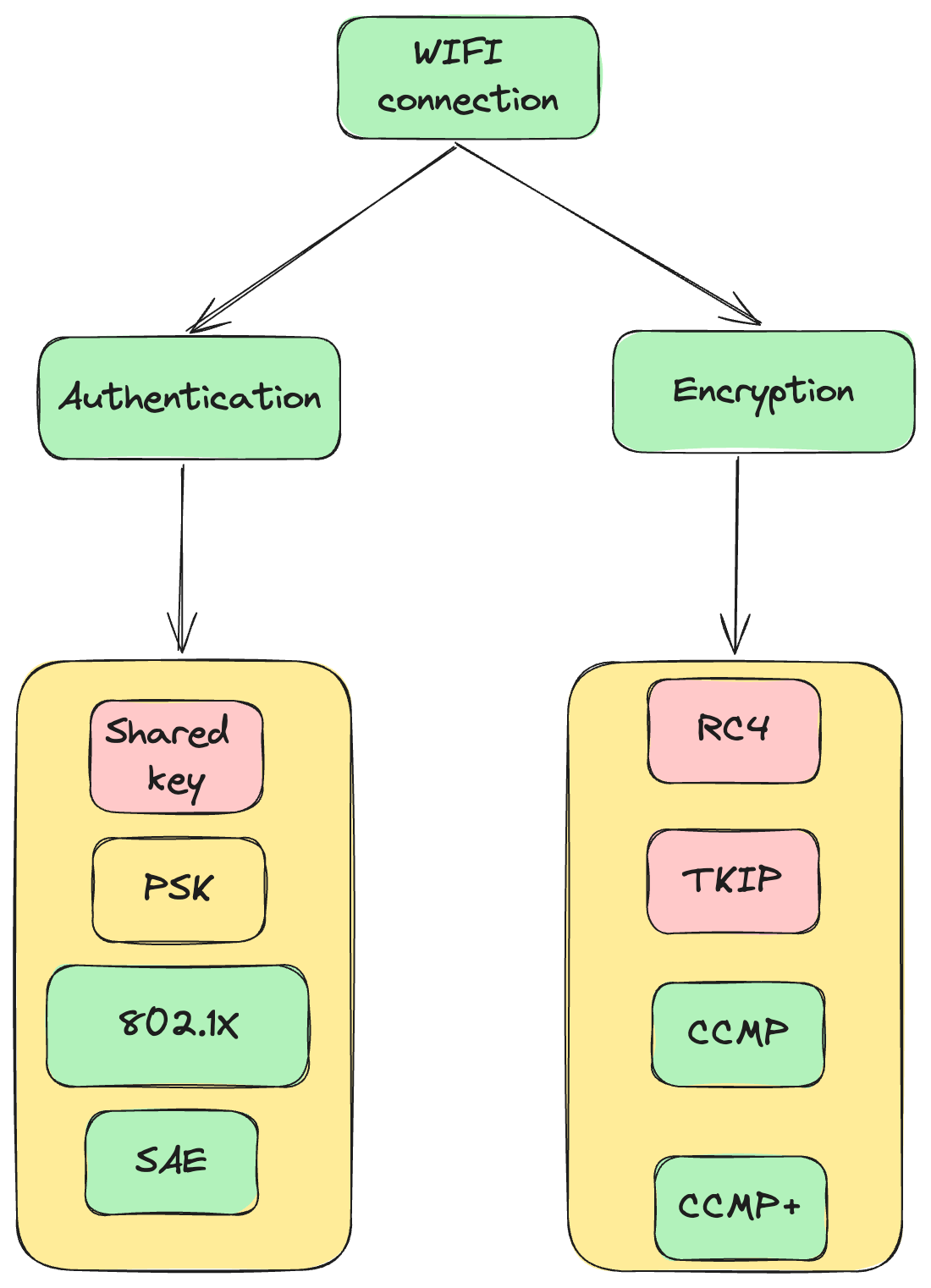
These are handled separately. And that’s exactly why WPA2 or WPA3 alone doesn’t tell you the full picture.
WPA2 and WPA3 define the encryption standard. PSK, SAE, and Enterprise define the authentication method.
This is very important, and you need to be aware of this general concept.
Think of it like a building:
WPA2/WPA3 is the type of lock on the door.
PSK, SAE, and Enterprise are the different ways people prove they’re allowed inside.
So the complete description of any Wi-Fi network is always the combination of both.
Here are the possible combinations:
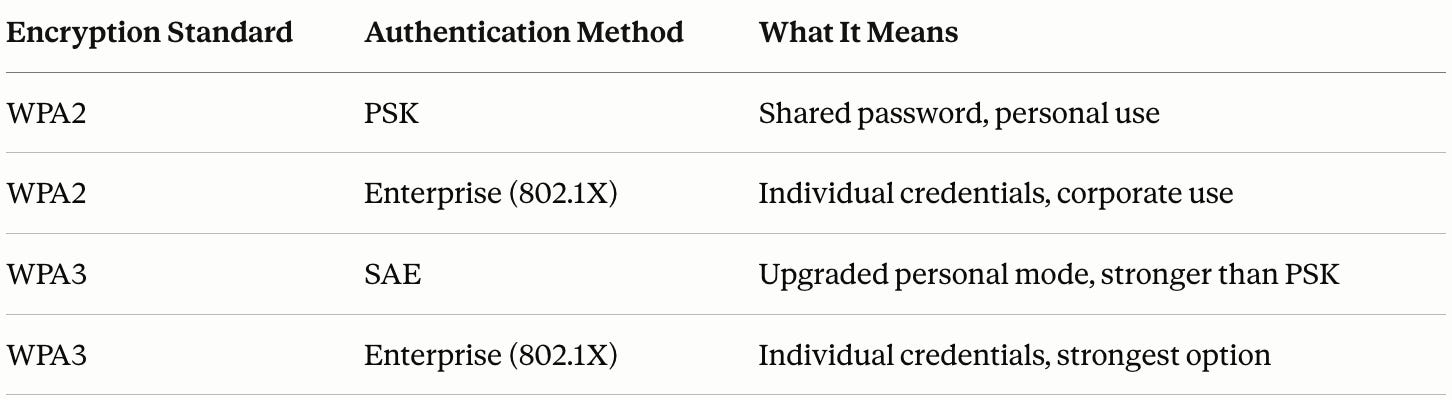
The CISSP will give you a scenario and ask you to pick the right combination. Keep this table in your head.
Quiz time: Take a CISSP-like quiz, drop your score in the comments, and get a free Decoded Security WIFI Standards cheatsheet!
WEP vs WPA vs WPA2 vs WPA3: What's the Difference?
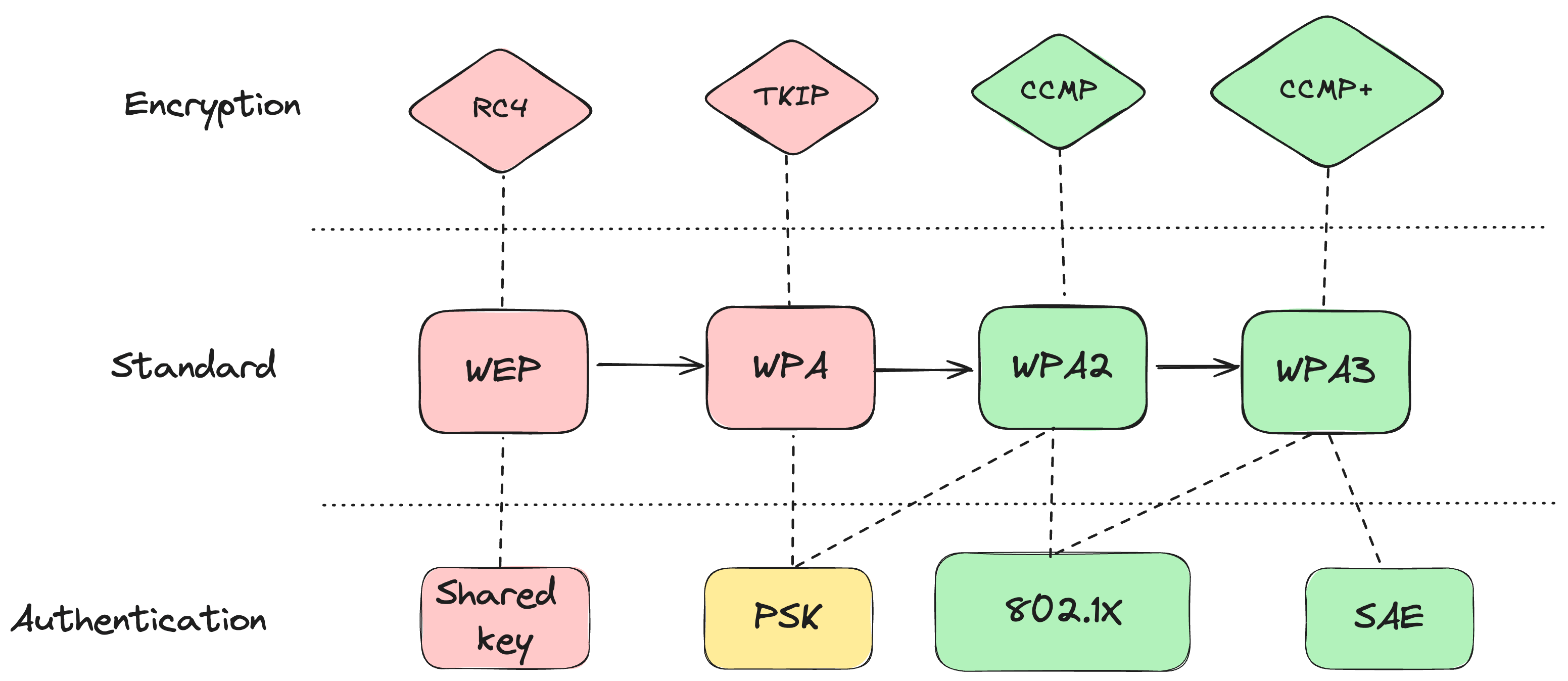
Each standard replaced the one before it because the previous one had a serious security flaw.
You are expected to understand these flaws and choose the right option in the given scenario.
WEP (Wired Equivalent Privacy)
WEP was the original standard. The goal was to give wireless networks the same security as wired ones. It failed.
Attackers could crack WEP in minutes using freely available tools. It was deprecated in 2004. If you see WEP in a scenario, treat it as no security at all.
CISSP Note: It is never a good idea to use WEP.
WPA (Wi-Fi Protected Access)
WPA replaced WEP as an emergency fix.
It uses TKIP encryption, which was designed to run on existing hardware without requiring replacements.
Better than WEP, but still a patch. Now considered weak.
CISSP note: Used in scenarios where you have no possiblity to replace HW.
WPA2
WPA2 was the real upgrade.
It replaced TKIP with CCMP, which uses AES-128 encryption.
Strong, widely supported, and still running on the majority of networks today.
WPA2 is the minimum acceptable standard.
WPA3
WPA3 is the current best practice. It uses an improved version of CCMP and replaces the older PSK handshake with SAE (Simultaneous Authentication of Equals).
SAE uses the Dragonfly Key Exchange, meaning both parties prove they know the password without ever sending it over the network.
This eliminates offline dictionary attacks and adds forward secrecy, meaning a compromised session key doesn’t expose past sessions.
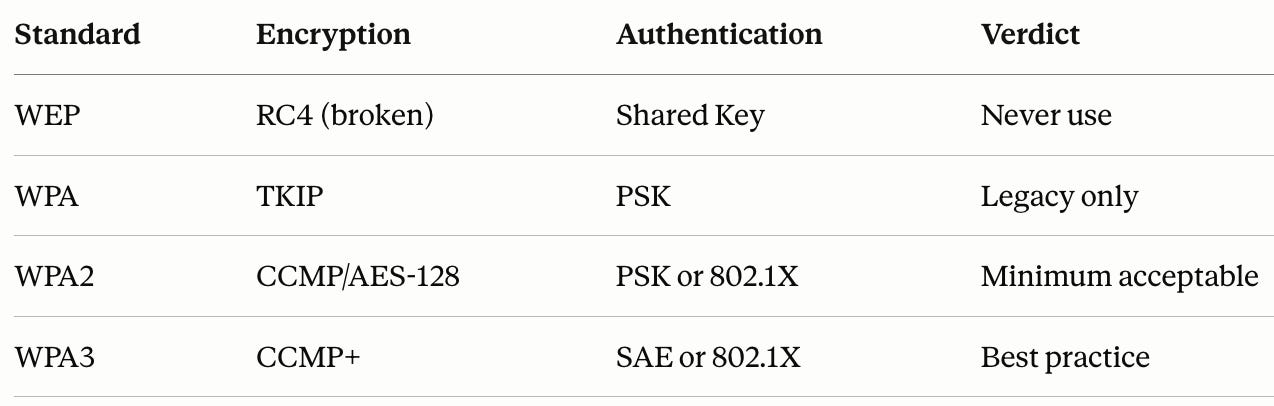
CISSP shortcut: WEP (broken) → WPA (weak) → WPA2 (current standard) → WPA3. Each replaced the one before it.
Quiz time!
Take the quiz, drop your score below, and get a CISSP printable cheatsheet that covers everything you need to know about the WIFI security!
PSK, SAE, and Enterprise: Choosing the Right Authentication Method
Now that you understand the encryption standards, here’s how the authentication methods work and when to use each one.
WPA2-PSK (Personal Mode)
PSK stands for Pre-Shared Key. Everyone uses the same shared password to connect.
Simple and widely supported.
But there’s no individual accountability, and a weak password is vulnerable to offline dictionary attacks.
An attacker captures the handshake and runs password guesses against it offline, with no limit and no detection.
CISSP note: Use it only for home-network scenarios and only if there are compatibility limitations in the given scenario.
WPA3-SAE (Personal Mode, Upgraded)
SAE replaces PSK in WPA3-Personal.
Even if an attacker captures the handshake, they can’t run offline attacks against it.
Forward secrecy means past sessions stay protected even if a key is later compromised. No user accounts needed.
Use it for: Secure guest Wi-Fi or personal networks where you want real protection without managing individual credentials.
WPA2/3-Enterprise (802.1X Authentication)
Before explaining this one: 802.1X is not a Wi-Fi protocol. It’s an authentication framework. Here’s how it works:
Your device connects to the network
The access point blocks all traffic and asks for credentials
Your device sends them to a RADIUS server, a backend authentication server
The RADIUS server verifies them and grants or denies access
Every user has their own credentials. No shared passwords. Full accountability.
The tradeoff: It requires infrastructure. A RADIUS server, user accounts, and backend configuration. That overhead makes no sense for a guest network. It makes complete sense for a corporate one.
CISSP note: use it for corporate networks where individual accountability is required.
MAC Filtering and Captive Portals: Do They Actually Secure Wi-Fi?
MAC Filtering
Whitelists specific device MAC addresses. If your address isn’t on the list, you can’t connect.
Sounds useful. The problem: MAC addresses travel in cleartext even inside WPA2. Any attacker on the network can read a valid MAC address and spoof it in under a minute.
CISSP note: Layer 2 control. Trivial to bypass. Never a substitute for encryption.
Captive Portals
The page that appears at hotels and airports before you get internet access. You accept terms, authenticate, or pay.
Captive portals sit in front of internet access, not in front of the wireless connection. The Wi-Fi traffic itself is not protected by the portal. If the underlying encryption is weak, traffic is still exposed.
CISSP note: Captive portals = access control. Not confidentiality. Not integrity. Access control only. If a scenario asks how to control who can access the internet on a guest network, a captive portal is a valid option.
Think you've got this down? Take the CISSP-like quiz and drop your score in the comments. I'll reply to everyone.
Conclusion
Let me give you a couple of shortcuts that served me well during the exam:
Guest Wi-Fi, no user accounts needed: WPA3-SAE
Corporate network, individual accountability required: Enterprise/802.1X
If you need contact information on people who use your network, use the captive portal
WEP or open network anywhere in the scenario - INSECURE
That’s everything the CISSP expects you to know about Wi-Fi security.
With the knowledge in this article, you will be able to answer most questions on Wifi security without spending weeks going through advanced networking topics.
Keep Learning: Related Articles
If Domain 4 still feels overwhelming, these will help fill in the gaps.
Start Here: The Decoded Security Roadmap
Not sure where to begin? This is the map. It breaks down exactly what to study and in what order, whether you’re going for CISSP, Security+, or a GRC role.
7 Networking Questions That Instantly Reveal Skill Gaps
Before you go deeper into Wi-Fi security, make sure your networking fundamentals actually hold up. These 7 questions show you exactly where the gaps are.
This Is How I Explain DNS to Beginners
Wi-Fi gets your device on the network. DNS is what happens next. If you’ve never had DNS explained in a way that actually clicks, start here.
This Is How I Explain VPNs to Beginners
Wi-Fi security protects the connection to the access point. A VPN protects what happens after that. Here’s the difference, explained without the jargon.
Let’s Connect
If you want to collaborate, discuss, or just geek out over networking and cybersecurity, reach out:
Email: erich.winkler@decodedsecurity.com
LinkedIn: Erich Winkler
Gumroad community: Decoded Security
Start Here: Decoded Security Roadmap
Quiz platform: Test Your Knowledge
Enjoyed this article? Like it or drop a comment. I’d love to hear your thoughts and questions!
Let’s learn and grow together!