

You might think you know what a VPN is. It is an encrypted tunnel between two communication points. Am I right?
Well, that’s one way to put it, but if you’re serious about your cybersecurity career, you are going to need more than that.
That’s why I put everything you need to know about VPNs in one place.
Warning: Crucial CC, CISSP and Security+ topics
After reading this article, you will know:
What a VPN actually is and why it exists
Why simply using a VPN doesn’t mean you are safe
Key components of the VPN infrastructure
The most important VPN protocols (PPTP, L2TP, IPsec)
Key takeaways - What you need to know as a cybersecurity professional
Bonus - Decoded Security printable cheat-sheet: One page with the most important information
This is a foundational topic. Let’s build it from scratch.
If you've ever clicked "Connect" on a VPN without really knowing what it does, give this a like. I think more people than we'd expect have been there. Let’s change that together!
What Is a VPN?
Let’s start with the simplest possible explanation.
When you connect to the internet from a coffee shop, your traffic travels over a network you don’t control. Anyone on that network could potentially intercept what you’re sending.
A VPN solves this problem by creating an encrypted tunnel between your device and a remote server.
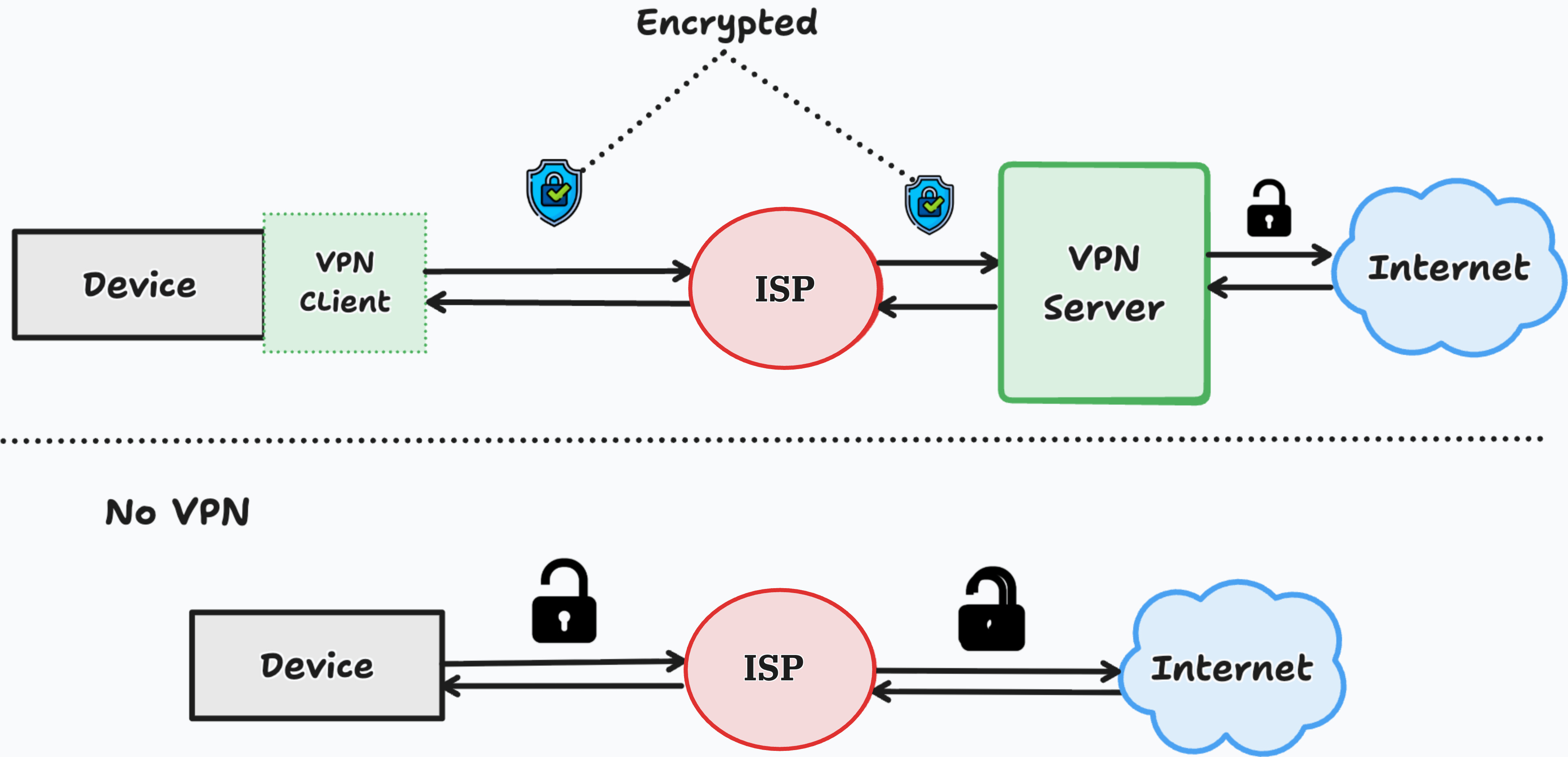
Think of it like this:
Imagine you need to send a confidential letter across a city. Instead of handing it to a random stranger on the street, you put it in a locked tube, send it through a private pipe directly to the recipient, and only they can open it.
That’s a VPN.
The three things a VPN provides:
Confidentiality: Your traffic is encrypted. Nobody in the middle can read it.
Authentication: Both sides verify who they’re talking to.
Integrity: The data hasn’t been tampered with in transit.
Sounds familiar? Those are core security principles. VPNs exist to enforce them over untrusted networks.
What a VPN actually is and why it exists - You know the answer now! ✅
Why Does This Actually Matter?
Today, remote work is standard. Employees connect to company systems from home, hotels, and airports. Without VPNs, every one of those connections is a risk.
A company that doesn’t use VPNs for remote access is exposing internal systems to anyone who can intercept traffic on a public network.
That’s why every serious organization uses VPNs. And that’s why every cybersecurity professional is expected to understand them.
Besides that, people are starting to use different VPN providers for personal use. You have seen the ads, right?
”Connect securely from anywhere in the world..”
Is it a good idea to use a VPN while traveling?
Yes, but before you do, make sure to continue reading! There is one catch that you need to be familiar with!
Why Every VPN Isn’t Safe
When you connect to a VPN, you are not becoming anonymous. You are moving trust.
Before the VPN: your ISP (Internet Service Provider) can see your traffic.
After the VPN: your VPN provider can see your traffic.
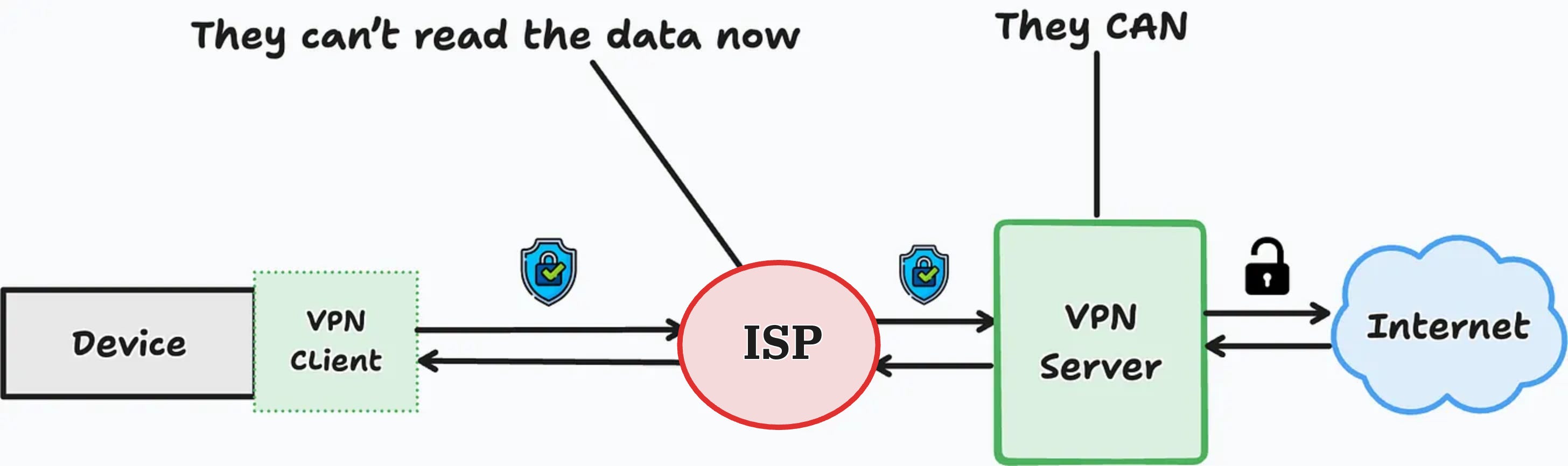
You haven’t eliminated the problem. You’ve relocated it.
And if you’re using a free VPN, it gets worse.
Free VPNs are not a service. They are a business. If you’re not paying for the product, you are the product. Your browsing history, location, and behavior patterns get packaged and sold.
Some free VPN providers have been caught injecting ads into user traffic. Others have been linked to data harvesting operations.
You installed a privacy tool, and you handed your data to a stranger.
Even paid VPNs aren’t automatically safe either. The questions that actually matter:
Do they keep logs of your activity?
Where are they headquartered, and what laws apply to them?
Have they been independently audited?
The rule is simple. A VPN is only as trustworthy as the provider running it. Choose carefully.
Why simply using a VPN doesn’t mean you are safe - Checked! ✅
This marks the end of the “users” section. I felt obligated to spread the awareness as I personally know many people who use various VPNs, and it would be better if they didn’t use any at all.
Now we are moving to the part of the article that is crucial for cybersecurity professionals and CISSP candidates!
If this changed how you think about VPNs, give it a like. It helps other people find it.
Key Components of a VPN
Before we get into different protocols, let’s quickly describe what the VPN is actually made of.
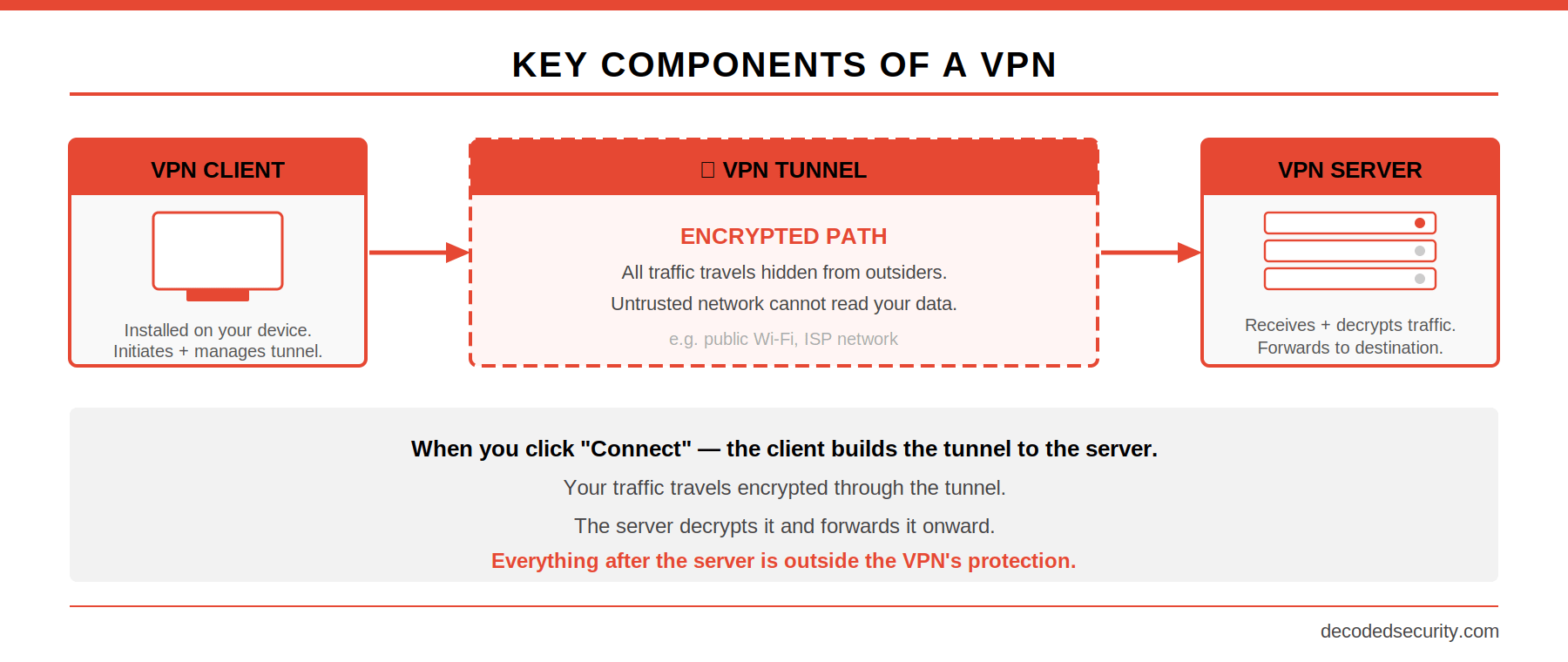
VPN Client
The software that is installed on your device. It initiates the connection, handles encryption, and manages the tunnel.
VPN Tunnel
The encrypted path between your device and the VPN server. All your traffic travels through this tunnel, hidden from anyone outside it.
VPN Server
The endpoint on the other side. It receives your encrypted traffic, decrypts it, and forwards it to its destination. In a corporate setup, this sits at the edge of the company network. In a consumer setup, it’s operated by the VPN provider.
Simple, isn’t it?
Each user has a client on their device that handles the connection between their device and the VPN server.
Now..buckle up. Because the next topic is one of the most tested in the certification exams and is actually essential to understand for real cybersecurity work.
Key components of the VPN infrastructure - Great progress! ✅
Quick test: Can you explain the difference between the VPN client and the VPN server in one sentence? Write it in the comments. I'll tell you if you've got it right.
VPN Protocols
A VPN isn’t a single technology. It’s a concept implemented through different protocols, each with its own approach to encryption, authentication, and performance.
Basically, in this section, we are going to break down how the “tunnel” is created and implemented.
PPTP (Point-to-Point Tunneling Protocol)
PPTP is one of the oldest VPN protocols. You’ll see it mentioned in study materials. You will almost never see it used in practice.
Why? Because it has serious known vulnerabilities. The encryption it uses is weak by modern standards. It was fast, which was important in the 1990s when processing power was limited. That tradeoff no longer makes sense.
I only mention it because it often appears in the certification exam as the least secure protocol.
For the exam: PPTP = fast, obsolete, insecure. Don’t recommend it. Don’t use it.
L2TP (Layer 2 Tunneling Protocol)
L2TP is the next generation. But here’s the catch: L2TP doesn’t provide any encryption on its own.
It creates the tunnel. Nothing more.
That’s why you almost always see it paired with IPsec. Written as L2TP/IPsec.
When properly implemented with IPsec, L2TP/IPsec is considered secure. But it’s a legacy solution at this point. You’ll see it in older enterprise environments and on exam questions.
For the exam: L2TP alone = no encryption. L2TP/IPsec = secure when properly implemented.
IPsec (Internet Protocol Security)
This is the one you really need to understand.
IPsec isn’t a single protocol. It’s a suite of protocols designed to authenticate and encrypt IP packets. It can work as a standalone VPN solution or in combination with L2TP.
IPsec has two main components, and knowing the difference between them is high-probability exam content.
Authentication Header (AH)
AH calculates a cryptographic hash over the entire packet. This provides:
Integrity: the packet hasn’t been modified in transit
Authentication: you know who sent it
What AH does NOT provide: encryption. The data is visible. AH just ensures it hasn’t been tampered with.
Encapsulating Security Payload (ESP)
ESP encrypts the payload of the IP packet. This provides:
Confidentiality: the data is hidden
Integrity
Limited authentication
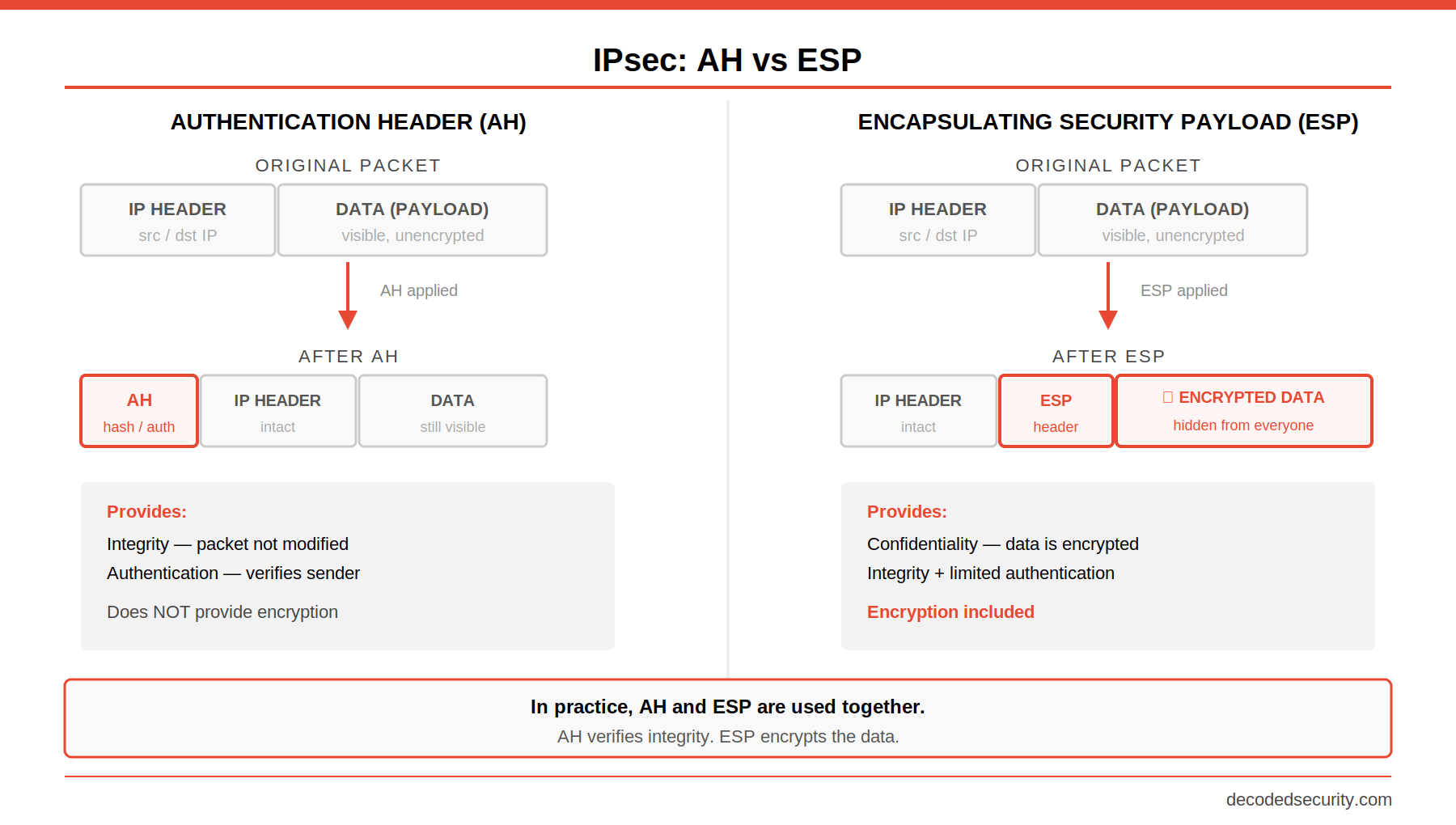
ESP is what actually hides your data. AH confirms the data wasn’t touched. In practice, they’re often used together.
There is much more to the IPsec protocols, but I think this is enough for one day.
The most important VPN protocols (PPTP, L2TP, IPsec) - Checked! ✅
Are you interested in more networking topics? Give this article a like and help me create more free content for our community!
Key Takeaways
Here’s what you need to walk away with.
On the basics:
A VPN creates an encrypted tunnel between your device and a remote server
It provides confidentiality, authentication, and integrity over untrusted networks
A VPN moves trust, it doesn’t eliminate it. Your provider can see everything your ISP used to see
Never use a free VPN. If you’re not paying for the product, you are the product
On VPN components:
Client: initiates the connection and manages the tunnel from your device
Tunnel: the encrypted path your traffic travels through
Server: receives, decrypts, and forwards your traffic at the other end
On protocols:
PPTP: fast, obsolete, do not use
L2TP: no encryption alone, secure when paired with IPsec
IPsec: the gold standard, used standalone or with L2TP
On IPsec components:
AH: integrity and authentication, no encryption
ESP: confidentiality, integrity, limited authentication
They’re often used together
Help me make the Decoded Security better!
Which part of this article was new to you?
Comment "BASICS", "PROTOCOLS", or "IPSEC".
I want to see where most people are starting from. It helps me decide what to write next.
Bonus - Decoded Security Cheatsheet
Everything for the exam and real-work practice at one page.

Conclusion
VPNs are not complicated once you understand what they’re actually doing.
They exist to solve one problem: how do you communicate securely over a network you don’t trust?
The answer is: build a private tunnel. Encrypt what goes through it. Authenticate who’s on each end. Verify nothing was changed in transit.
Every VPN protocol, every configuration option, every exam question circles back to those fundamentals.
If you got value from this article, give it a like. It helps me understand which topics to cover next and helps other people find it.
And if you want a structured path through all the networking and security fundamentals that actually matter for certifications and job interviews, subscribe to Decoded Security.
Every article is built to move your knowledge forward, one concept at a time.
Looking to go deeper on networking? Start with these:
Let’s Connect
If you want to collaborate, discuss, or just geek out over networking and cybersecurity, reach out:
Email: erich.winkler@decodedsecurity.com
LinkedIn: Erich Winkler
Gumroad community: Decoded Security
Start Here: Decoded Security Roadmap
Enjoyed this article? Like it or drop a comment. I’d love to hear your thoughts and questions!
Let’s learn and grow together!
One of my favorite topics!
VPN client is the application on the user side which is sending encrypted requests to VPN server via VPN tunnel, VPN server is the forwarder for the requested target.