

I have to confess something here. For years, I didn’t know how DNS (Domain Name Server) actually works.
I simply went with that one simple sentence: it translates IP addresses to domain names and vice versa. Magic sentence that means nothing.
If that’s you, give me a like so I know I am not the only one in the world!
And let’s be honest, it was enough. But then I wanted to switch to cybersecurity, and this lack of knowledge about such a crucial system started to really slow me down.
DNS components…no idea.
DNS record types…I believe there is something like… A?
And the worst part?
Every time you ask someone how it works, they immediately jump into some random detail.
Really… go and ask someone how DNS works.
The answer will probably look like this:
“It translates IP addresses to domain names. And there is a recursive resolver, which can be vulnerable to DNS amplification attacks. That is a huge problem because it can overload the whole infrastructure…”
Do you know how DNS works now?
No?
I didn’t either.
And the funny thing is, it’s actually really simple.
So let me show you.
Warning: CC and CISSP relevant topic!
DNS - Basic Concept
Let’s start from the beginning.
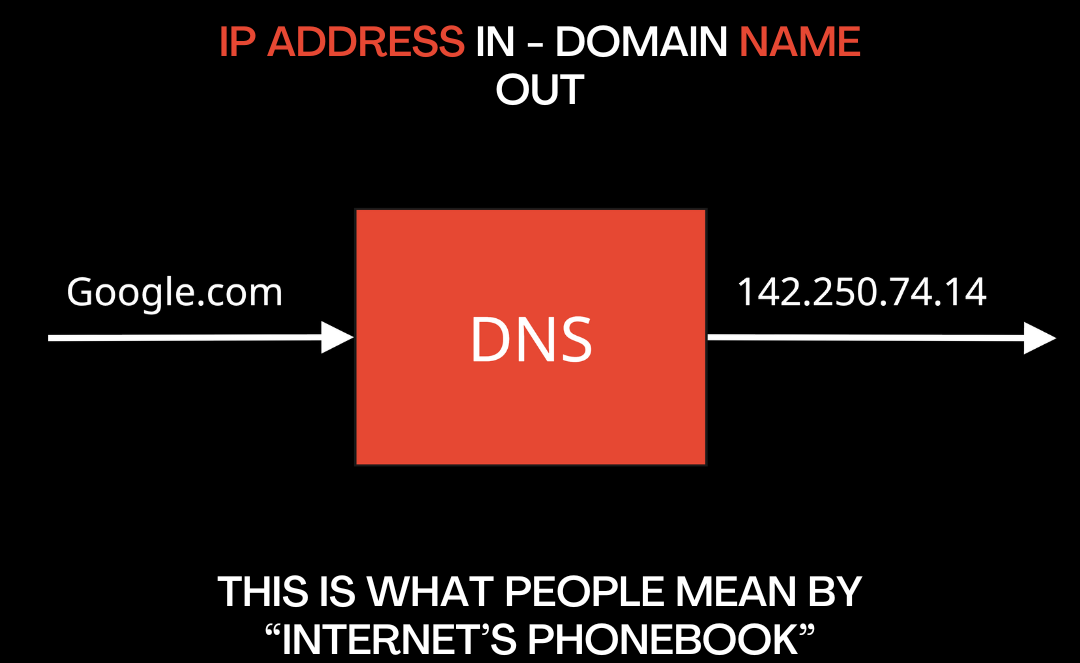
DNS is often called the Internet’s phonebook. But what does it mean?
It’s simple: if you want to connect to a website, you need to know its IP address, not its name.
There is no such thing as Google.com or YouTube.com.
But imagine you’d have to type 142.250.74.14 every time you want to connect to Google. That would make things really complicated.
DNS simply translates it for us, stupid humans who can’t remember a bunch of numbers.
Did you learn something new? Give me a like so I can teach you more!
DNS process (simplified)
Okay, now we know what DNS is supposed to do.
Now, let’s take a look at what actually happens when you type google.com in your browser.
Here’s the simplified process:
You type a domain name
Resolver checks the HOSTS file
Checks cache
If not found → asks DNS server
Gets IP address
Browser connects
I bet you have a couple of questions now. What is the Resolver? What is the HOSTS file?
Let me explain that.
Do you find this article interesting? Give it a like! It helps me understand what should I focus on!
DNS lookup (less simplified)
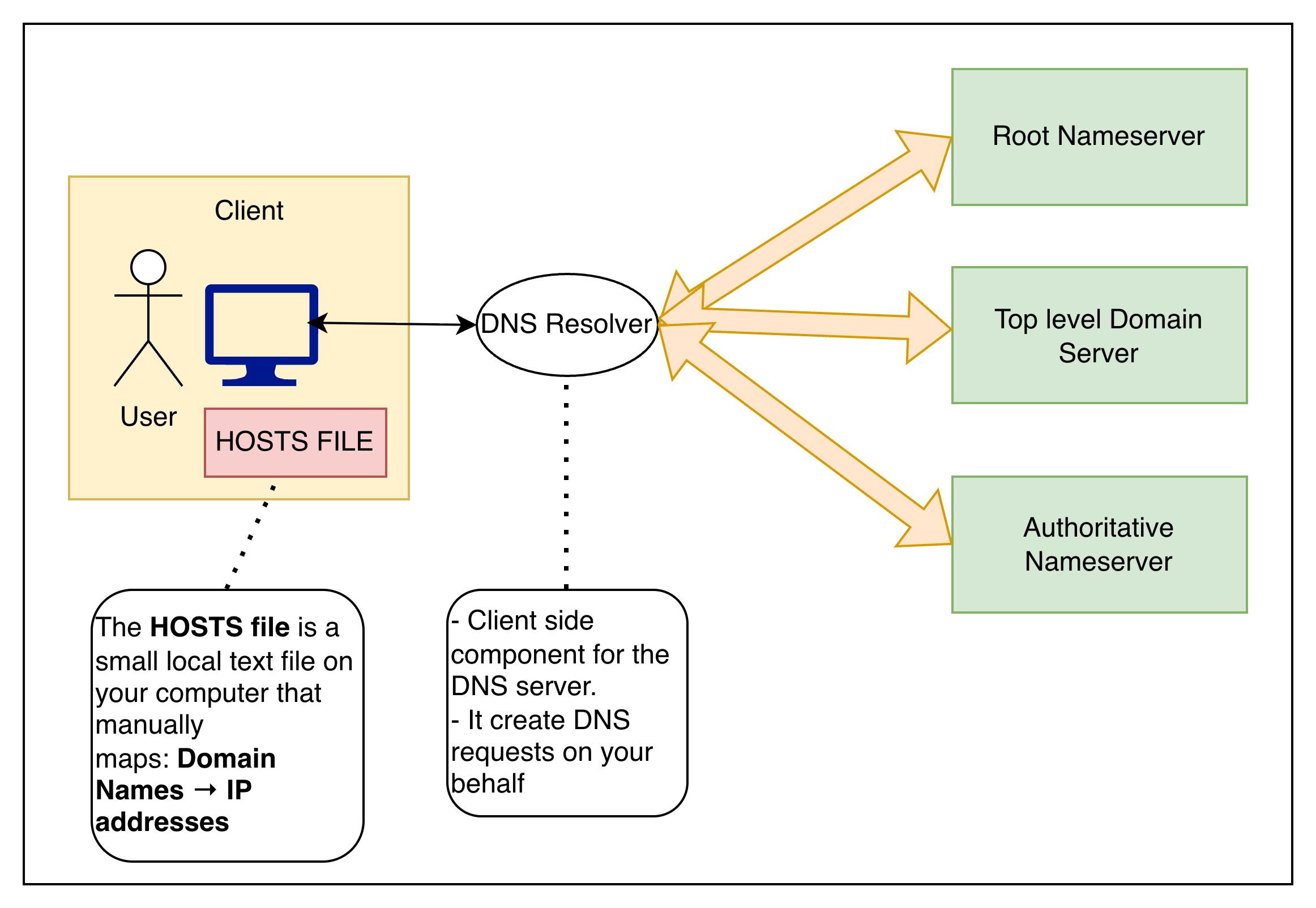
DNS process:
Step 1: Check the HOSTS file
HOSTS file: This is a small local text file with manual mappings.
Example: 192.168.1.50 example.com
If found:
process stops
no DNS request
browser connects immediately
Step 2: Check local DNS cache (Not important now)
If the desired information isn’t in the HOSTS file, then the system checks the DNS Cache.
Step 3: Query sent to recursive resolver
You type example.com.
The request goes to a DNS resolver
The resolver sends requests to the DNS servers, not you.
Step 4: Resolver asks a root nameserver
The resolver contacts a root nameserver (.).
Root servers don’t know the IP.
They only know: Which Top-Level Domain (TLD) server to ask next?
Step 5: Root responds with the TLD server
The root server replies:
“Ask the .com nameserver.”
So now the resolver knows where to go next.
Step 6: Resolver asks the TLD nameserver
The resolver queries the .com TLD server.
This server manages all .com domains.
It still doesn’t know the final IP.
Step 7: TLD returns authoritative nameserver
The TLD replies:
“The authoritative nameserver for example.com is ns1.example.com.”
Now we’re getting closer.
Step 8: Resolver asks the authoritative nameserver
The resolver contacts the authoritative nameserver.
This is the server that actually owns the domain’s records.
This server finally knows the answer.
Step 9: The Authoritative server returns the IP
It responds:
example.com → 93.184.216.34
This is the real IP address.
Step 10: Resolver returns the answer to your browser
The resolver:
sends the IP back to your computer
caches it for future use
Your browser now knows where to connect.
DNS lookup is DONE!
Super short recap of the process
Here’s the entire lookup again in 10 seconds:
Check the HOSTS file
Check cache
Ask resolver
Root → TLD
TLD → authoritative server
Get IP
Browser connects
Done.
Milliseconds.
Thousands of times per day.
You just never noticed.
Conclusion
Congratulations! Now you understand how DNS works! Well, at least the basics!
There are many topics we need to go through!
Next time, we will go through different kinds of DNS and why it all matters from a cybersecurity perspective! Because, like it or not, you need to know these things to become a cybersecurity professional.
Thanks Erich, that was a super clear explanation of something that I have been playing around with recently in trying to capture email addresses for an app I am building. Now I know what the hell DNS means and does. 🙏
Good job! In a world where everyone in IT Is looking at the Clouds, this back to the roots Is Gold.