

Everybody claims to know exactly how networking works.
Really..go out and ask people who have anything to do with tech.
They will all tell you how it’s easy, and everybody knows it.
Then ask them to explain the series of events that happen when you open a website.
That’s where the confidence disappears.
Because this isn’t a trivia question.
It’s a test of whether you understand the system or just memorize pieces of it.
And in cybersecurity, that difference matters.
Because you can’t protect what you don’t fully understand.
That’s why this question shows up in interviews.
And if you can answer it clearly, step by step, you’re already ahead of most candidates.
In this article, you’ll learn exactly that.
High-level concept
First, you need to understand that opening a website is not a single action.
It’s a chain of dependencies:
DNS → TCP → TLS → HTTP → RenderingEach link of this chain solves a different problem:
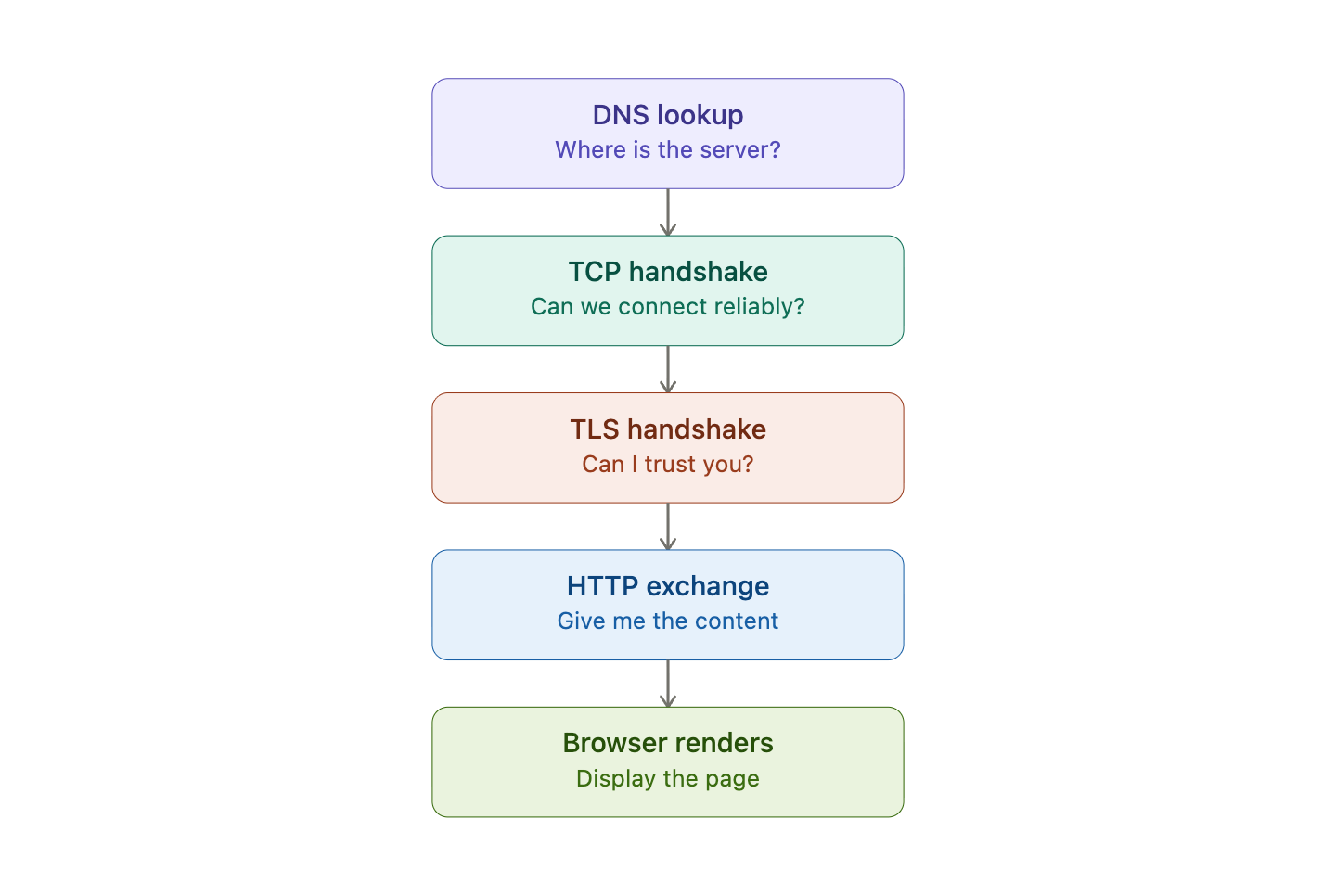
DNS → Where is the server? (Application layer)
TCP → Can we communicate reliably? (Transport layer)
TLS → Can I trust you? (Between Application and Transport)
HTTP → Give me the content (Application layer)
Make sure you understand the TCP/IP model and its different layers.
Step-by-Step (Interview-Level Explanation)
1. URL Parsing
Let’s start from the beginning.
When you type:
https://www.example.com/login?user=adminYour browser parse the URL:
Scheme (Protocol) →
httpsHost (Domain) →
www.example.comPath →
/loginQuery string →
user=admin
The scheme (https) doesn’t just define the protocol, it determines the entire communication stack that will be used.
For example:
https:// → HTTP over TLS over TCP
http:// → HTTP over TCP
Okay great. We parsed the URL. What now? We want to send the request to the server, right?
Well, not so fast. We don’t even know where the server is yet..
Watch what actually happens when you try to open the website. This visualization tells you more than any article ever will.
2. DNS Resolution - Finding the Server
Your browser knows where to go. It doesn’t know the IP address yet.
DNS translates example.com into 93.184.216.34.
Here’s the real lookup chain, and where it stops depends on what’s already cached:
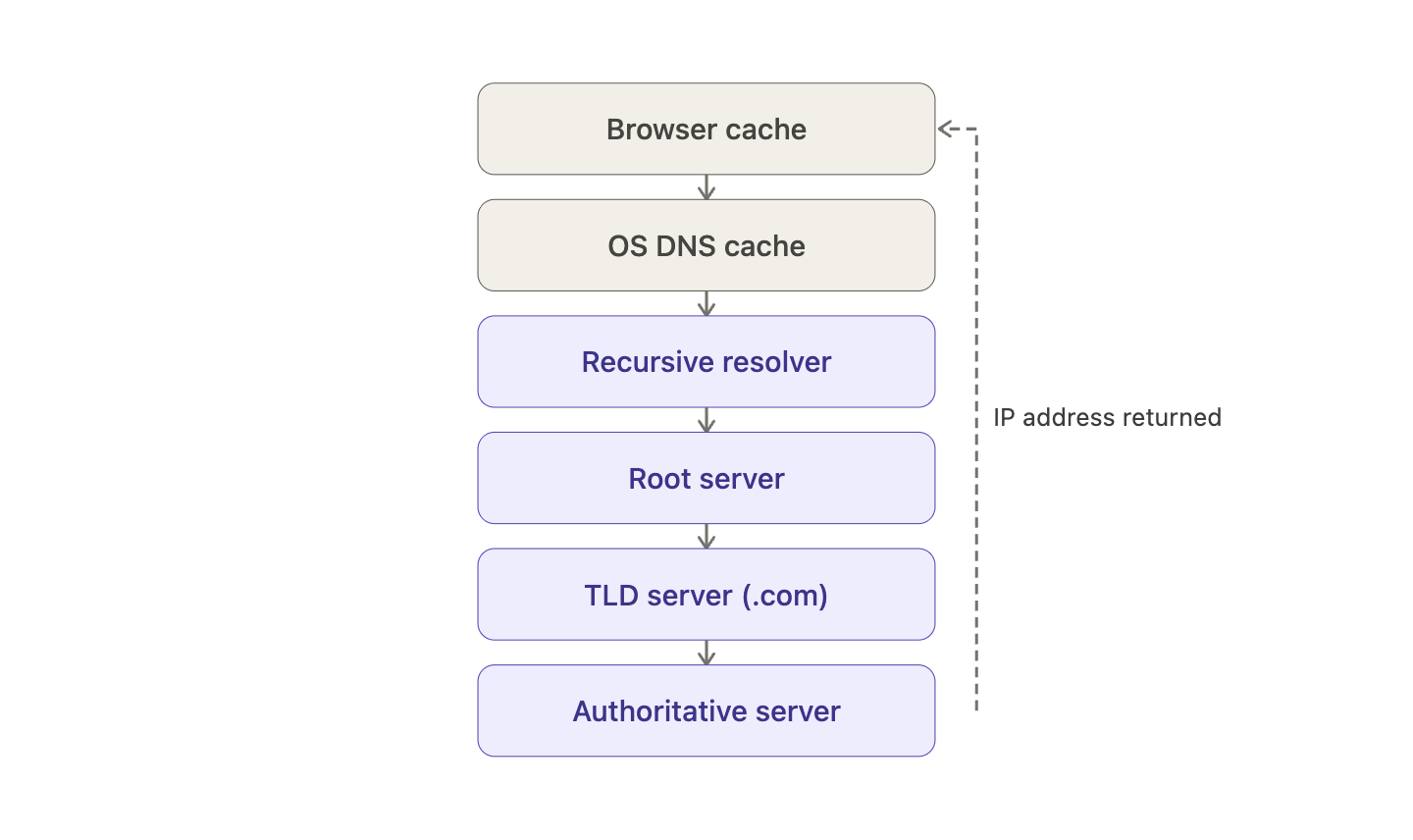
The query descends until one level can answer. Most everyday lookups never reach the root, they hit a cache first.
This is very simplified explanation, if you want to know more about how DNS really works, read it HERE:

Okay, great! Now we have the IP address and we can make the request, right?
Well, not yet!
Step 3: TCP Handshake (Making the Connection)
We need to establish a reliable connection first!
That’s the job for the Transport layer. In particular, the TCP protocol.
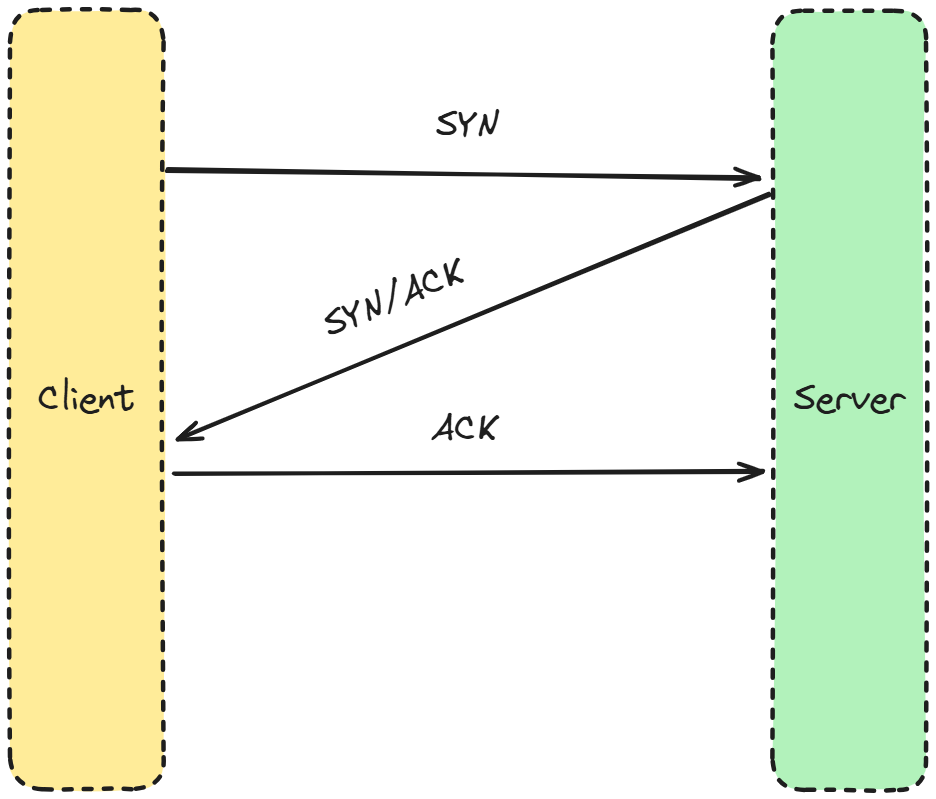
It establishes a connection between two devices using something called a three-way handshake:
SYN → Client wants to start communication
SYN-ACK → Server acknowledges
ACK → Client confirms
That’s it. Simple, efficient.
Do you want to know more? I love to hear that! I have covered this topic in one of my previous articles! Read it here: TCP protocol.
Okay, okay. So now it’s finally time to make a request, right?
Well, we are really almost there! I promise!
Step 4: TLS Handshake
This is where it gets interesting when it comes to security.
The TLS protocol lies between the application and transport layers.
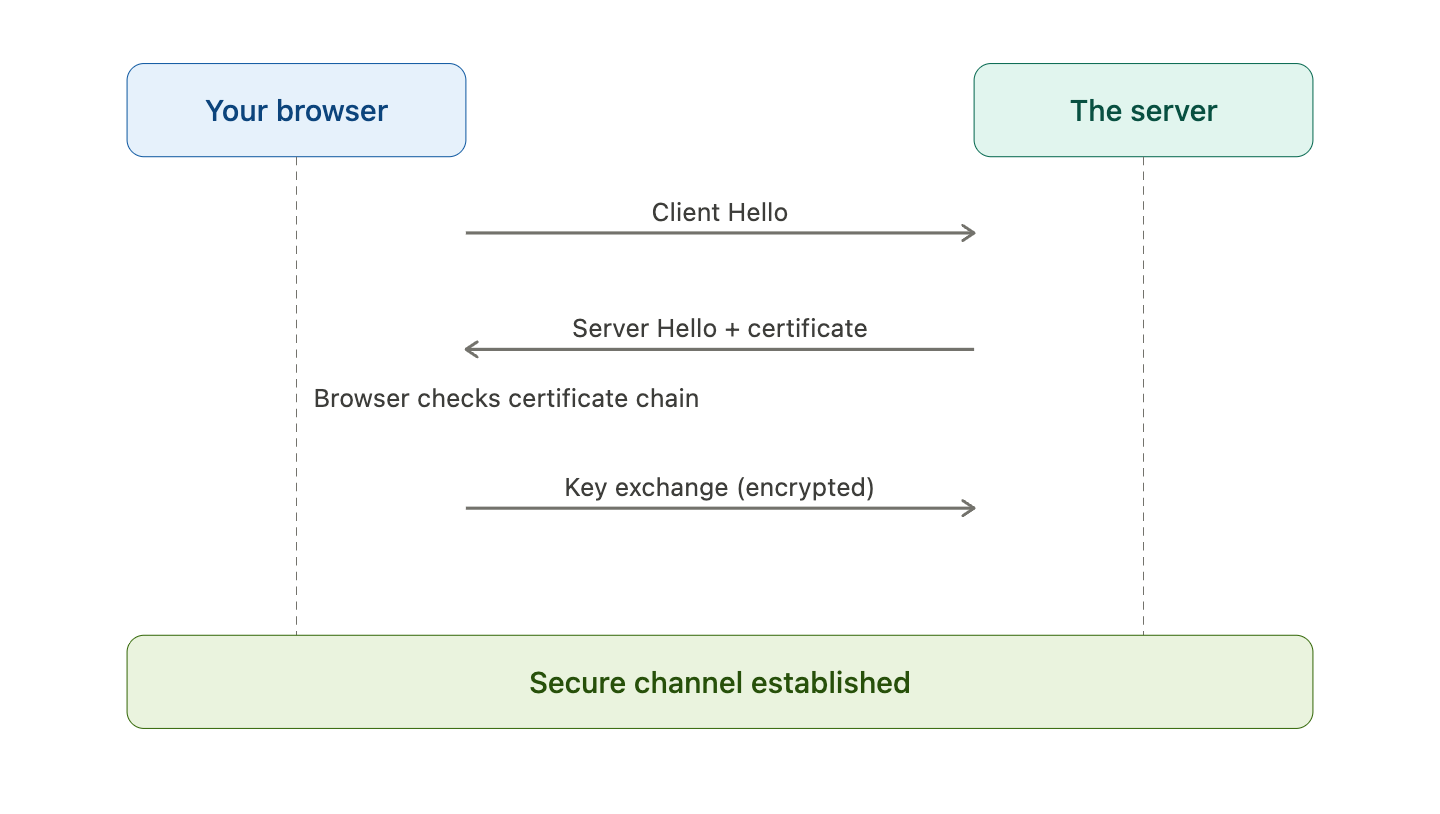
It has three simple (haha)..ensure authenticity, integrity, confidentiality of the connection.
Here’s what each step actually does:
1. Client Hello: Your browser initiates the handshake by sending:
Supported TLS versions
Supported cipher suites
Random data (used later for key generation)
2. Server Hello + Certificate
The server responds with:
The selected cipher suite
Its digital certificate
That certificate contains:
The server’s public key
A digital signature from a trusted Certificate Authority (CA)
3. Certificate Verification
Your browser validates the certificate:
Is it signed by a trusted CA?
Is it expired?
Does the domain match?
If you don’t know what a Certification Authority is, I got you covered!

This is where your digital signatures article connects directly.
Without a valid signature, the browser rejects the connection.
4. Key Exchange
The client and server establish a shared secret.
In modern TLS (1.2+ / 1.3), this is typically done using:
(EC)DHE → ephemeral key exchange
Important: The certificate is used for authentication, not for encrypting all traffic directly.
5. Secure Channel Established
Both sides derive session keys.
From this point on:
All data is encrypted
All data is integrity-protected
Step 5: HTTP Request and Response (Finally Asking for Data)
Once the secure channel is open, the browser sends:
GET /login HTTP/1.1
Host: example.com
The server processes the request, queries a database if needed, and returns HTML with a 200 OK response.
Step 6: Browser Rendering (The Part You Actually See)
The browser parses the HTML, loads CSS, and executes JavaScript.
Only now do you see the page.
Everything before this? Invisible. Automatic. Completed in under a second.
And almost entirely attackable if any single step is misconfigured.
If you've made it this far, which step surprised you most? Drop a comment below. I read every single one!
Hands-On Lab: See the Whole Chain With Docker
Congratulations! You now understand the whole process. Which is great!
But just a theory isn’t enough. If you want to get ahead of other candidates, you must get that hands-on experience.
That’s why I prepared a lab that recreates DNS resolution, HTTP requests, and live TLS negotiation in a contained environment.
What you need: Docker Desktop. Nothing else.
If you don’t know how to use Docker or what it is, I got you covered.
→ Download a free step-by-step guide HERE.
