

Subnetting confuses a lot of people. And I completely get it. I was confused too.
And you know what?
I think the only reason why it is confusing for so many people is that it’s explained incorrectly.
Most tutorials jump straight into masks, ranges, and formulas…
Without explaining what’s actually underneath.
And that’s the problem.
Because subnetting only makes sense once you understand one thing:
What an IP address really is!
Have you struggled with subnetting in the past? Give this article a like and help other people with the same problem discover it!
What is an IP address?
Most people see an IP address like this:
192.168.1.42
And treat it like a label.
But it’s not.
It’s a structured 32-bit number, and every part of it has meaning.
So here is what your IP address actually looks like.
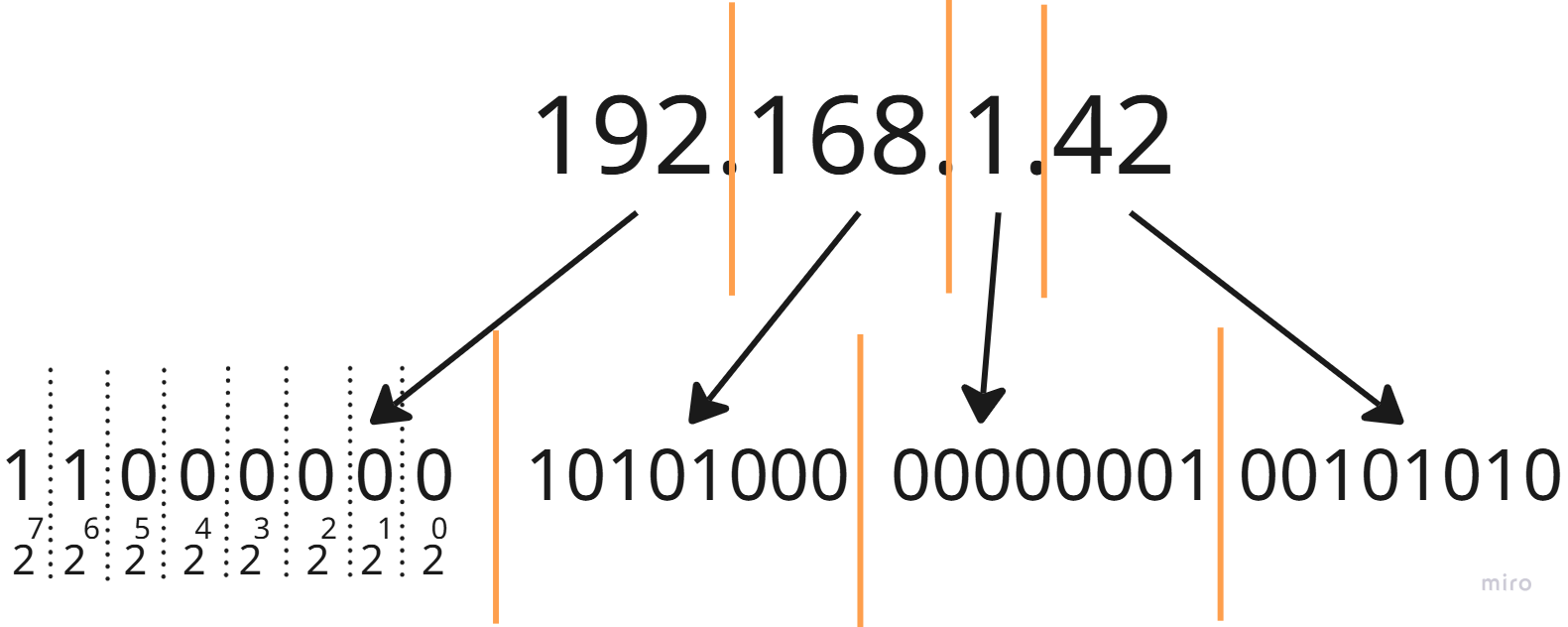
Those dots between the numbers? That just separates bytes.
That 192 in your IP address? It’s actually 11000000 in binary.
Why am I talking about it?
Because once you think of an IP address as 4 bytes rather than 4 random numbers, things get a lot easier!
So the first lecture today is this:
Always think of an IP address as 4 individual bytes.
Now, I am going to show you why it’s so important.
Have you ever thought of an IP address this way?
If not, give this article a like and help other people find it!
Subnetting - What does it really mean?
Let’s start with the definition.
Definition: Subnetting is the process of dividing an IP network into smaller sub-networks by splitting the IP address into a network portion and a host portion.
That didn’t tell you much, huh?
Don’t worry, it didn’t mean to.
Let’s break it down in plain English.
Subnetting means:
Choosing how many bits identify the network, and how many identify the device.
So when you think of an IP address as a line of bits:
[ network bits | host bits ]Subnetting is simply deciding where that boundary (“|”) sits.
On the left, we have a fixed number of bits that define the network, and on the right, we have a fixed number of bits that address individual devices.
Still confusing, right? Let’s take a look at an example.
Don’t give up now! It’s about to start making sense!
Want to SEE this boundary instead of imagining it? My free Subnet Calculator shows the binary view of any subnet, with the network/host split marked. Open it in another tab and follow along.
Example - Mask /24
The last term you need to know here is a “subnet mask.”
Here is the definition: A subnet mask is a 32-bit value that defines which part of an IP address represents the network and which part represents the host.
In other words, it is a simple representation of how many bits you reserve for addressing individual devices.
Basically, it’s just a fancy way of saying, put the boundary (“|”) here, thank you.
So, what if you have a /24 mask?
That means, you take the first 24 bits from the left and set them to 1.
11111111.11111111.11111111.00000000In dotted decimal notation, it would look like this:
255.255.255.0This means the first 24 bits define the network. They are fixed, and only the last 8 bits (last byte) are dedicated to individual devices.
192.168.1.X // X - devices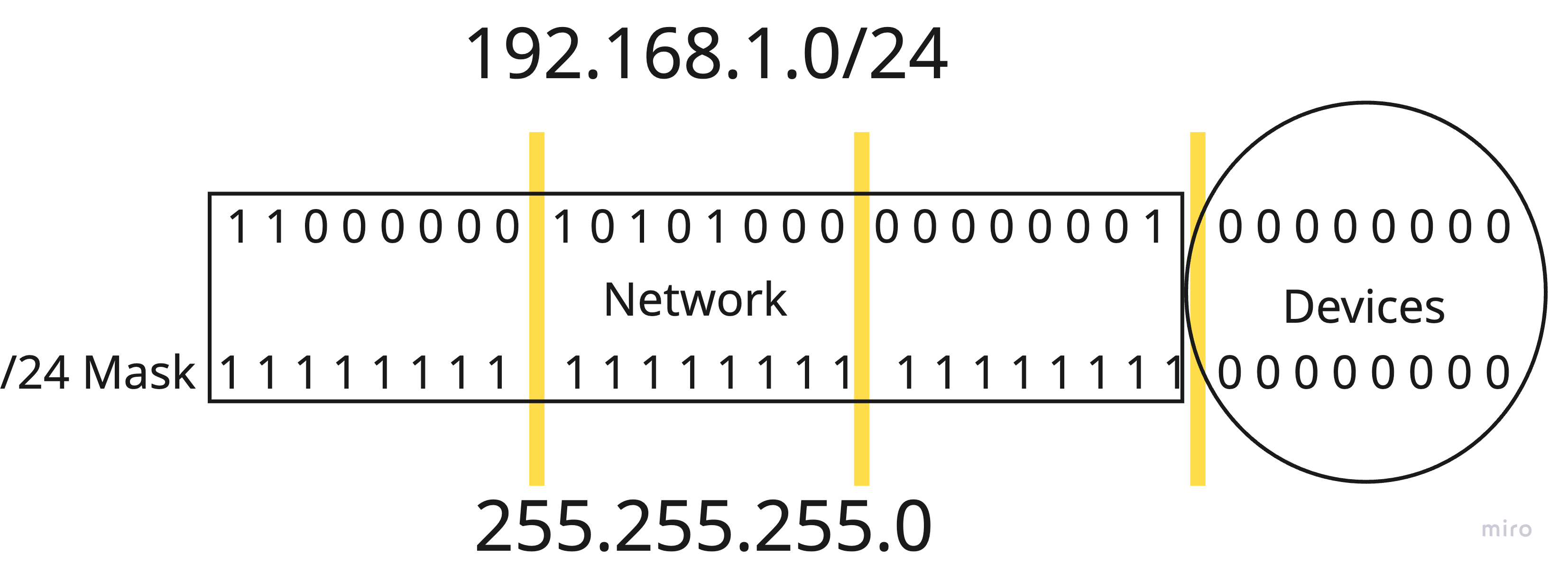
So, how many devices do you think you can have in this network?
Have you answered it in the comments?
No?
This is how you learn, think about it, and give us your answer!
Okay, great. Let’s see what the correct answer is.
You have 8 bits, which can hold 2 values: 0 and 1.
That 2^8 combinations = 256 devices.
If that was your answer, you’re almost correct.
The correct answer is 254. Why? Because you have to exclude network and broadcast addresses. We’ll talk about it next time!
What’s next
First of all, if you don’t fully understand subnetting now, don’t worry. It can be a very confusing topic at first.
Take your time, and read this article twice. Once you do, you can try to create subnets with different masks.
192.168.1.0/25
192.168.1.0/12
192.168.1.0/27
Take a pen and paper and answer the following questions.
What does the network mask actually look like?
How many devices can there be?
And what would the network and broadcast addresses be?
What is the first and last usable address?
If you answer these in the comments, I will personally give you feedback!
Conclusion
Congratulations! You just took a huge step in your cybersecurity journey, and I am proud of you.
After reading this article, you are now able to design a network with adequate subnets. You know what an IP address actually is and what those funny numbers after “/” mean.
Believe it or not, that puts you way ahead of most people. Really, go ahead and ask around and see for yourself how many people can give you the right answer. I’ll wait!
Next time, we will talk about cybersecurity implications.
So subscribe and learn something new every week!
Thank you for reading Decoded Security!
Erich
‼️ Free Resource 🚨
If this article helped, I put together a free 80-page guide covering the 10 cybersecurity concepts behind 90% of entry-level interview questions.
👉 Download it here: decodedsecurity.gumroad.com/l/Top10_Cybersecurity_Concepts
Let’s Connect
If you want to collaborate, discuss, or just geek out over networking and cybersecurity, reach out:
Email: erich.winkler@decodedsecurity.com
LinkedIn: Erich Winkler
Gumroad community: Decoded Security
Start Here: Decoded Security Roadmap
Enjoyed this article? Like it or drop a comment. I’d love to hear your thoughts and questions!
Let’s learn and grow together!