

localhost:8000
Have you ever stopped to wonder what that actually means?
What is that 8000 doing there?
If you want a career in cybersecurity, you need to know these networking basics. That is non-negotiable.
Ports and scanning are not something you memorize only for an exam and forget. They are the ground floor of the whole field.
Firewalls, threat detection, penetration testing, incident response, and almost every interview you will ever sit in all assume you already understand this.
So let me show you everything you need to know about this topic to pass not only security exams, but also security interviews, and most importantly, be a useful member of a security team.
What you’ll learn today:
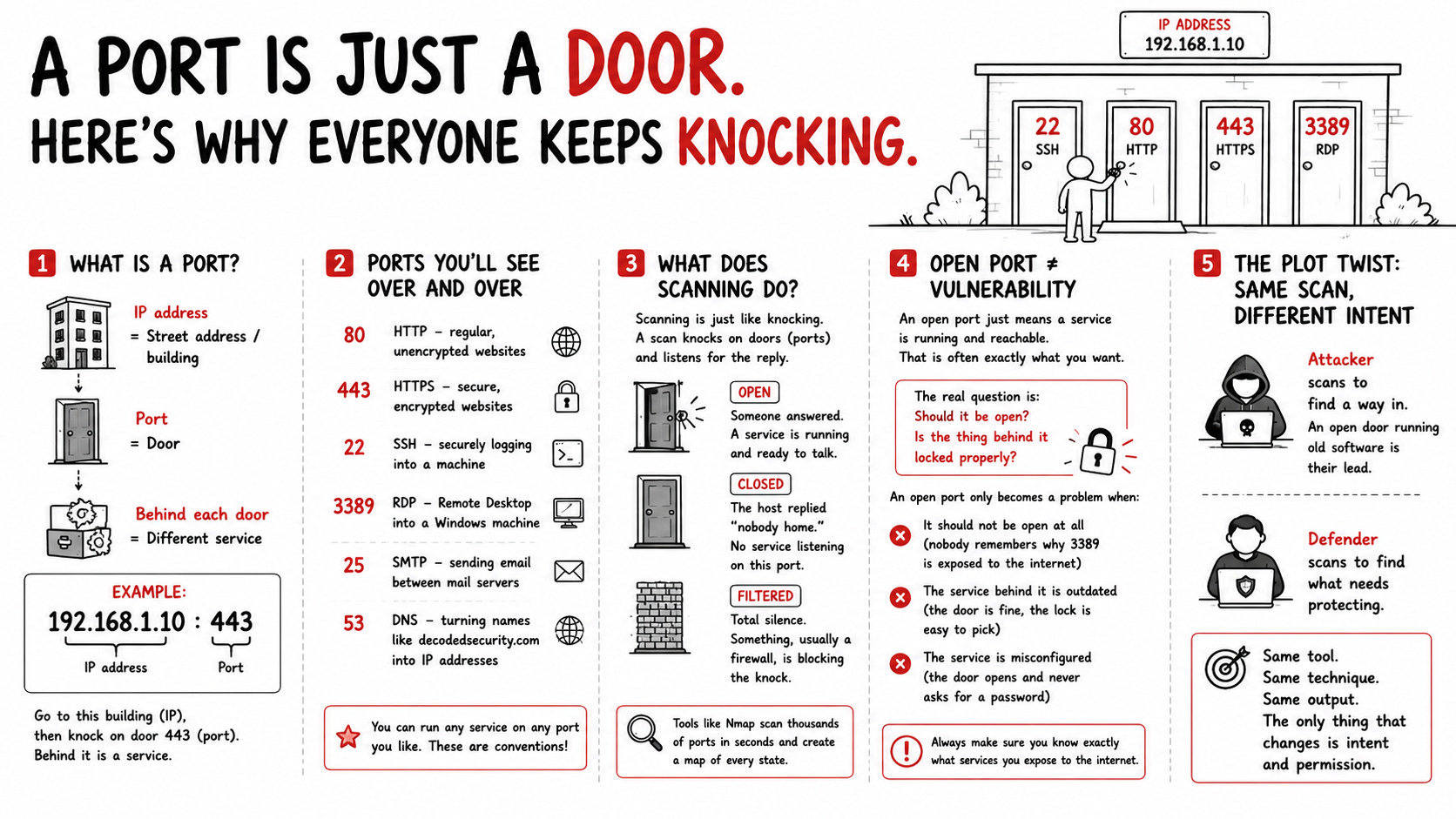
What a network port actually is
The handful of ports worth memorizing
What port scanning is, and the three answers a scan gives you
Why attackers and defenders scan the exact same way
What an “open port” really means
What is a port actually?
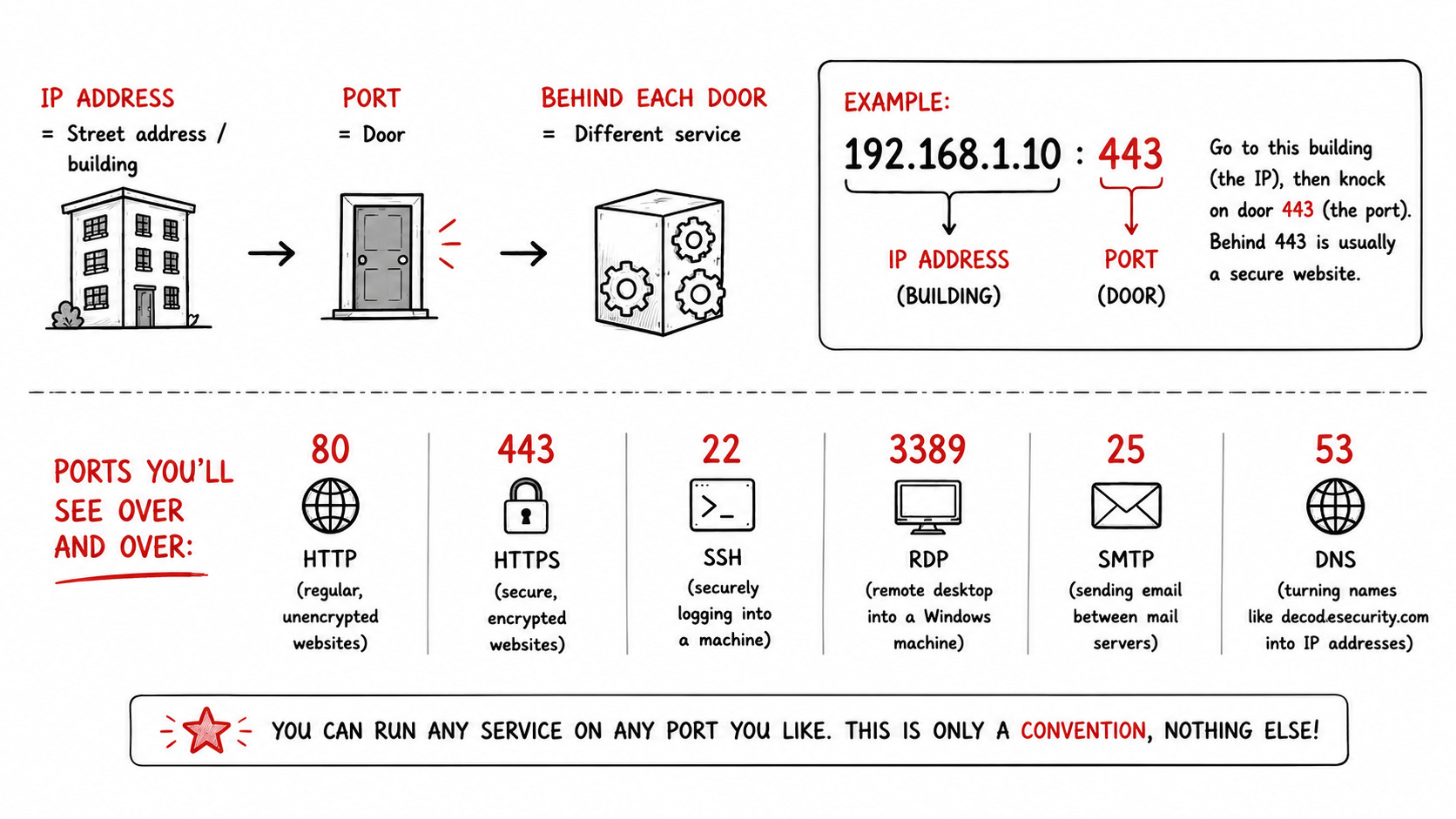
Every device on a network has an IP address.
You can think of it as the street address of a building. But a building is not one room.
It has many doors, and behind each is a different service.
A port is one of those doors.
Your computer might run a website, an email service, and a remote login all at once. The port number is how it knows which service the incoming traffic is meant for. So the full address of a service is the IP plus the port:
192.168.1.10:443
That means: go to this building (the IP), then knock on door 443 (the port). Behind 443 is usually a secure website.
👉 Clearest “what is a port” you have read? Tap the ❤️ like so the next beginner finds it.
The doors you will see over and over
There are 65,535 possible ports, but a couple you should be aware of. Especially if you’re preparing for some cybersecurity exam, such as the Security+:
80 (HTTP) regular, unencrypted websites
443 (HTTPS) secure, encrypted websites (the little lock icon)
22 (SSH) securely logging into a machine from a command line
3389 (RDP) Remote Desktop into a Windows machine
25 (SMTP) sending email between mail servers
53 (DNS) turning names like decodedsecurity.com into IP addresses
However, there is one thing I’d like to make absolutely clear. You can run any service on any port you like. This is only a convention, nothing else!
Scanning is just like knocking
If a port is a door, a port scan is knocking on those doors, one after another, to see which open.
A scanning tool sends a small message to a port and listens for the reply.
That reply sorts every door into one of three states:
Open. Someone answered. A service is running behind this door and is ready to talk. This is a live entry point.
Closed. The host replied “nobody home.” The machine is reachable, but no service is listening behind that door.
Filtered. Total silence. Something, usually a firewall, is blocking the knock, so you cannot even tell if a service is there.
The important distinction here is that closed and filtered are not the same.
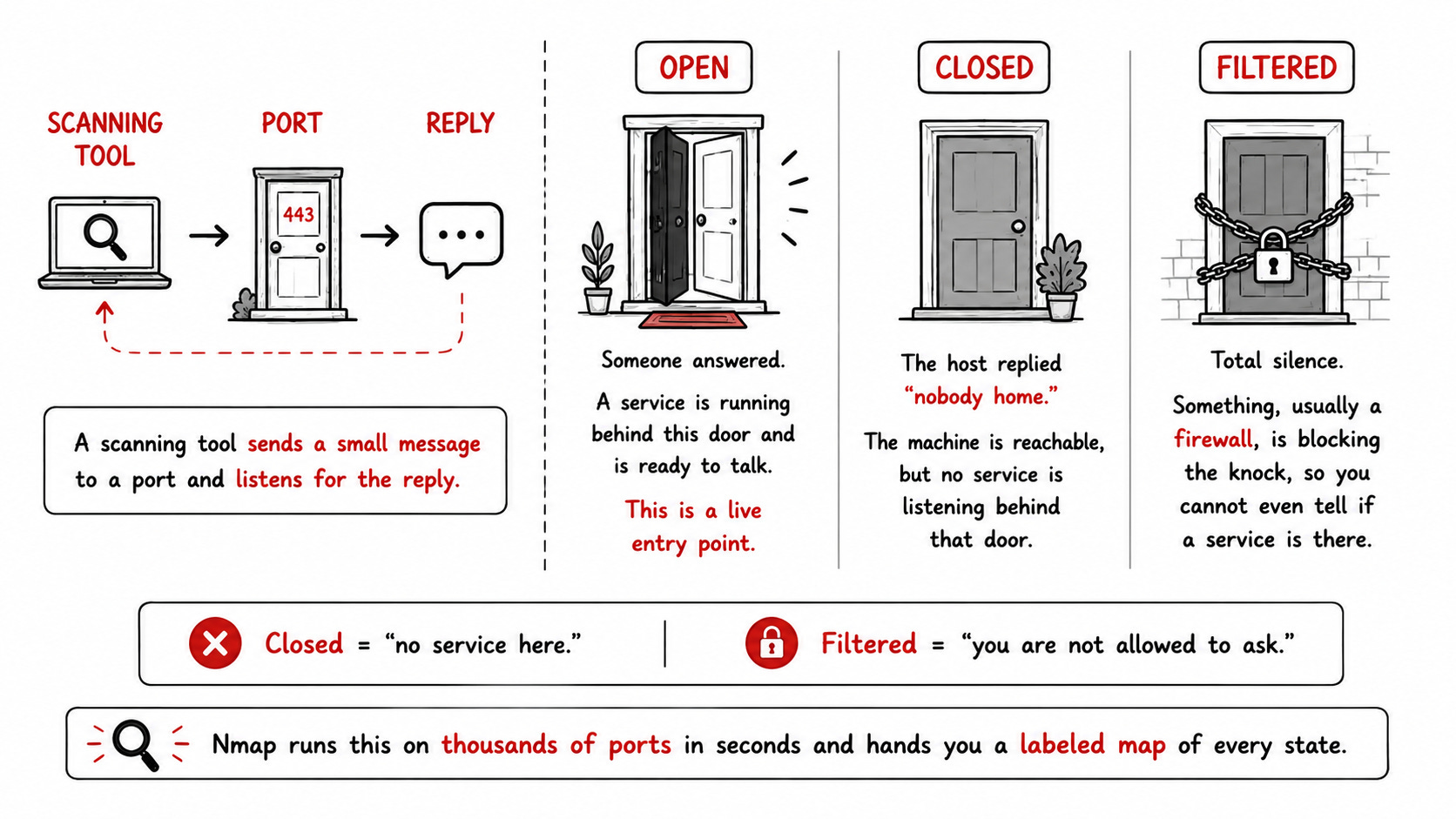
Closed means “no service here.” Filtered means “you are not allowed to ask.”
A tool like Nmap runs this on thousands of ports in seconds and hands you a labeled map of every state. That map is the starting point for almost every security assessment.
Want to watch these states change in real time? Try the Decoded Security Port Scanner and learn how to read the output!
What an “open port” actually means
Here is the myth I want to kill: an open port is not the same as a vulnerability.
An open port just means a service is running and reachable, which is often exactly what you want. Your web server is supposed to have 443 open. A closed 443 means your website is down.
An open port only becomes a problem when:
It should not be open at all (nobody remembers why 3389 is exposed to the internet)
The service behind it is outdated (the door is fine, the lock is easy to pick)
The service is misconfigured (the door opens and never asks for a password)
So the real question is never just “is this port open?” It is “should it be open, and is the thing behind it locked properly?”
Remember: Always make sure you know exactly what services you expose to the internet.
The plot twist: attackers and defenders scan the same way
Here is the funny thing about port scanning. Both sides do it. Because it turned out, that in this case, the easiest way to find a vulnerable service on your own network is to do the same thing that attackers would do.
The only difference is the reason why we do it.
An attacker scans to find a way in: An open door running old software is their lead.
A defender scans to find what needs protecting: You cannot secure a door you did not know existed.
Same tool. Same technique. Same output.
The only thing that changes is intent and permission.
Port scanning is a flashlight: a burglar uses one to case a house, a homeowner uses one to check the locks. Nobody blames the flashlight.
Do you like my analogies? Hit ❤️ and help other people find it!
Key takeaways
Okay, I have been working as a cybersecurity manager for years, and here is what I believe you should take from this article
A port is a numbered door, and each leads to a different service.
The full address is the IP plus the port (localhost:8000)
A scan is knocking to see which doors are open, closed, or filtered.
What each state means
Attackers and defenders use the same technique; intent and permission are the differences.
An open port is not automatically dangerous, only when it should not be open, or the service behind it is weak.
Master this one analogy, and a whole layer of networking makes sense. Scans stop being scary and start being information.
If this made ports click, do two quick things: tap the ❤️ like so more beginners find it, and subscribe so you never miss the next one.
What to read next
If ports clicked for you, keep building your networking foundation with these:
This Is How I Explain DNS To Beginners: how a name like decodedsecurity.com turns into an IP address, the step that happens before you ever knock on a port. Read it here
This Is How I Explain Subnetting: what an IP address really is underneath, and how networks get carved into smaller pieces. Read it here
What Actually Happens When You Open a Website: the full DNS to TCP to TLS to HTTP chain, and the exact question interviewers love to ask. Read it here
Free resource: Top 10 Cybersecurity Fundamentals
Before you go, grab my free guide. It covers the 10 cybersecurity fundamentals behind roughly 90% of entry-level interview questions, the exact concepts that get you hired faster. 80 pages, zero cost.
Let’s Connect
If you want to collaborate, discuss, or just geek out over networking and cybersecurity, reach out:
Email: erich.winkler@decodedsecurity.com
LinkedIn: Erich Winkler
Gumroad community: Decoded Security
Start Here: Decoded Security Roadmap
Decoded Security Platform: Decoded Security
Enjoyed this article? Like it or drop a comment. I’d love to hear your thoughts and questions!
Let’s learn and grow together!
Note: Infographics were created by drawntocyber.