

“Create a passkey for faster sign-in?”
“Skip passwords. Use a passkey instead.”
“Set up a passkey now?”
Sound familiar?
Google, Microsoft, Apple, Amazon, your bank. Suddenly everyone wants you to create a passkey. You click “Not now”, and next time the pop-up is back.
It’s easy to see it as just another tech trend. Something companies push because everyone else does.
So let’s find out: are passkeys really more secure, or is it just hype?
To answer that, we need to start with the problem passkeys are trying to solve. Because it’s a big one.
Every password you’ve ever used has the same weakness. To prove it’s you, you have to send it.
You type it into a login page. It travels to a server. The server stores a version of it.
And anything you send can be intercepted, phished or leaked.
Passkeys fix that in a surprisingly simple way. You don’t need to understand cryptography to get it. You just need one idea.
What you can expect from this article:
What problem passkeys actually solve
How they work, step by step
Their limits and how they can be misused
Are passkeys really more secure, or just a trend? The honest pros and cons
What the CC and CISSP exams expect you to know
The Misconception That Stops Most People
Before we get into what passkeys are, let me address one misconception that I hear ALL THE TIME!
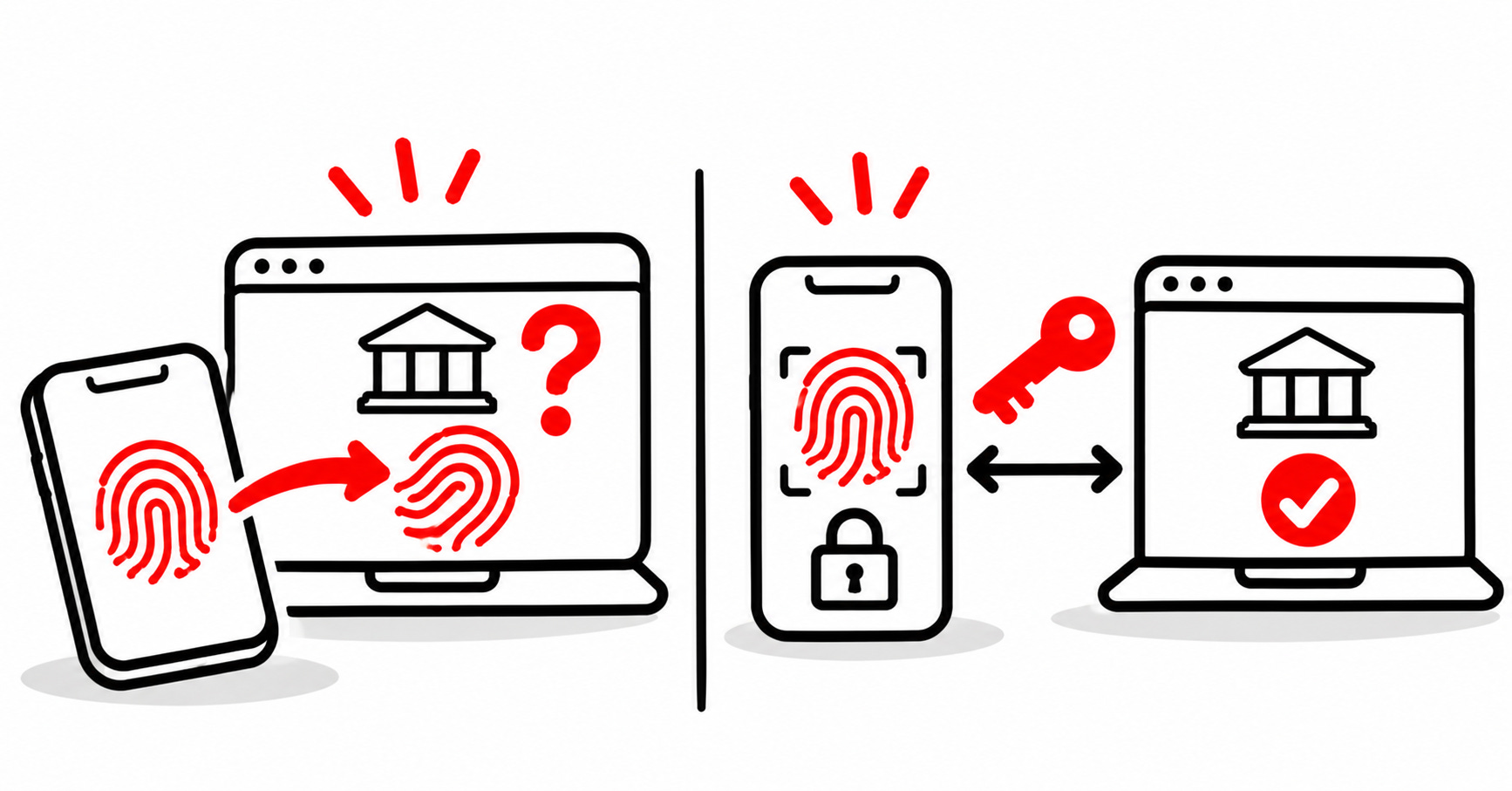
When people hear “log in with your fingerprint”, many think: wait, so the website gets my fingerprint?
No. Never. That’s not how it works.
Your fingerprint (or face, or PIN) never leaves your device. It doesn’t go to Google, your bank or anywhere else.
It only unlocks something stored safely on your phone or laptop. And that something is what proves it’s you.
Know someone who keeps clicking “Not now”? Send them this article. It might be the 5 minutes that saves their account.
What Problem Do Passkeys Solve?
Passwords fail in three predictable ways:
Phishing: you type your password into a fake page, and the attacker has it.
Reuse: one leaked password opens every account where you used it.
Breaches: websites store versions of your password, and attackers crack them after a leak.
All three have the same root cause: the password is a shared secret. You know it, the website knows a version of it, and anyone who intercepts it can use it.
Passkeys remove the shared secret. There’s nothing to type, nothing to reuse, and nothing useful to steal from the website’s database.
How Do Passkeys Work?
Here’s the one idea:
With a password, you prove who you are by showing a secret. With a passkey, you prove who you are without ever showing it.
Think of it like a unique seal, the kind used to stamp wax on old letters.
You keep the seal itself. Nobody else has it, and it never leaves your hands.
The website keeps a picture of your seal’s imprint, so it can recognize your stamp.
You can’t recreate the seal from a picture of its imprint. That’s what makes the whole thing work.
Now let’s take a look at the process, step by step:
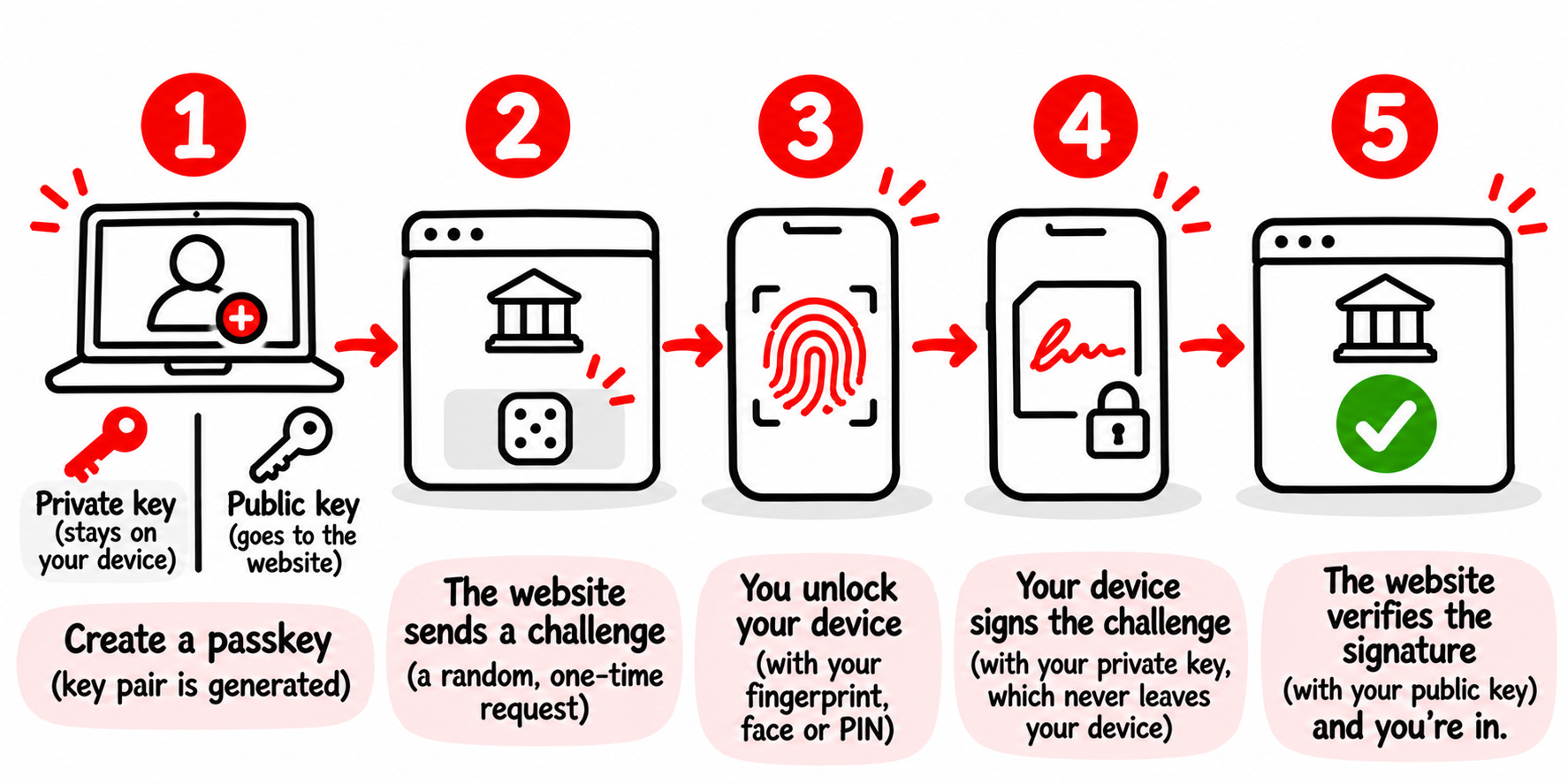
Step 1: You create a passkey.
Your device creates a key pair: a private key (the seal) and a public key (the picture). The private key stays on your device. The website only receives and stores the public key.
Step 2: You log in, and the website sends a challenge.
It’s a new, random piece of data, like a fresh piece of paper. It’s different every time.
Step 3: You unlock your device.
With your fingerprint, face or device PIN. This check happens on your device only, and it’s what allows the private key to be used.
Step 4: Your device signs the challenge.
It “stamps” the challenge with the private key and sends back the signature. The private key itself never leaves your device.
Step 5: The website verifies the signature.
It checks the signature with the public key it stored. Match? You’re in.
And one more important detail: each passkey belongs to one website. It’s tied to the exact address it was created for, and your device won’t use it anywhere else.
Why this stops phishing
Imagine you get an email: “Your account will be locked. Log in here.” The link leads to a perfect copy of your bank’s login page, on a slightly different address.
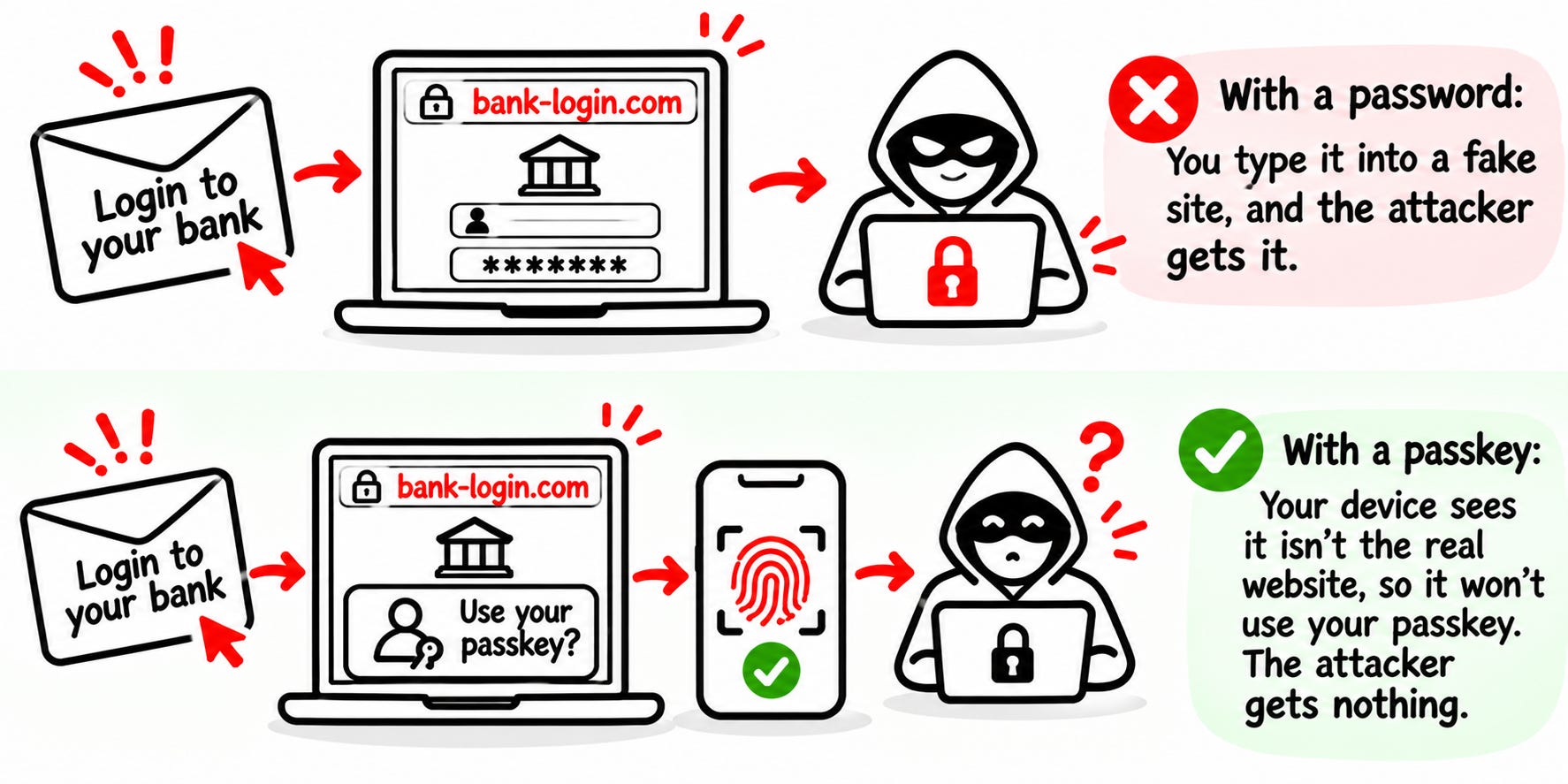
With a password: you type it in, and the attacker has it. Game over.
With a passkey: your device sees it isn’t the real website. There’s no passkey for that address, so it has nothing to offer. The fake page gets nothing.
The attacker can copy the page. They can’t copy the address it lives on!
The Limits
Passkeys are a big step forward, but not magic:
Losing your device: most passkeys today sync through your Apple, Google or Microsoft account, or your password manager, so a new phone can get them back. But that means protecting that account matters even more.
Not every website supports them yet. You’ll be using passwords for a while too.
Passwords often don’t disappear. Many websites still keep a password as a backup login option, and that backup can still be phished.
How Can Passkeys Be Misused?
I want you to remember one thing. Using passkeys doesn’t make your account automatically safe.
This is the part most “passkeys are the future” articles skip.
Here are a couple of ways attackers can go around them:
Account recovery: if you can still reset your account with an SMS code or an email link, attackers will target that instead. Your account is only as strong as its weakest way in.
The backup password: if the website still accepts your old password, a phishing page will ask for that instead of the passkey.
Stolen sessions: passkeys protect the moment you log in, not what comes after. Malware on your device can steal the session cookie and use your account without ever logging in.
A compromised sync account: if someone takes over the Apple, Google or Microsoft account that syncs your passkeys, they may get access to all of them.
An attacker’s own passkey: once attackers get into an account by any route, they can add their own passkey and keep access, even after you change your password.
An unlocked device: anyone who can unlock your phone can use your passkeys.
What to do about it:
Protect your sync account (Apple, Google or Microsoft) with a strong password and multi-factor authentication.
Remove SMS recovery and old passwords where the website allows it.
Check the list of passkeys on your important accounts now and then, and delete any you don’t recognize.
Keep your devices updated, and lock them.
So, Are Passkeys Really More Secure, or Just a Trend?
Short answer: they’re not just a trend. For logging in, they’re far more secure than passwords. But they’re not a complete solution.
Here’s both sides.
The positives:
Phishing-resistant by design. A passkey only works on the real website. You can’t hand it to a fake page, even if you fall for the trick. With passwords, security depends on you spotting the fake. With passkeys, it doesn’t.
Nothing to steal in a breach. The website only stores your public key. A leaked database is useless for logging in.
No reuse, no weak passwords. Every passkey is unique and strong by default. You can’t choose “Summer2026!” even if you want to.
Secure and easy at the same time. That’s rare in security. Usually, more security means more friction, and people find ways around it. Passkeys are faster than passwords, so people actually use them.
The negatives:
They protect the login, not the whole account. Recovery options, backup passwords and stolen sessions are still open doors.
You depend on a few big companies. Most passkeys live in your Apple, Google or Microsoft account. That’s convenient, but it also concentrates risk: that one account becomes extremely valuable to attackers.
Your device becomes your key. Whoever can unlock it can use your passkeys.
It’s still new. Not every website supports passkeys, and many keep passwords as a backup, which brings the old risks back.
So here’s what I recommend:
Start with a solid foundation: strong, unique passwords and 2FA, managed in a well-established password manager. Protect that password manager account at all costs.
Then add passkeys on top, starting with your most important accounts. You’ll be far better protected against phishing, because there’s no password to type into a fake page.
So next time that pop-up appears, maybe don’t click “Not now.” But make sure your password manager is secured first!
What the Exam Expects You to Know
If you’re preparing for the CC, Security+ or CISSP, here’s what matters:
Authentication factors: something you know (PIN), something you have (your device) and something you are (fingerprint). A passkey combines possession of your device with your biometric or PIN, so it gives you multi-factor authentication in one step.
Remember the trap: a password plus a PIN is not MFA, because both are something you know. A passkey on your device, unlocked with your fingerprint, combines two different factor types.
Public key cryptography: the private key signs, the public key verifies. The private key is never shared.
Phishing resistance: passkeys are bound to the real website, which is why they’re considered phishing-resistant.
Weakest link: an account is only as secure as its weakest login or recovery method.
Conclusion
If you’re reading this, congratulations! You just made another step in cybersecurity.
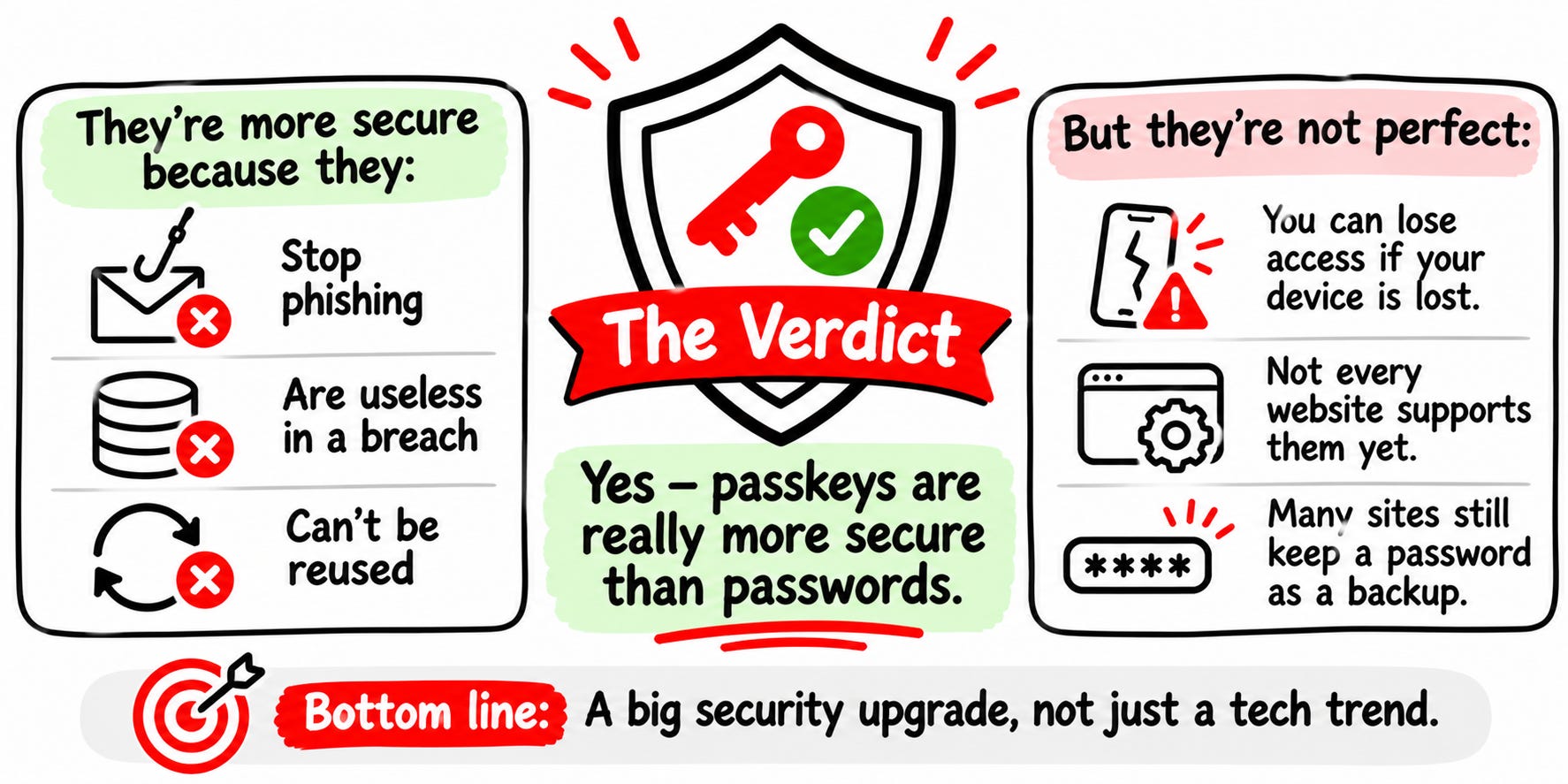
I want you to remember that passkeys protect the login, but not everything around it. Your account is still only as strong as its weakest way in: the recovery options, the backup password, or the account that syncs your passkeys.
So don’t rely just on passkeys. Handle everything else and then use passkey on top of that!
Now I’m curious: have you already set up a passkey, or do you keep clicking “Not now”? Tell me in the comments. I read every response.
Where to Go Next
Do you want to learn more about authentication methods and account protection?
Read more on Decoded Security:


Authentication is one of the core topics of CC Domain 3.
Want to see how well you’d do on exam questions like these?
Take the free CC Readiness Test: 15 minutes, a score for each domain:
Let’s Connect
If you want to collaborate, discuss, or just geek out over networking and cybersecurity, reach out:
Email: erich.winkler@decodedsecurity.com
LinkedIn: Erich Winkler
Gumroad community: Decoded Security
Start Here: Decoded Security Roadmap
Enjoyed this article? Like it or drop a comment. I’d love to hear your thoughts and questions!
Let’s learn and grow together!