

Here’s the hard truth: If you want your first job in cybersecurity, you need to know the basics of Linux.
That’s non-negotiable.
If that scares you, I have good news.
Linux is a complex environment. But you don’t need to know everything, at least not for most cybersecurity roles.
You just need to know what actually matters.
And that’s exactly what I am going to tell you today.
The Misconception That Stops Most Beginners (Including Me)
When I used to hear “learn Linux for cybersecurity” I pictured memorizing hundreds of commands.
ls. cd. chmod. grep. awk. sed. netstat. ps. curl. wget.
The list feels endless. (And it is!)
So I tried to avoid it for as long as possible. And of course, I hit the wall.
Here is the truth that I wish someone had told me back then:
You don’t need to know everything about Linux. You just need to understand the general concept and how to read the manual. Everything else will follow.
The Core Idea Of Linux
In Windows, everything has a graphical interface. You click folders, drag files, open menus.
Linux works differently.
In Linux, everything is a file.
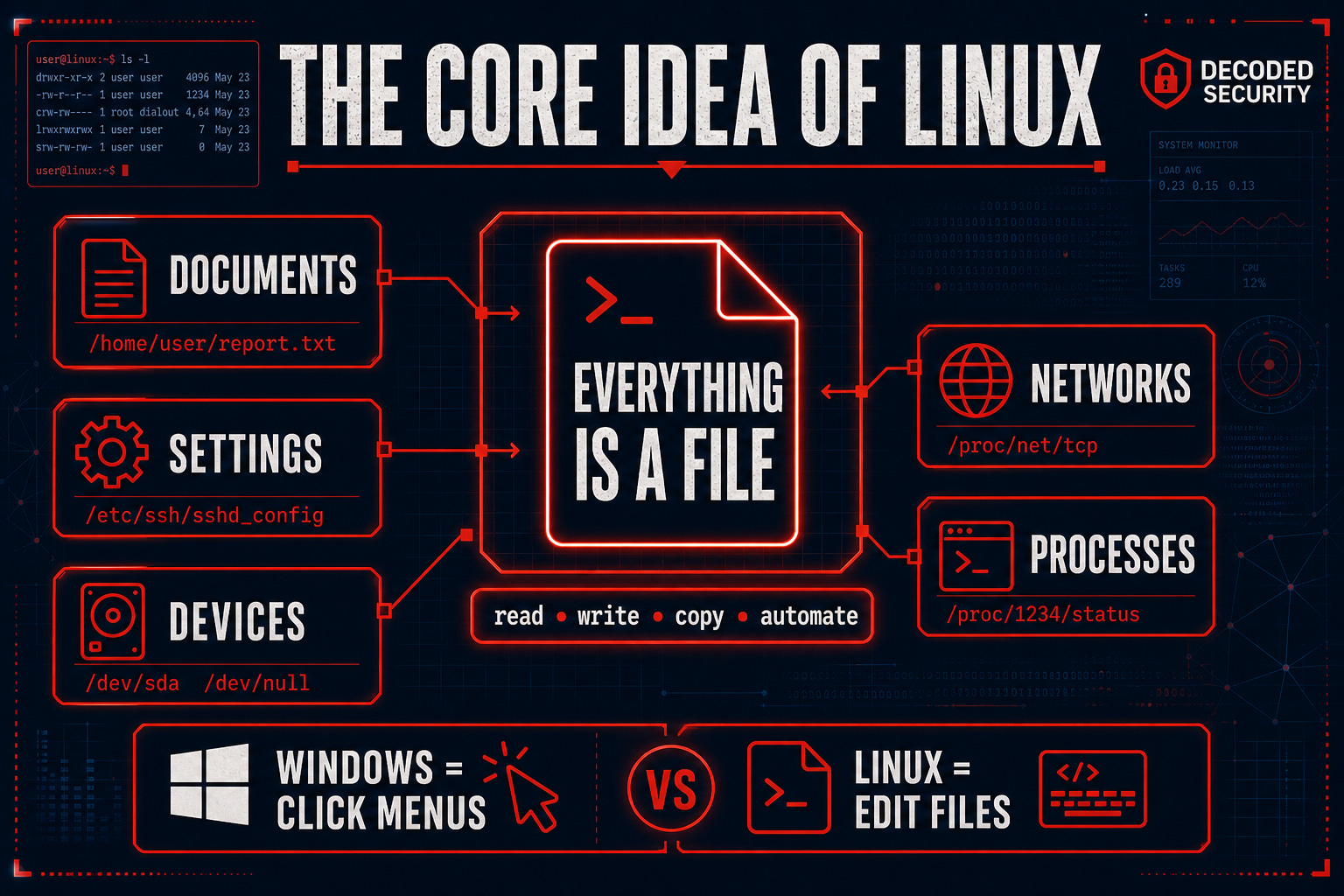
Your documents are files. Your settings are files. Your hardware devices are files. Your network connections are files. Even your running processes can be accessed as files.
This is not just a technical detail. It is the model that makes Linux make sense.
Think of it this way:
In Windows, you configure your WiFi through a settings menu with buttons and dropdowns.
In Linux, you can configure your WiFi by editing a text file. Because the network configuration is stored as a file. Like everything else.
This is why Linux is so powerful for cybersecurity. When everything is a file, you can read it, write it, copy it, move it, and automate it with simple commands.
And that is exactly what security professionals do every day.
Top 4 Things You Need Know To Start
Before you learn a single command, you need to understand four foundational concepts. Everything else builds on these.
1. The Linux Filesystem
The Linux filesystem is organized as a single tree starting from the root directory, written as /.
Everything lives somewhere in that tree.
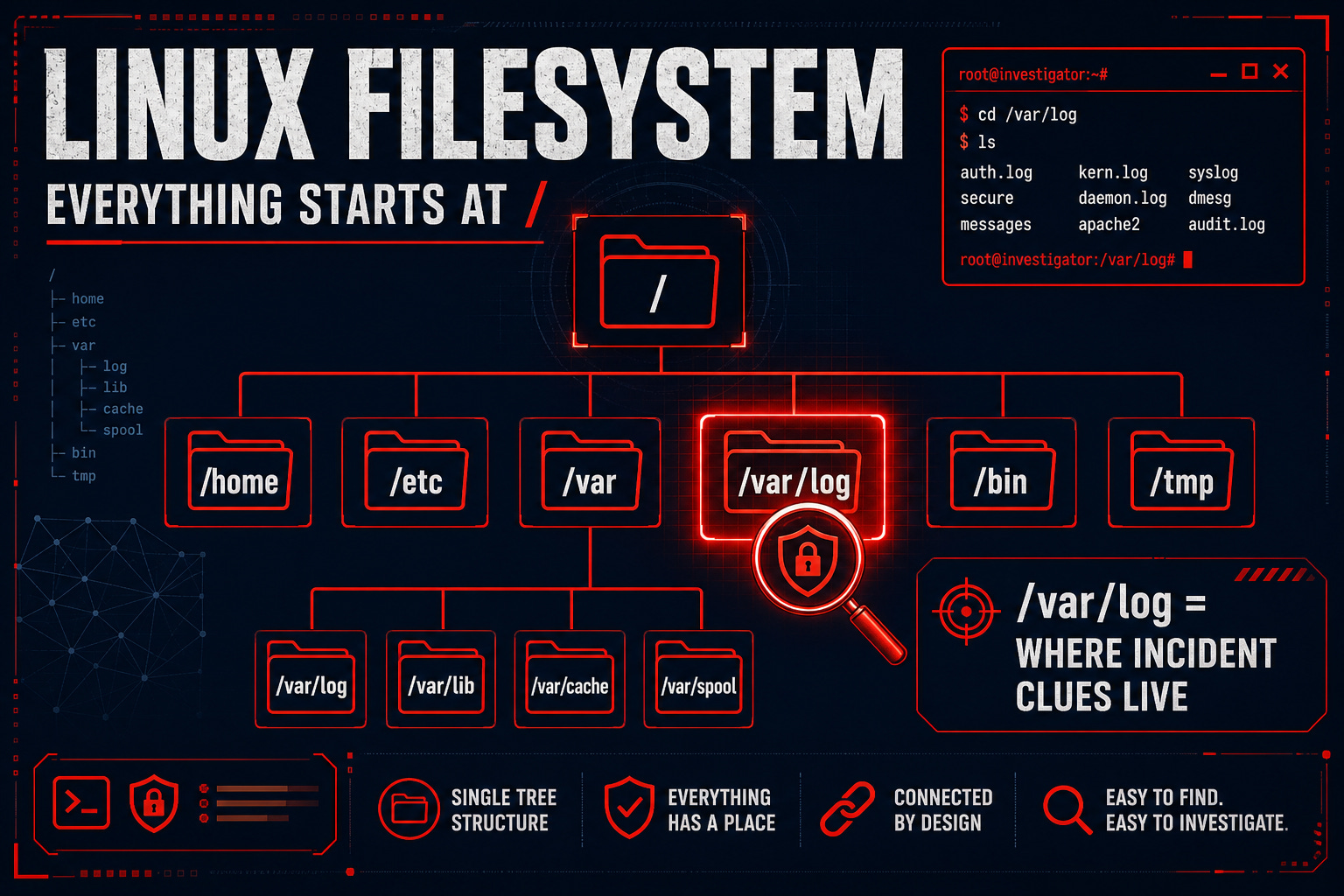
The most important directory for cybersecurity work is /var/log.
This is where system logs live. When something goes wrong or when you are investigating an incident, this is where you look first.
2. Linux Distributions
Linux is not one operating system. It is a family of operating systems built on the same foundation.
Each version is called a distribution.
The ones you will encounter most in cybersecurity:
Ubuntu - the most beginner-friendly, great for learning
Kali Linux - built specifically for security testing, comes with hundreds of security tools pre-installed
Debian - stable and widely used in servers
CentOS / Rocky Linux - common in enterprise environments
For beginners, start with Ubuntu. Once you are comfortable, explore Kali for security-specific work.
Not sure how much Linux you need for your specific path?
Comment below with your details, and I will tell you exactly what to focus on:
[Target role | Current level]
3. Permissions
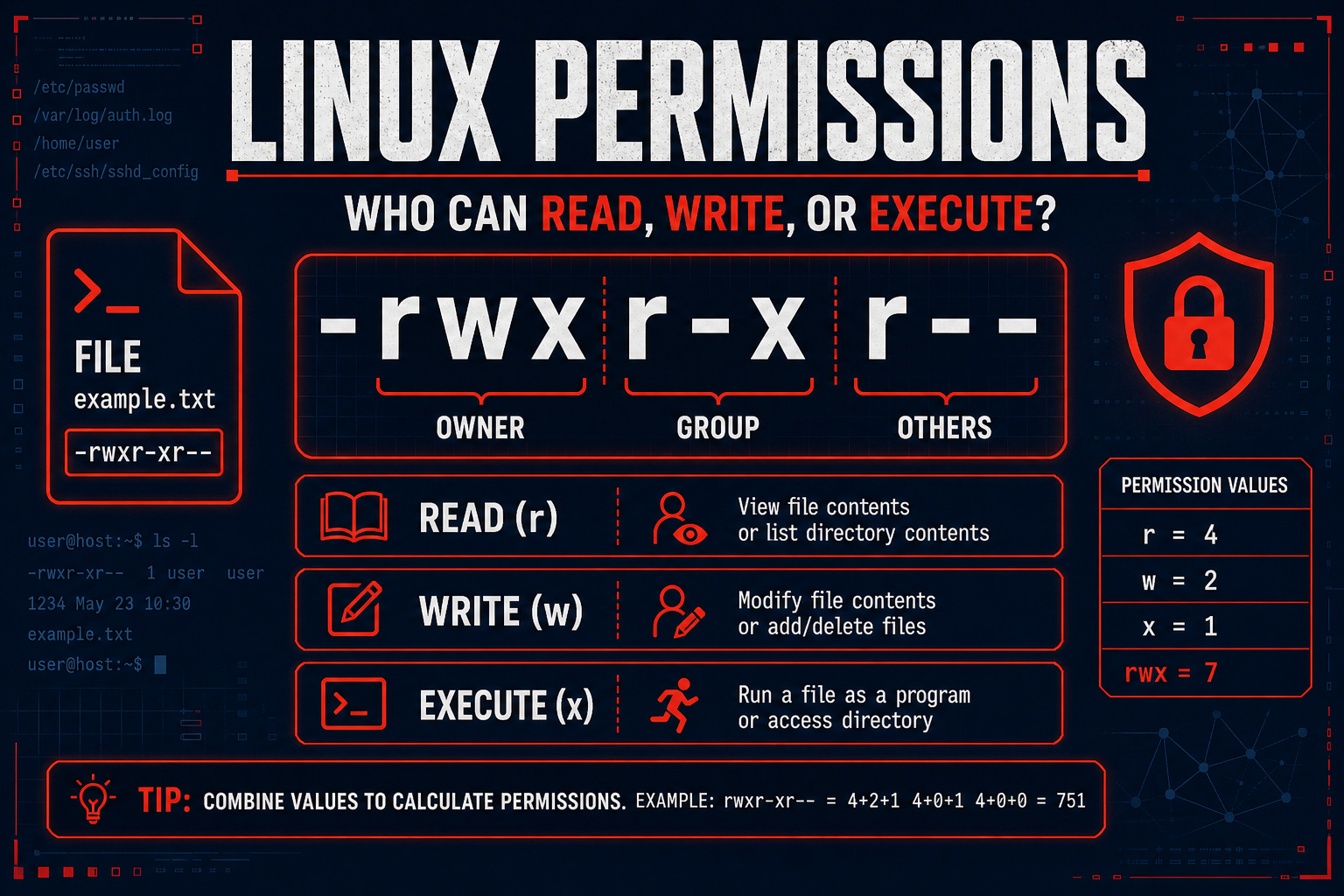
Linux controls who can do what to every file and directory.
Every file has three permission levels:
Owner - the person who created the file
Group - a defined group of users
Others - everyone else
And three types of permission:
Read (r) - can view the file
Write (w) - can modify the file
Execute (x) - can run the file as a program
When you see something like -rwxr-xr-- in a terminal, that is the permission string. It tells you exactly who can do what with that file.
4. Basic Commands
Once you understand the filesystem and permissions, commands start making sense.
I already wrote a full breakdown of the five commands you actually need for an entry-level cybersecurity role.
If you have not read it yet, start there before anything else:

How To Actually Install and Practice Linux
Reading about Linux is not enough. You need to use it.
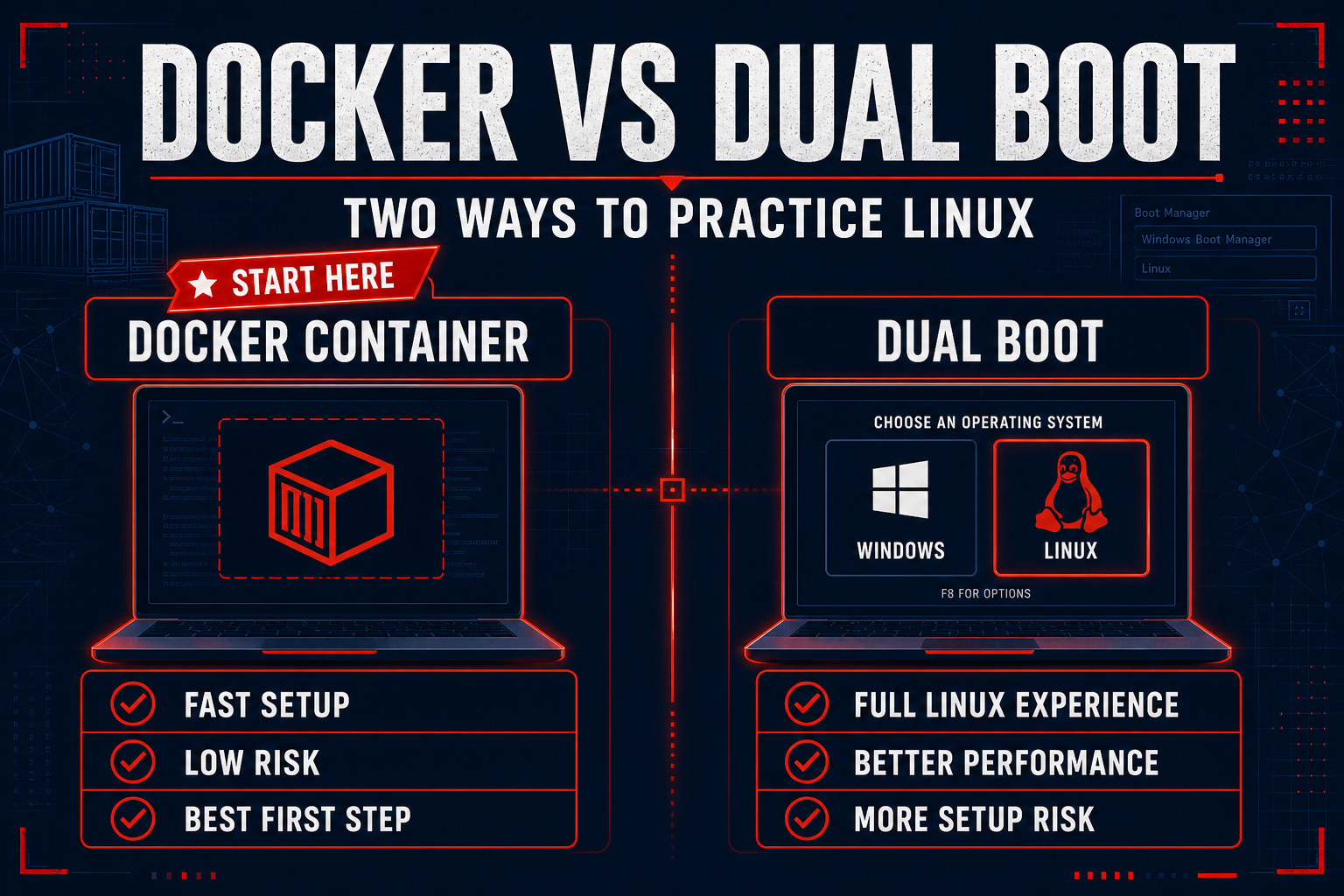
Here are the two best options for beginners:
Option 1: Docker (Recommended for complete beginners)
Docker lets you run a Linux environment inside any operating system without changing anything on your computer.
You can spin up a Linux container, practice commands, break things, and delete it when you are done. No risk to your main system.
How to start:
Install Docker Desktop on your computer (free)
Open your terminal and run: docker run -it ubuntu
You now have a full Ubuntu Linux environment to practice in
This is the fastest way to get hands-on with Linux without any setup complexity.
I prepared a complete guide for you: Run Your First Linux Environment in 60 Minutes (FREE)
Option 2: Dual Boot (Recommended when you are ready to go deeper)
Dual booting means installing Linux alongside your existing operating system.
When you start your computer, you choose which one to use.
This gives you a full, native Linux experience. Performance is better than Docker, and you get used to using Linux as your actual working environment.
The tradeoff is that setup takes more time, and there is a small risk of something going wrong during installation if you do not follow instructions carefully.
Use Docker first. Once you are comfortable with the basics, consider dual-booting for a more immersive experience.
Free Practice Platforms
Beyond your own machine, these platforms let you practice Linux in real cybersecurity scenarios:
TryHackMe - guided learning paths with Linux challenges built in. Perfect for complete beginners.
OverTheWire: Bandit - a free wargame that teaches Linux commands by making you solve puzzles. Surprisingly fun.
HackTheBox - more advanced, better suited once you have the basics down
Conclusion
Congratulations! You just made another step in your cybersecurity journey.
But Linux isn’t something you’ll learn through reading, you have to execute!
That’s why I want you to do the following steps RIGHT NOW:
Install Docker on your computer
Run a Linux Distribution
Finish the Free Lab I prepared for you: Run Your First Linux Environment in 60 Minutes
Comment on what your biggest problem was under this article - let me help you out!
Good luck!
- Erich
Where To Go Next
If this article gave you the foundation, the next step is getting practical with the actual commands:
👉 Top 5 Linux Commands for an Entry-Level Cybersecurity Role
And if you want to know which cybersecurity path makes Linux most relevant for your specific goals:
👉 How to Choose the Right Cybersecurity Role
💬 Which of the four foundational concepts was most useful to you? Comment below. I read every response!
Want a clear 90-day plan for turning your knowledge into a job offer?
👉 The 90-Day Cybersecurity Job Blueprint - €9.99
4.8 stars. 45 people have used it. 14-day money-back guarantee.
Let’s Connect
If you want to collaborate, discuss, or just geek out over networking and cybersecurity, reach out:
Email: erich.winkler@decodedsecurity.com
LinkedIn: Erich Winkler
Gumroad community: Decoded Security
Start Here: Decoded Security Roadmap
Love the content!!