

Most companies don’t find out their backup strategy was broken until the moment they need it most.
A ransomware attack hits on a Thursday night. The team triggers recovery. The backup exists. It was running for months. And then someone realizes: the backup was pointing to the same network share that got encrypted.
Three months of data. Gone.
Simply because of a bad backup strategy.
But how did that happen?
Many people think the hard part is knowing how different recovery strategies work.
But that’s actually quite simple. You can learn that in an hour.
The catch is understanding your business well enough to choose the right strategy.
The method doesn’t matter if the requirements are wrong.
In this article, I will walk you through the entire process, from the very beginning to choosing the right backup strategy that fulfills the business requirements at the least cost.
Note: Yes, cybersecurity is all about money. Deal with it :)
CC, CISSP - Domain 7, and Security+ essential topic! Continue reading if you want to pass any of them!
What you’ll learn in this article:
Why recovery metrics come before backup methods
What MTD, RTO, WRT, and RPO actually mean
How MTD, RTO, WRT, and RPO Work Together
How to use them to make the right backup decisions
BONUS: Printable A4 cheat sheet for certification exams with all the key backup and recovery metrics in one place
The Numbers That Drive Every Backup Decision
As always, people try to skip directly to choosing the backup methods. But remember, a good cybersecurity professional always balances the COST of security controls with their benefits.
So, before you choose a backup method, you need to understand metrics that describe the needs of your company and allow you to choose the right backup strategy.
Trust me, not all systems needs to be backup up every day.
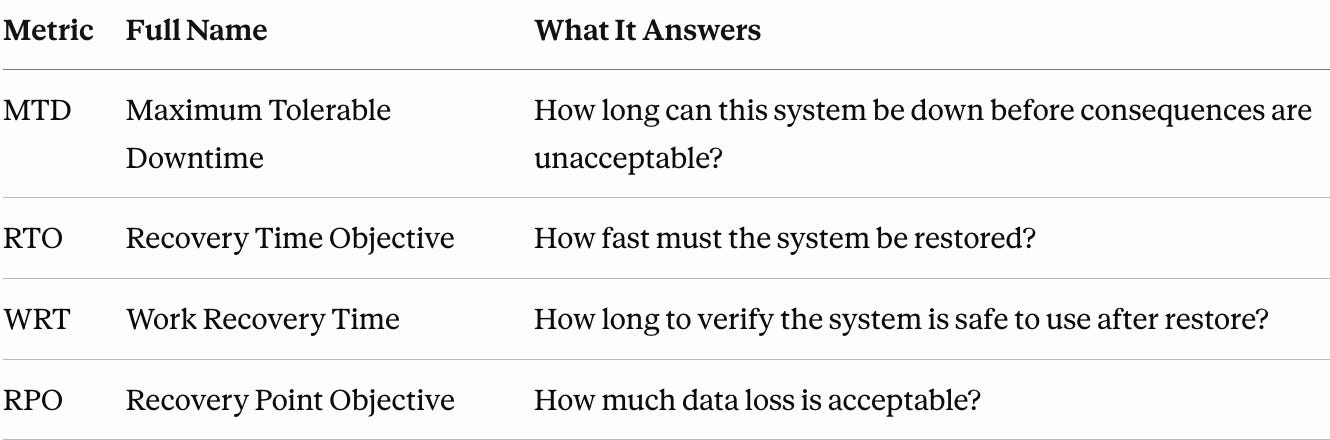
MTD: Maximum Tolerable Downtime
This is the basic deadline. The absolute maximum amount of time a system or process can be down before the consequences become unacceptable. We're talking regulatory violations, financial collapse, reputational damage that can't be undone. Everything else is measured against this number.
If you don’t meet this deadline, you’re done!
BONUS: Comment “Cheatsheet” and I’ll send you a printable A4 cheat sheet for certification exams with all the key backup and recovery metrics in one place.
RTO: Recovery Time Objective
This metric tells you how long the business can survive without the system.
In other words, the maximum time period within which a mission-critical system must be restored to a designated service level after a disruption.
This defines how fast you need to recover. Some systems are not important and can be out for a week. Some need to be up and running within minutes.
The shorter your RTO, the more expensive and complex your backup solution needs to be.
Remember: RTO < MTD. That’s non-negotiable.
WRT: Work Recovery Time
This is the part most people forget to account for.
The Work Recovery Time is the maximum amount of time available for certifying the functionality and integrity of restored systems and data before they go back into production.
You need to realize here that restoring a database is not the same as confirming the database is working correctly.
WRT is the validation window.
During this window, you check whether all records are intact, the application is functioning correctly, and users can log in.
RTO covers getting the system back. WRT covers confirming it’s safe to use.
RPO: Recovery Point Objective
How much data loss is acceptable?
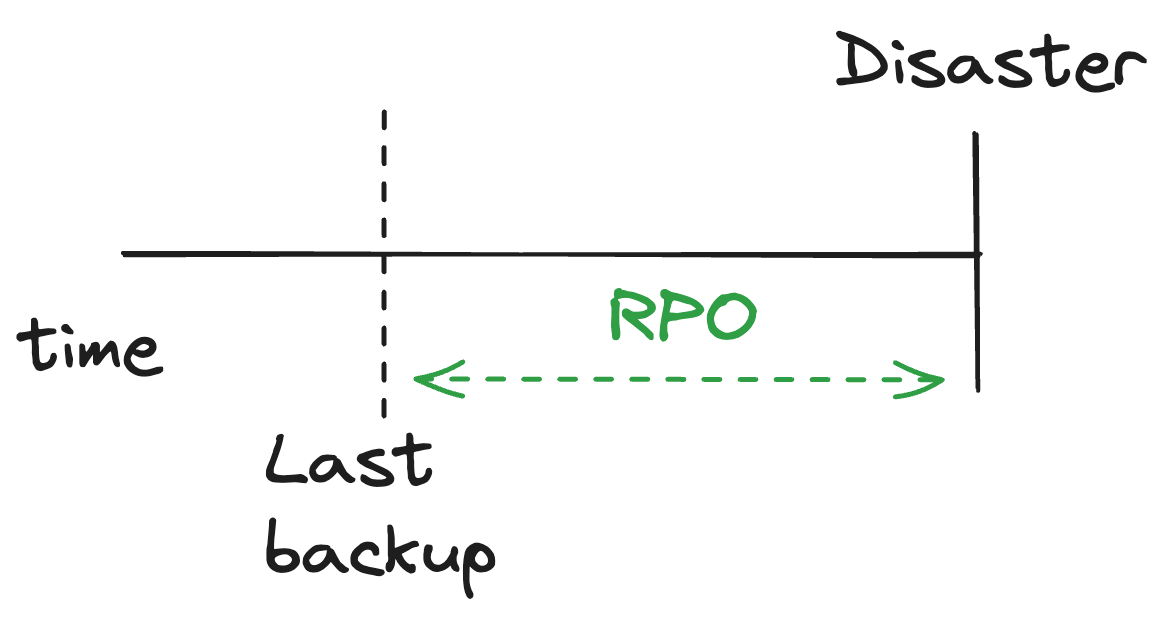
If your RPO is 4 hours, you can afford to run backups every 4 hours and lose at most 4 hours of data in a disaster.
If your RPO is zero, you need real-time replication.
These are business decisions, not technical ones.
A security professional’s job is to translate them into the right backup architecture.
If this helped you understand backup metrics, give it a like so more people preparing for Security+, CISSP, or CC can find it too.
How They Connect
I know I have covered the connection between the metrics above, but it is so important that I decided to put it in one section.
If you’re preparing for any cybersecurity exam, this section is key to answering most questions about backup strategies (especially for the CISSP)
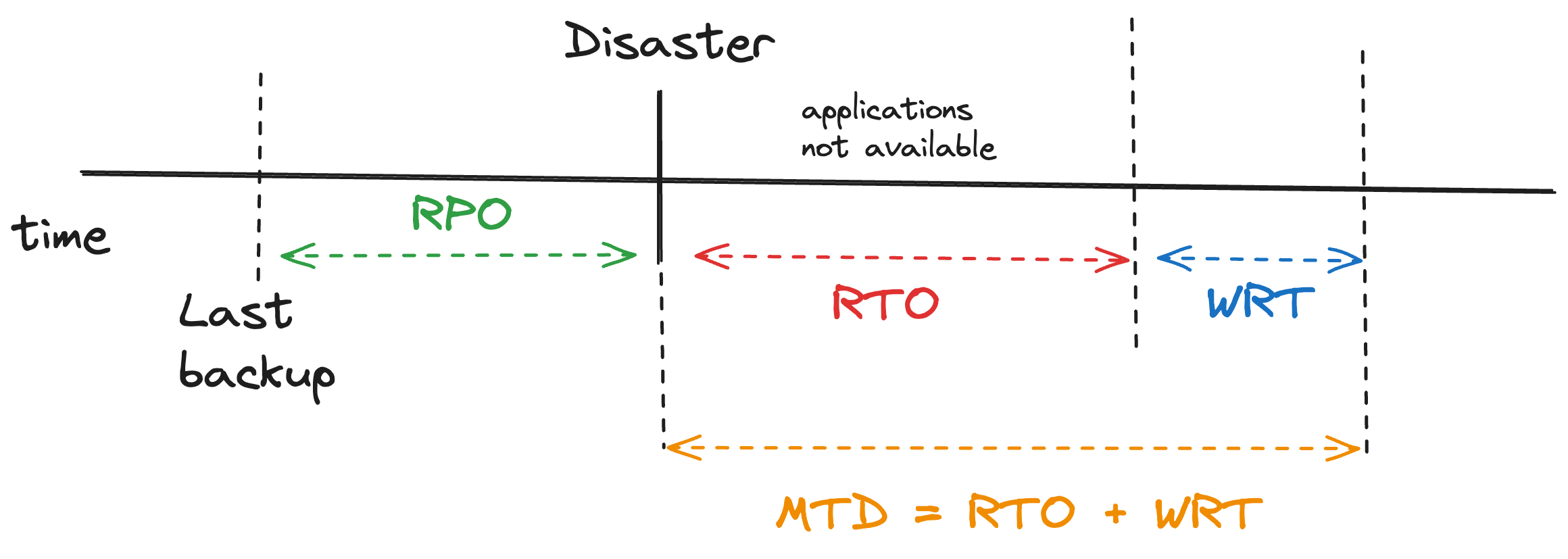
MTD sets the ceiling. Nothing can exceed it. This is a number that should come up from your BIA (Business Impact Analysis)
RTO is the time required to restore the system. RTO < MTD
WRT is the time to verify that the system is safe to use. It starts the moment all systems are back online. Remember MTD = RTO + WRT.
RPO determines how often backups run. The tighter the RPO, the more frequent the backup cycle, and the more expensive it gets.
Remember: MTD = RTO + WRT. The total time consumed by recovery and verification must never exceed your hard deadline.
If this saved you time or clarified the topic, consider giving it a like. It helps the article reach others.
How to Use These Metrics to Make the Right Backup Decision
Now you know the metrics, which means you are further than most people. Trust me, many technically oriented people tend to ignore this despite the fact that it is absolutely essential.
But now is the time to apply them.
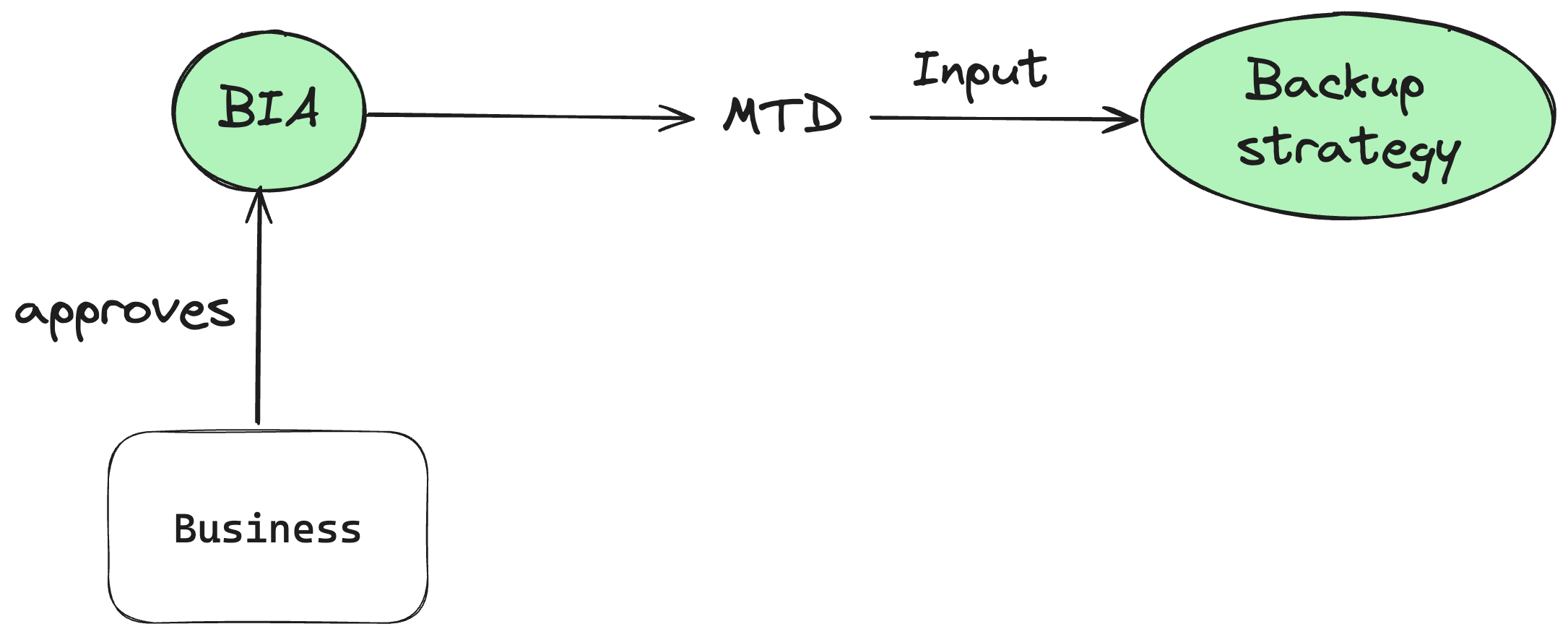
Step 1: Start with MTD
Talk to the business.
Let them determine how long this system can be down before the consequences are unacceptable.
This number comes from your Business Impact Analysis.
It's not a technical decision. It's a business one. As a cybersecurity professional, you can help them with the analysis, but they need to be the ones who approve the number.
Step 2: Set your RTO and WRT
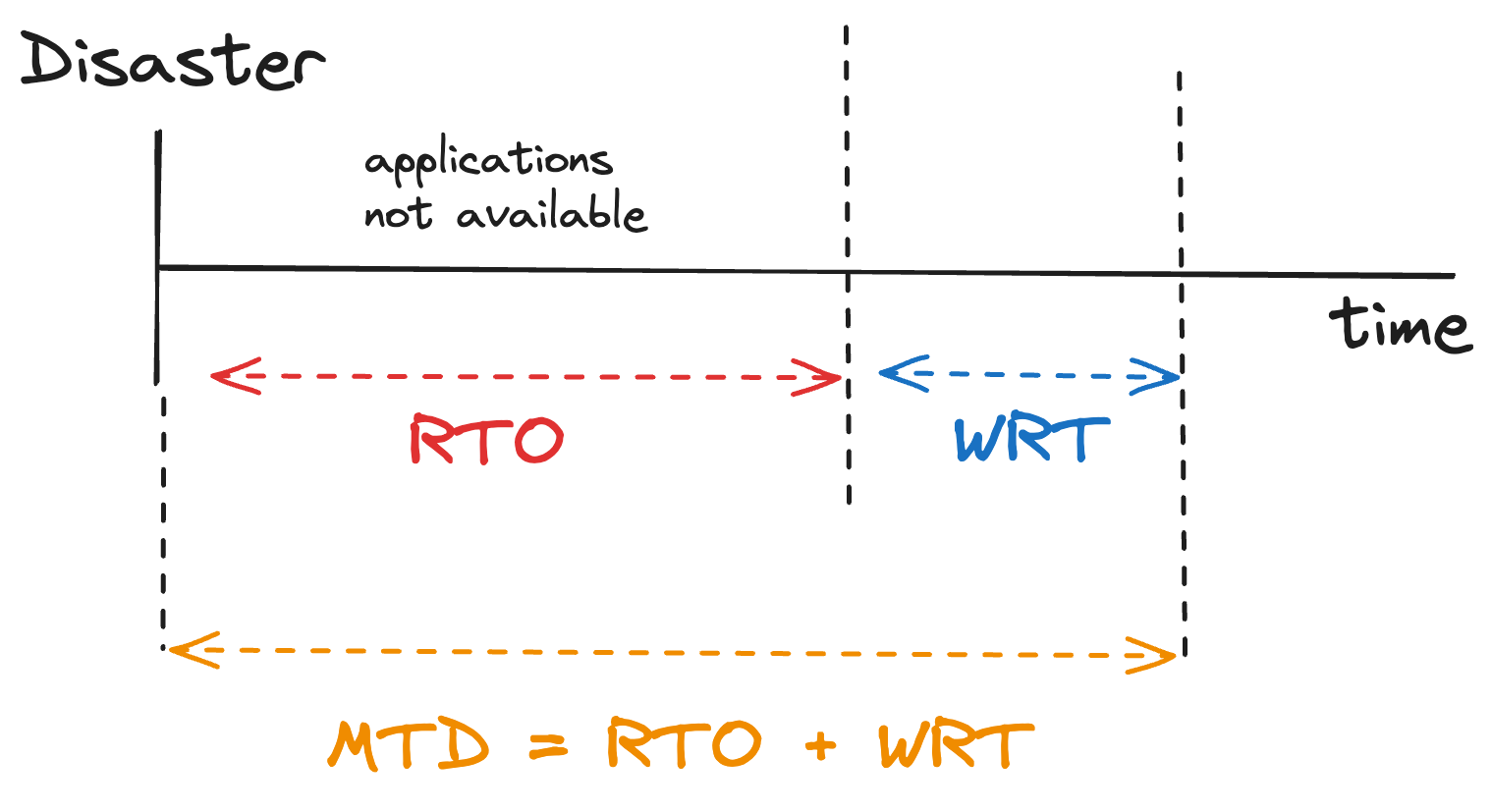
Once you have MTD, split it into two windows.
How long will the technical restore take?
That's your RTO.
How long do you need to verify everything works correctly before going live again? That's your WRT.
The two must add up to less than or equal to your MTD.
Understand what RPO actually means now? Give this article a like and help other people understand, too.
Step 3: Define your RPO.
Remember: This number comes from BIA.
Now that we know how fast we need to get our systems back and running, it’s time to determine how much data loss the business can tolerate.
One hour? One day? Zero?
This number directly determines how often you need to run backups and how much you’ll spend doing it.
Step 4: Now choose your backup method.
Only at this point does the method question make sense.
Long RPO, high MTD: a weekly full backup with daily differentials is probably enough.
Short RPO, low MTD: you need frequent backups, fast restore capability, and possibly real-time replication.
RPO of zero: no backup method gets you there. You need mirroring.
The method is the last decision, not the first.
Every organization that skips the metrics and starts with the method ends up either overspending on protecting their systems that don’t need it, or underspending on systems that can’t afford to go down.
And that’s why certification exams put so much stress on this topic.
BONUS: Comment “Cheatsheet” and I’ll send you a printable A4 cheat sheet for certification exams with all the key backup and recovery metrics in one place.
Conclusion
Most people think a backup strategy is a technical problem.
Pick the right method, configure it correctly, and you’re done.
I believe that after reading this article, you’re not like most people.
You understand now where those magical numbers come from and why they are so important for choosing the right backup strategy.
Take these four metrics and use them.
Next time someone asks about backup, don’t start with the methods.
Start with MTD. Ask what the real deadline is. Ask how much data loss the business can actually tolerate.
That’s the thinking. That’s how people will know you know what you’re talking about.
And if you want to know more about data security, here is what you should read next:
Backup strategies in details - NEXT WEEK
Frequently Asked Questions
What is the difference between RTO and RPO?
RTO measures time: how fast must the system be restored? RPO measures data: how much data loss is acceptable? RTO is about recovery speed. RPO is about backup frequency.
What does MTD mean in cybersecurity?
MTD stands for Maximum Tolerable Downtime. It’s the absolute maximum time a system can be unavailable before the consequences become unacceptable to the business. It’s the hard deadline that every recovery plan must be built around.
Is RTO always less than MTD?
Yes. Always. RTO must be less than MTD. MTD = RTO + WRT. If RTO and WRT together exceed MTD, the recovery plan has already failed before anything goes wrong.
Where do these numbers come from?
From the Business Impact Analysis (BIA). These are business decisions, not technical ones. The role of a cybersecurity professional is to help the business define them and then translate them into the right technical solution.
BONUS:
Comment “Cheatsheet” and I’ll send you a printable A4 cheat sheet for certification exams with all the key backup and recovery metrics in one place.
Let’s Connect
If you want to collaborate, discuss, or just geek out over networking and cybersecurity, reach out:
Email: erich.winkler@decodedsecurity.com
LinkedIn: Erich Winkler
Gumroad community: Decoded Security
Start Here: Decoded Security Roadmap
Enjoyed this article? Like it or drop a comment. I’d love to hear your thoughts and questions!
Let’s learn and grow together!