

Right now, your smart TV may be sharing a network with your laptop.
Not your screen. Not your files by default. But the same local space.
It can see that your laptop exists.
It can see your phone, your printer, your NAS, your tablet, your camera, and every other device that answers on your home network.
That matters because smart devices are often the least trustworthy things we connect.
They are cheap. They are rarely updated. They run software you cannot inspect.
Some stop receiving security fixes after a few years. Some never receive meaningful fixes at all.
And if one of them is vulnerable, your firewall can be working perfectly, and you can still have a problem.
Because once a device is already inside your home network, the question changes.
It is no longer only: Can an attacker get in from the internet?
It becomes: What can this device reach now that it is already inside?
That is why smart devices belong on a separate network.
In this article, I will explain:
Why smart devices are risky even when your firewall works
How a compromised device can look around your home network
Why a separate VLAN or guest network limit the damage
The Real Problem Is Trust
Most people build a home network like this:
Laptop, phone, printer, smart TV, security camera, thermostat, smart speaker, gaming console, and maybe a NAS all connected to the same Wi-Fi.
It feels normal because everything works.
Your phone can cast to the TV. Your laptop can print. Your devices can reach the internet. Nothing looks dangerous.
But from a security point of view, this is a trust problem.
Your laptop may have full-disk encryption, regular updates, a modern browser, and security controls.
Your smart TV may be running an old operating system, filled with vendor apps, talking to multiple cloud services, and receiving updates on a schedule you do not control.
Yet on a typical home network, both devices are treated as peers.
They are in the same room. They can discover each other. They can attempt to talk to each other.
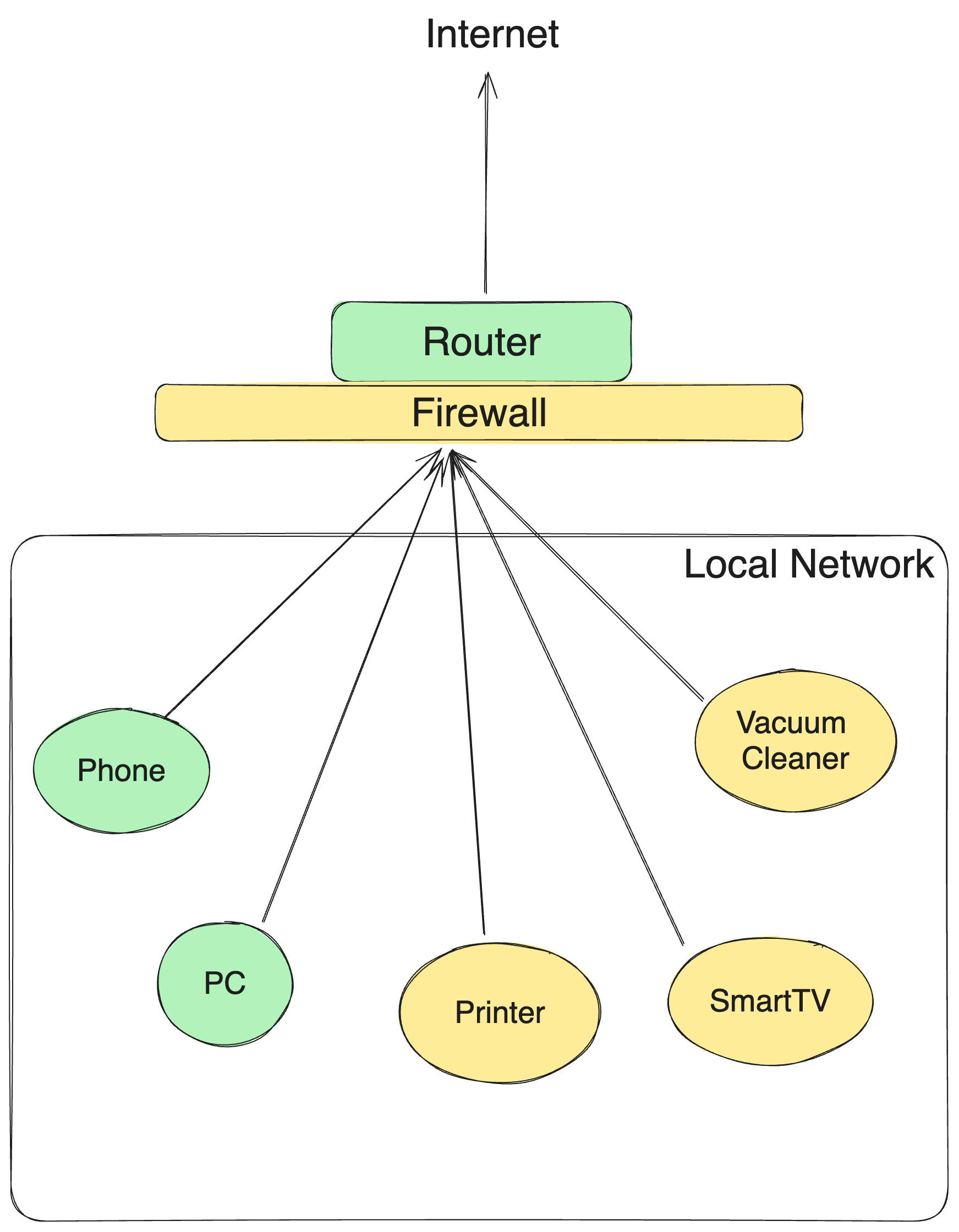
They are trusted far more than they deserve.
The danger is not that every smart device is malicious. The danger is that many of them are weak, exposed, forgotten, or poorly maintained.
Attackers love weak devices because weak devices make good footholds.
A firewall protects you from the outside. It does nothing about the threats you plug in yourself.
What Happens If a Smart Device Is Compromised
Imagine your smart TV has a vulnerability.
Maybe it is an old app. Maybe it is outdated firmware. Maybe the vendor abandoned updates. Maybe an attacker finds a bug in a service the TV exposes locally.
Once that device is compromised, the attacker does not need to break through your firewall again.
They are already operating from inside your network.
From there, the device can ask simple questions:
Who else is here?
What addresses are alive?
Which devices have open services?
This is not magic. It is normal networking.
ARP requests can reveal devices on the local network.
Ping sweeps can identify which addresses respond.
Port scans can check what services are exposed.
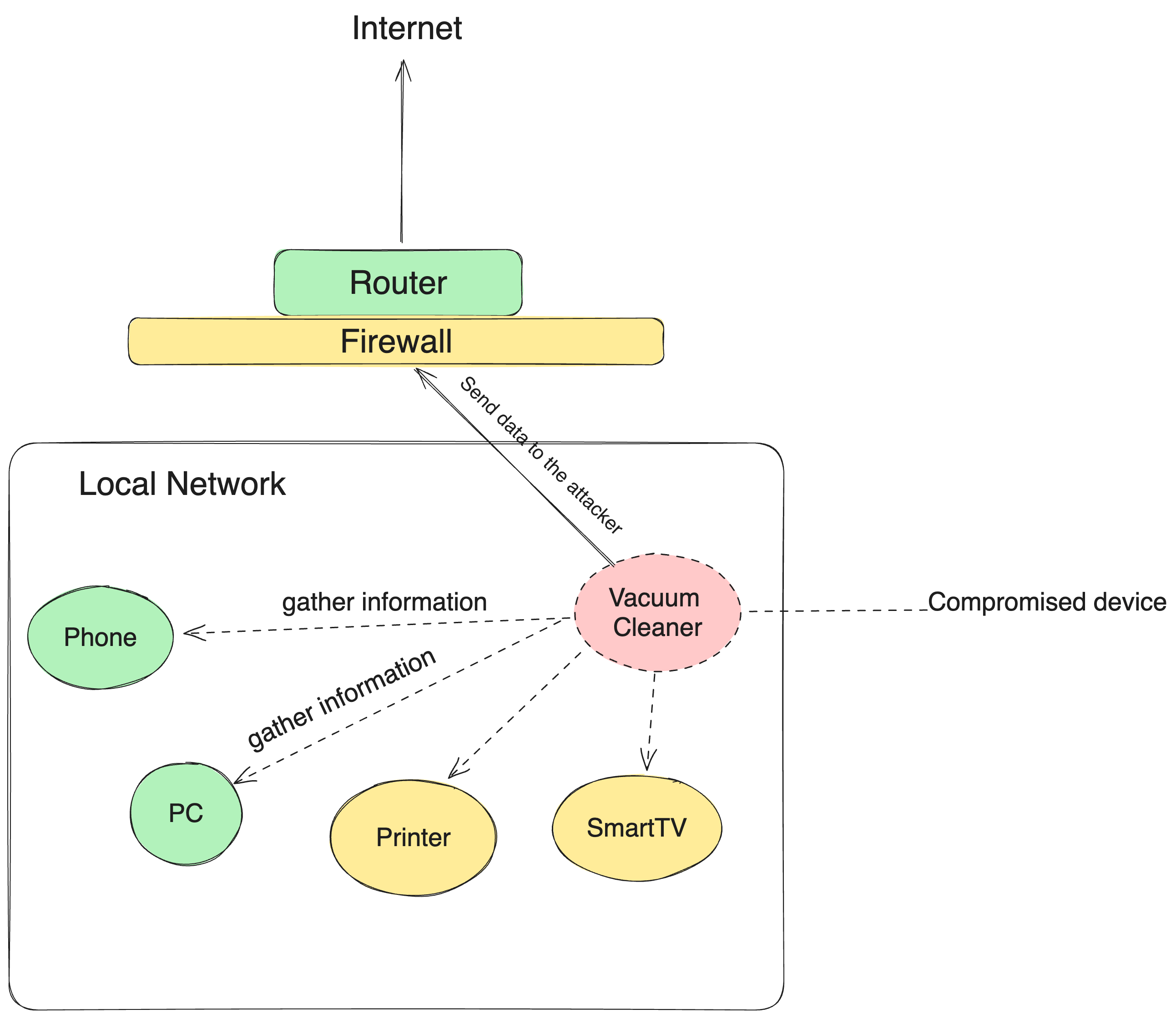
Port 445 might suggest file sharing. Port 22 might suggest remote access. A web interface might reveal a printer, router, camera, NAS, or admin panel.
None of this requires the attacker to defeat the internet-facing firewall, because the traffic is happening locally.
The compromised device is not attacking from outside your house.
It is attacking from the couch.
Do you connect untrusted device to a separate VLAN? Let me know in the comments!
And then it phones home
After a device sees what is around it, sending information out is often easy.
Most home networks allow outbound internet traffic by default. They have to.
Your devices need to stream video, check for updates, sync data, load websites, and talk to cloud services.
Much of that traffic uses HTTPS over port 443, the same encrypted channel your browser uses.
So if a compromised smart TV sends data to a remote server, the firewall may see encrypted outbound traffic to the internet and allow it.
The Fix: Put Smart Devices on Their Own VLAN
The principle is simple:
Your smart devices should be allowed to reach the internet.
They should not automatically be allowed to reach your laptop, phone, NAS, work machine, or private devices.
That is what a VLAN gives you.
A VLAN is a way to split one physical network into separate logical networks. Same home. Separate rooms.
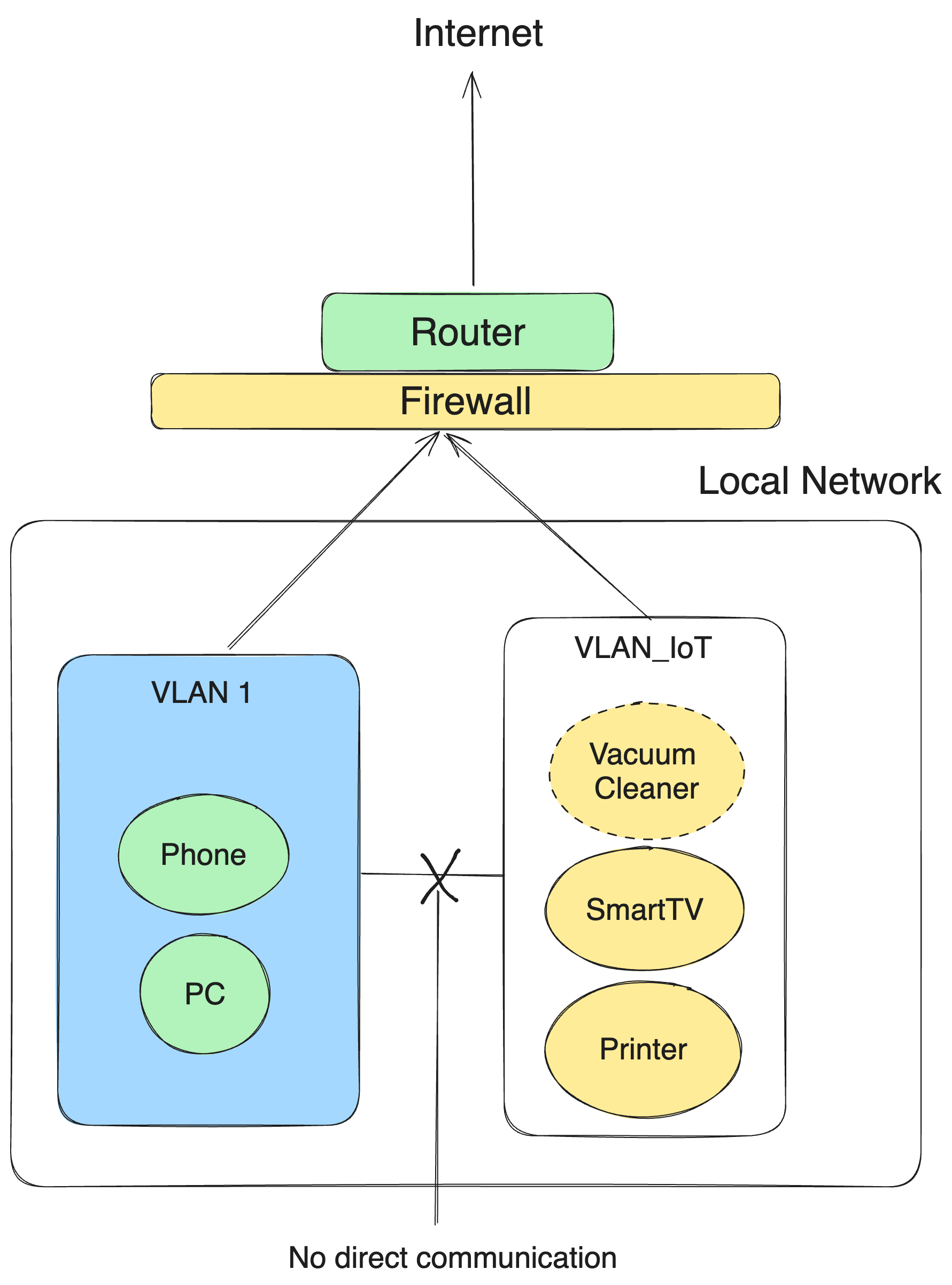
For example:
Main network: laptops, phones, work devices, NAS
IoT network: TV, cameras, speakers, smart plugs, thermostat, vacuum, doorbell
Guest network: visitors and temporary devices
When your smart TV is on the IoT network, it can still stream Netflix and download updates.
But if it tries to scan your main network, it should hit a wall.
Your laptop is no longer standing next to it. Your NAS is no longer one open door away.
That is the whole point of segmentation. You assume some devices are more likely to be vulnerable, so you limit what they can reach before anything bad happens.
Security is not only about keeping attackers out.
It is also about reducing what they can do if they get in.
If You Do Not Have VLANs, Use a Guest Network
You do not need enterprise equipment to start.
Many home routers have a guest network feature. In many cases, a guest network is a simplified form of isolation: devices on the guest network can reach the internet, but cannot freely access devices on your main network.
That is good enough for many homes.
Move these devices first:
Smart TVs
Security cameras
Smart speakers
Smart plugs
Doorbells
Robot vacuums
Thermostats
Cheap or old printers
Unknown devices you cannot confidently update
Keep your trusted network for the devices that matter most:
Laptop
Phone
Work devices
NAS
Admin devices used to manage your router
If you have a router that supports real VLANs, even better. Create a dedicated IoT VLAN and add firewall rules that allow IoT devices to reach the internet, but block them from initiating connections to your main network.
You can still create exceptions where needed.
For example, you might allow your phone to control the TV, or allow a specific printer connection from your laptop. The key is that these should be deliberate exceptions, not default trust for every device.
Do you want a step by step manual how to set-up a separate VLAN?
Let me know in the comments!
Conclusion
The goal of this article wasn’t to scare you. It was to show you that a firewall doesn’t solve everything.
And unlike the big companies, you can’t hire experts to design your network, and attackers know it.
Starting today, be careful about what you connect to your main network.
Trust me, even the simplest adjustments make the attackers move to an easier target, because there is an infinite number of them.
Do this tonight: scan your network, count your devices, and move your smart devices to a guest network or IoT VLAN.
Thank you for reading Decoded Security.
See you next time!
Let’s Connect
If you want to collaborate, discuss, or just geek out over networking and cybersecurity, reach out:
Email: erich.winkler@decodedsecurity.com
LinkedIn: Erich Winkler
Gumroad community: Decoded Security
Start Here: Decoded Security Roadmap
Enjoyed this article? Like it or drop a comment. I’d love to hear your thoughts and questions!
Let’s learn and grow together!
I might be watching it