

One of the biggest problems in cybersecurity is actually quite simple:
How do you prove someone is who they claim to be?
Because if you get this wrong, nothing else matters.
It doesn’t matter how well your whole system is set up if you can’t be sure who you are talking to.
That’s why the process of authentication is so widely tested during all cybersecurity exams, including the CC, CISSP, and Security+.
Not familiar with the methods of authentication yet? Read this First!

Today, we are going to focus on a method that is treated as the gold standard.
But just because this method is better than asking for a password, that doesn’t make it automatically secure.
And be sure that the exam will test you on that.
Let’s get to it!
Biometric authentication
Definition: Biometrics verifies an individual’s identity by analyzing a unique personal characteristic.
That sounds pretty clear, doesn’t it?
You simply take anything that you can reliably analyze and is based on unique personal characteristics and uses instead of a dumb password.
Well, there is a catch. But before I tell it to you, let’s add more definitions to make sure you know everything you need.
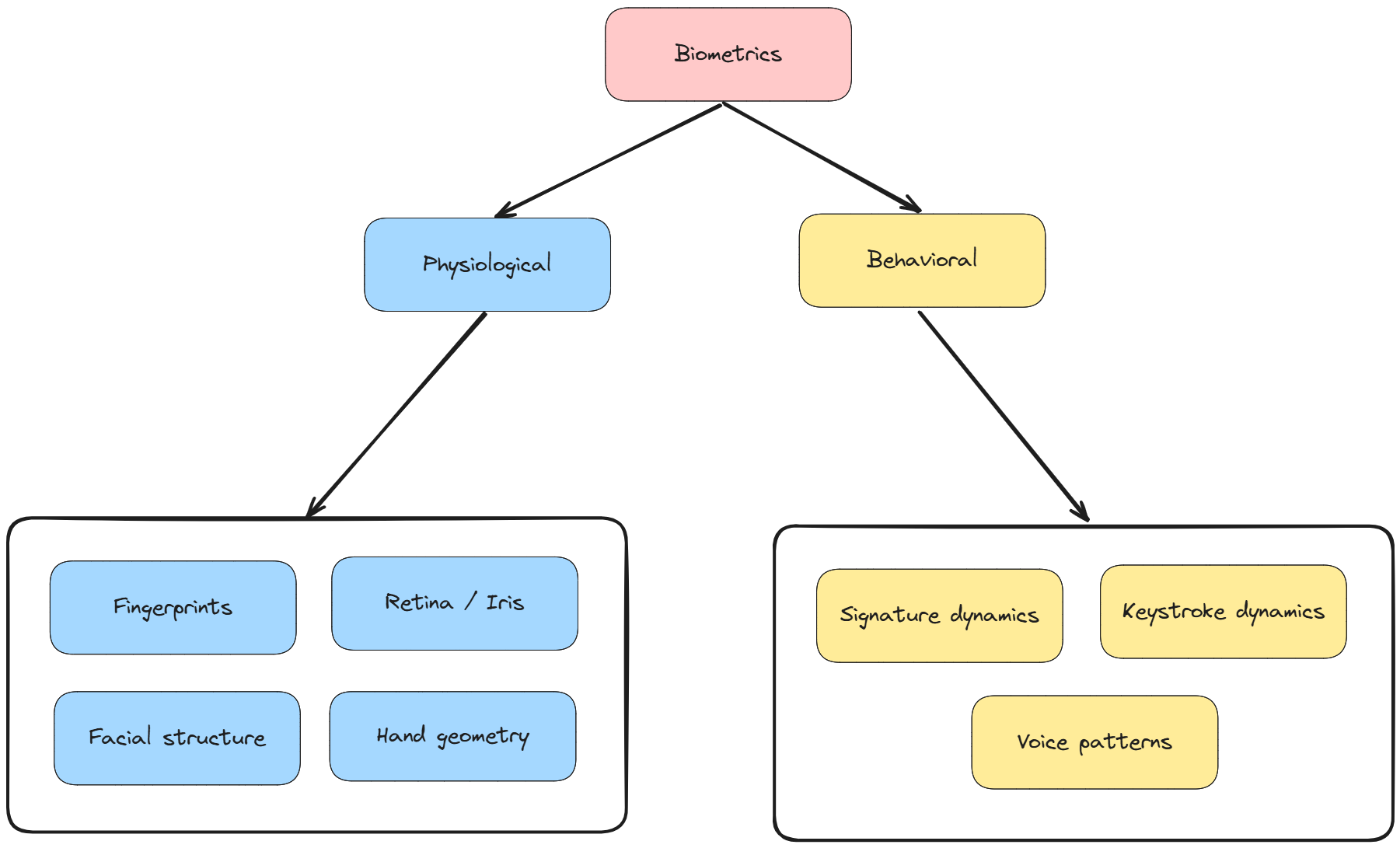
There are two types of biometric authentication:
Physiological: Uses physical attributes unique to an individual
Fingerprints
Retina / Iris (Note: Privacy issues - PHI)
Facial structure
Hand geometry
Behavioral: Uses patterns of behavior unique to an individual
Signature dynamics
Keystroke dynamics
Voice patterns
Why is this so important?
Because behavioral characteristics can change over time. We are not machines, and we don’t always do things the same way.
Make sure to keep it in mind!
“The Catch” - Errors
Exam tip: This is what you actually need to know
Remember how I mentioned “the catch”?
Here it is:
Biometric authentication doesn’t always work as expected.
With passwords, it’s simple:
100 % Match → access granted
No match → access denied
It’s 100% or nothing.
But biometrics don’t work like that.
You never get a perfect match.
Instead, the system asks:
“Is this close enough to be the same person?”
And that’s where problems start.
Because now, two things can happen:
1. False Rejection Rate (FRR)
Event: The system rejects a legitimate user.
FRR Definition: The percentage of times a biometric system incorrectly rejects a legitimate user.
Example: Your fingerprint is valid, but the system doesn’t recognize it.
2. False Acceptance Rate (FAR)
Event: An attacker is accepted as a legitimate user.
Definition:
The percentage of times a biometric system incorrectly accepts an unauthorized user.
Which one is better?
Well, that depends on the system.
If you make the system stricter:
FAR ↓ (more secure)
FRR ↑ (more users get blocked)
If you make it more lenient:
FRR ↓ (better usability)
FAR ↑ (less secure)
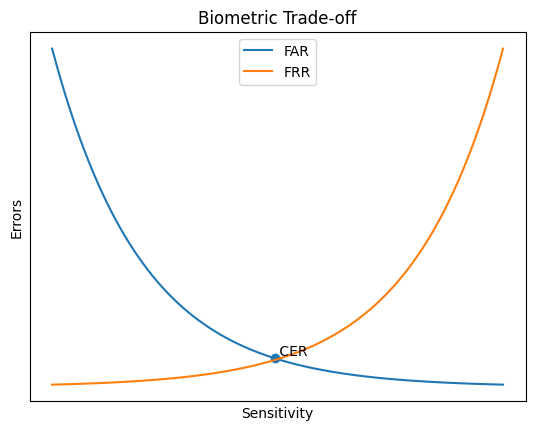
Without changing the biometric mechanism, you can only decide which mistake you prefer.
Great. Now you understand the main problem with biometric authentication and its sensitivity.
Now there is one more question to answer: How do we compare biometric systems?
Because every system has FRR and FAR.
And depending on the configuration, you can tune one… but worsen the other.
So which one matters more?
FRR or FAR? And at what setting?
This is exactly why we use the Crossover Error Rate (CER).
Are you preparing for a certification exam? Make sure to check the Decoded Security Certification Hub for more FREE Resources!
Crossover Error Rate (CER)
Definition:
The point at which the False Rejection Rate (FRR) equals the False Acceptance Rate (FAR).
In other words, it’s the point where the system makes equal mistakes on both sides.
It is a single number to compare biometric systems.
Lower CER → fewer total errors → better system
Higher CER → more errors → worse system
And that’s it! You can now compare two biometric systems!
Additional Information (Exam Notes)
Biometrics are based on probability, not certainty
Threshold setting determines system sensitivity (strict vs lenient)
Lower threshold → higher FAR, lower FRR
Higher threshold → lower FAR, higher FRR
False Acceptance Rate (FAR) is a bigger security risk than FRR
False Rejection Rate (FRR) mainly affects usability
Crossover Error Rate (CER) is used to compare systems
Lower CER = better overall accuracy
Physiological biometrics are generally more stable than behavioral ones
Some methods raise privacy concerns (e.g., retina scan → PHI)
Processing speed matters (slow systems reduce adoption)
BIOMETRIC SYSTEMS ARE EXPENSIVE!
Conclusion
Congratulations! After reading this article, you are ahead of most people.
You now understand that biometrics isn’t just about scanning fingerprints.
You understand both its benefits and its drawbacks, including the errors involved.
We also covered how to prioritize error types based on system sensitivity and how to compare biometric systems.
With all of that, you are more prepared than 95% of people claiming to be cybersecurity experts.
Thanks for reading Decoded Security!
— Erich
If you’re preparing for CISSP, CC, or Security+, make sure to check the Decoded Security Certification Hub for more free resources!
Let’s Connect
If you want to collaborate, discuss, or just geek out over networking and cybersecurity, reach out:
Email: erich.winkler@decodedsecurity.com
LinkedIn: Erich Winkler
Gumroad community: Decoded Security
Start Here: Decoded Security Roadmap
Enjoyed this article? Like it or drop a comment. I’d love to hear your thoughts and questions!