

Imagine all your data gone.
Your old pictures, your diary, your tax forms.
Everything is gone. Why?
Because you kept all your precious data on one external drive, securely stored in your top drawer.
One day, you wanted to show your friend an old photo. So, you took out the hard drive and plug in in your computer.
And..nothing happened.
It’s all gone and there is no way back.
You can probably imagine, that this is a problem for both individuals and businesses.
So, what’s the solution?
How do we protect ourselves agains hardware failure?
What CISSP Teaches about security of data
Before I answer that, let’s quickly revisit the cybersecurity principles that was broken in this scenario.
Those of you who subscribe to my newsletter for a while know that there are three core security objectives.
The famous CIA triad.
Don’t know what the CIA triad is? No worries, just click the link below!

Confidentiality - Not broken in this scenario.
Integrity - Not broken in this scenario.
Availability - GONE
Availability is about ensuring authorized users can access data and systems when they need to.
It’s one-third of the CIA triad (Confidentiality, Integrity, Availability), and it’s not optional.
So what do we fix that?
Redundancy is the key
I want you to remember that. When it comes to availability, redundancy is always the key.
On the other hand, redundancy always comes with cost.
The solution that can help us out here is called RAID - Redundant Array of Independent Disks.
If we had our data on a system that uses RAID, the chances are we would just buy a new hard drive, plug it in and continue with our lives.
So, let me tell you more about this magic thing that will make your data always available.
What RAID Actually Does (And What It Doesn’t)
Before we deep dive into technical details of the solution, let me be clear about what you can expect from this solutions. Because even technical educated people often misunderstand what RAID actually offers and then get into no win situation later.

RAID protects against:
Hard drive mechanical failure
Drive electronics dying
Physical disk damage
RAID does NOT protect against:
Ransomware (encrypts all redundant copies simultaneously)
Accidental deletion (deletes across all drives)
File corruption (corrupts across all drives)
Malicious insiders (affects all copies)
Natural disasters (destroys the entire array)
Software bugs that corrupt data
Logical errors in filesystems
For examples, if ransomware hits your RAID array, congratulations, you now have multiple perfect copies of encrypted garbage.
This is why security professionals need to understand RAID. Not because we configure storage arrays, but because we assess risk.
And “we have RAID” is not a complete answer to “how do we protect our data?”
The RAID Levels
First, let me explain what “RAID levels” actually means. Think of RAID levels as different recipes for combining multiple hard drives together. Each level uses a different approach to balance three things: speed, storage capacity, and protection against failure.
Some levels prioritize speed (RAID 0), some prioritize safety (RAID 1), and some try to balance both (RAID 5, 6, 10). The “level” is just a numbering system — RAID 0, RAID 1, RAID 5, and so on. Higher numbers don’t necessarily mean better protection; they just represent different strategies.
The key thing to understand: each RAID level makes different tradeoffs, and as a security professional, you need to know what those tradeoffs mean for availability risk.
RAID 0: Striping
What it is: Data striped across multiple drives for speed. Zero redundancy.
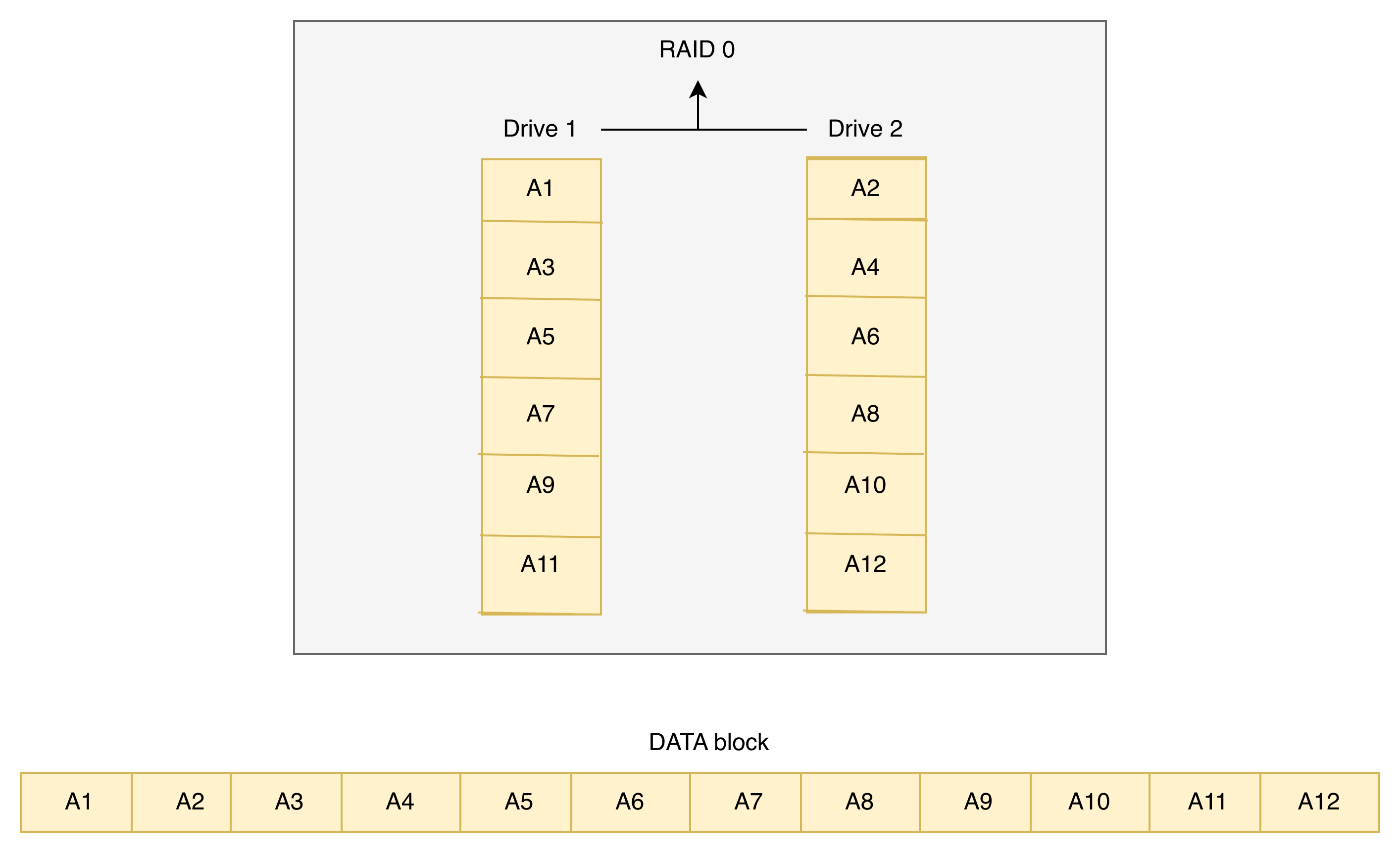
What it means for security: This is a critical single point of failure. Any drive fails, everything is gone instantly.
When you see it: Performance-critical temporary storage, caching systems.
If critical business data is on RAID 0, you’ve found a major availability risk. One drive failure = total data loss. This needs to be escalated immediately.
RAID 1: Mirroring
What it is: Everything written to one drive is simultaneously written to another. Complete duplication.
What it means for security: Simple, reliable redundancy. One drive fails, the system keeps running on the mirror.
When you see it: Critical systems where reliability matters more than cost, boot drives, database transaction logs, small business servers.
This is baseline acceptable redundancy. Easy to understand, easy to explain to non-technical leadership. “We have two copies at all times.”
RAID 5: The Industry Standard
What it is: Data and parity information striped across three or more drives. Can reconstruct data if one drive fails.
What it means for security: Good balance of storage efficiency and fault tolerance. You can lose one drive and keep running.
The catch: During the rebuild process (which can take 24+ hours for large drives), you’re vulnerable. If a second drive fails before rebuild completes, you lose everything.
When you see it: Everywhere. File servers, general storage, medium-sized business infrastructure.
Ask about rebuild times and monitoring. A RAID 5 array in degraded mode is one failure away from total loss.
RAID 6: RAID 5’s Safety Net
What it is: Like RAID 5, but with dual parity. Can survive two simultaneous drive failures.
What it means for security: Protection against the nightmare scenario, a second drive failing during rebuild. Costs you one more drive’s worth of capacity.
When you see it: Larger arrays, enterprise storage, anywhere rebuild times are measured in days not hours.
This is what “taking availability seriously” looks like for large storage systems. The extra drive cost is insurance against extended vulnerability windows.
RAID 1+0: The Enterprise Choice
What it is: Mirrored sets of striped drives. Combines RAID 1 redundancy with RAID 0 performance.
What it means for security: Can survive multiple drive failures (as long as you don’t lose both drives in a mirror pair). Fast performance, strong fault tolerance.
The cost: You need twice as many drives. To store 1TB usable data, you need 2TB physical drives.
When you see it: High-performance databases, transactional systems, enterprise applications where both speed and availability are critical.
When someone says “our database is on RAID 10,” they’re serious about availability. But still ask about backup.
FAQ
Not sure if you already understand this concept. The following questions will help you with that.
1. “What happens if a drive fails right now?”
Do we have hot spares that automatically replace failed drives?
How long does rebuild take?
What’s system performance like during rebuild?
Who gets notified when a drive fails?
2. “What happens if TWO drives fail?”
RAID 5? You lose everything.
RAID 6 or RAID 10? You probably survive, but verify.
3. “Are we monitoring drive health?”
S.M.A.R.T. monitoring can predict failures
Are alerts actually configured?
Is someone watching them?
When’s the last time a drive was proactively replaced?
4. “What protects us from non-hardware failures?”
Ransomware doesn’t care about your RAID level
Accidental deletion isn’t a hardware problem
This is where backup strategy matters
5. “When did we last test restoration from backup?”
RAID keeps you running during hardware failure
Backup gets you back after everything else
Untested backups are worthless
Are you preparing for a CC or CISSP certification exam? Check out free materials I have created for you!
Free Cybersecurity Tools & Resources
Explore practical cybersecurity tools, checklists, and guides, all designed to help you learn, protect, and apply real-world security principles.
Conclusion
If you’re reading this, congratulations!
If you’ve made it this far, you now understand something most people, and even many businesses, get dangerously wrong: hardware redundancy is not the same as data protection.
RAID keeps systems running.
Backups bring systems back.
And without both, availability is just an illusion.
Your data is often the most valuable thing you own, personally and professionally.
You can replace a laptop.
You can replace a server.
But you can’t replace your memories, your work, or your business if you lose them.
If this article helped you understand availability and RAID, let me know in the comments. I read every one!
Preparing for the CC or CISSP certification exam?
Not sure what exactly do you need to learn for the exam?
I have a solution for you → FREE materials
Great article on RAID Erich.
You mentioned:
Quote “
➡️ Ransomware doesn’t care about your RAID level"
➡️ Accidental deletion isn’t a hardware problem
➡️ This is where backup strategy matters” Unquote
Are you going to do a follow up article on backups, including:
👉 Why backups should be immutable
👉 Full / incremental or full / differential snapshots, the pros and cons
👉 Why cloud data needs backing up too