

Right now, while you’re reading this, someone is crafting a message with your name on it. They know where you work. They know what you bought online last week. And they’re betting you’ll be too distracted by holiday chaos to notice when they strike.
Last December, a cybersecurity professional, someone who literally teaches people about phishing, clicked a fake shipping notification.
Why?
Because she was expecting 12 packages, her kids were screaming, and the email arrived at 11 PM. Even experts fall for this.
Every year, the holidays bring a surge in online shopping, rushed decisions, and distracted people. And attackers know it.

This is the time when scammers are more active than at any other point in the year, using every psychological trick they have to separate you from your money.
Not because you’re careless.
Not because you’re “not technical.”
But because the human brain works in predictable ways, ways attackers are trained to exploit.
3 things you can do to effectively protect your accounts.
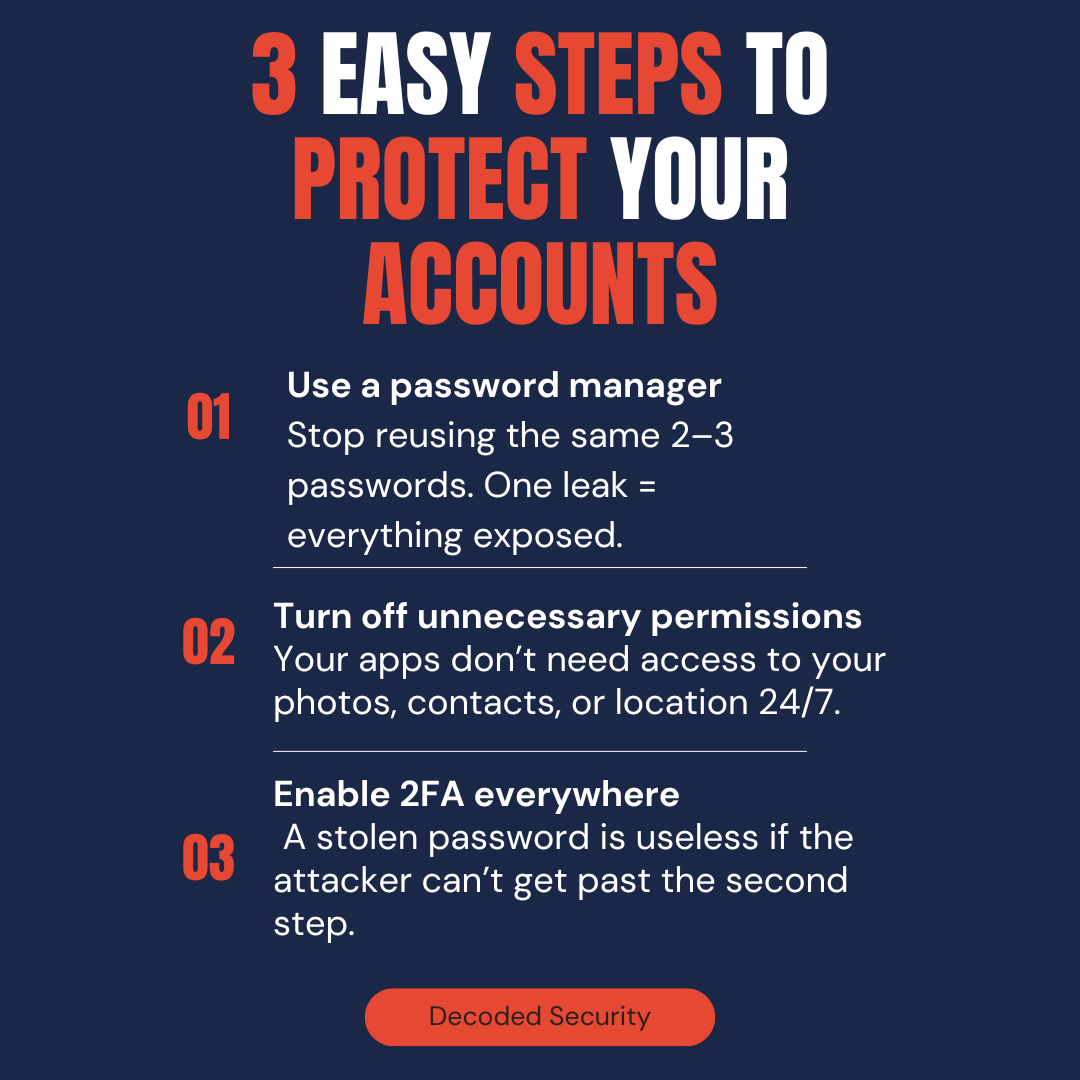
This post isn’t just another CISSP Domain 1 topic.
It’s a practical guide to protecting your privacy, money, and identity from the most common social engineering attacks currently happening.
The 7 Psychological Tricks That Empty Bank Accounts
Before we dive in, let’s make this personal.
As you read each principle below, ask yourself three questions:
👉 “Has this ever worked on me?”
👉 “Would I have fallen for this in a rushed moment?”
👉 “Who in my life would fall for this right now?”
If you’re honest, at least one of these will hit uncomfortably close. But recognizing these patterns is how you stop them from working.
Are you interested in how phishing works? Let me show you in 5 simple steps..

1. Familiarity
A friendly tone. A casual reference to something you mentioned online. Someone who “remembers” your last conversation.
Attackers study how real people in your life communicate, then mirror it perfectly. They’ll use your company’s email style, your bank’s formatting, even the emoji your boss uses in Slack messages.
What the attacker writes:
“Hey! Long time no chat 😊 Quick question about that vendor invoice you mentioned last week, can you verify this payment went through? Just want to make sure we’re all set before EOY. Thanks!”
Why it works: Your brain recognizes the pattern of a colleague’s message. You’re already mentally responding before you’ve verified who sent it.
Ask yourself: Would a friendly, casual message feel more trustworthy than a formal one?
2. Trust: The “I’m Here to Help” Con
This is the most dangerous one.
Attackers don’t start by asking for something. They start by solving a problem you didn’t know you had.
They’ll “notice” suspicious activity on your account. They’ll “help” you verify a delivery. They’ll walk you through a “security update” step by step, building trust with every instruction you follow.
What the attacker writes:
“We detected unauthorized access to your account from an IP in Romania. We’ve temporarily locked your account for your protection. To restore access, please verify your identity here: [link]”
Why it works: They created the crisis and the solution simultaneously. You feel grateful someone caught this “in time.”
Be honest: Would you trust someone who appears to be protecting you from a threat?
3. Authority: The “Don’t Question Me” Effect
Have you ever acted quickly because someone sounded official?
Confidence shuts down skepticism. A formal tone, official-looking logos, and technical language all trigger our instinct to defer to authority figures.
What the attacker writes:
“FINAL NOTICE: IRS Case #94728-B. Your 2023 tax return has been flagged for audit. Failure to respond within 24 hours will result in legal action. Call: 1-800-[spoofed number]”
Why it works: The IRS terrifies people. Official case numbers look legitimate. The threat of legal action makes your hands shake while you dial.
Real talk: Would you question someone who sounds like they’re in charge—especially if they’re threatening consequences?
4. Consensus: The “Everyone Else Already Did It” Nudge
Humans follow the crowd. That’s not a weakness, it’s a survival instinct.
When attackers tell you “other customers have confirmed this” or “your entire team has already updated their credentials,” you don’t want to be the difficult one. You don’t want to be left out.
What the attacker writes:
“Microsoft 365 Security Update: 94% of your organization has completed the mandatory password verification. You are one of 3 remaining users. Complete now to maintain access: [link]”
Why it works: You imagine your coworkers already did this. You don’t want to be the holdout who didn’t follow protocol.
Honest question: Would you go along with something if you believed everyone else already did?
5. Urgency: The “Your Brain Stops Thinking” Trigger
When you’re rushed, your brain switches from thinking → reacting.
Urgency is the attacker’s best friend. It bypasses logic, skips verification, and makes you click before you analyze.
What the attacker writes:
“URGENT: Your package delivery failed. Redelivery scheduled for TODAY ONLY. Confirm your address in the next 90 minutes or your package will be returned to sender: [link]”
Why it works: That gift you ordered for your kid? If it gets returned, you’ll miss Christmas. Panic overrides caution.
Notice your instinct right now: Do urgent messages make you want to act immediately?
6. Scarcity: The “You’ll Miss Out” Fear
Limited-time offer. Only two left. Last chance.
You’ve seen this in marketing forever. Attackers use the exact same playbook.
When time or availability feels limited, the fear of missing out overrides rational decision-making.
What the attacker writes:
“Your Amazon Prime membership is expiring in 2 hours. Renew now to keep your benefits and current pricing. This offer expires at midnight: [link]”
Why it works: You paid for Prime. You use it constantly. The idea of losing access tonight makes you click without checking if this email is real.
Reflection: Have you ever rushed a decision because you thought you’d miss out?
7. Intimidation: The “Fear Makes You Freeze” Weapon
Threat of account closure. Suspended access. Legal consequences. Frozen funds.
Attackers love fear because fear forces action. When you’re scared, you stop analyzing and start complying.
What the attacker writes:
“ACCOUNT SUSPENDED. We detected fraudulent activity on your Bank of America card ending in 4829. Your account has been frozen to prevent further unauthorized charges. Call immediately to resolve: 1-800-[spoofed number]”
Why it works: That’s your real card number (scraped from a data breach). The threat feels real. You grab your phone before you even finish reading.
Question for you: If a message threatens consequences, do you pause and verify… or panic and react?
QUICK REALITY CHECK
Before you continue, answer honestly:
□ Have you ever clicked a link in an email without carefully checking the sender first?
□ Would you question someone claiming to be from IT support or your bank?
□ Have you ever acted on an “urgent” message without verifying it through another channel?
If you checked even one box, you’re human. These tactics work on everyone, including security professionals.
The difference between getting scammed and staying safe isn’t intelligence.
It’s awareness.
The Scams Already in Your Inbox
These aren’t abstract “IT problems.” These are personal security threats targeting you, your parents, your colleagues, and your kids right now.
Phishing: The Mass Spray-and-Pray
Fake emails pretending to be:
Your bank (”unusual activity detected”)
Your cloud storage (”your files will be deleted”)
Your package delivery (”delivery failed, confirm address”)
Your employer (”update your direct deposit information”)
One wrong click = account takeover → identity theft → financial loss.
These work because they arrive when you’re expecting them.
During the holidays, everyone has packages coming.
Everyone’s getting bank alerts from increased spending. The camouflage is perfect.
Spear Phishing: The Personal Attack
This isn’t a generic blast. This is someone who researched you.
They know:
Your name and job title (LinkedIn)
Your boss’s name (company website)
Your company’s vendor relationships (public records)
Your recent projects (social media)
What it looks like:
“Hi Sarah,
Quick question about the Q4 invoice from Acme Solutions—the $8,400 charge. Can you verify the wire transfer went through? Mike mentioned you handled this one.
Thanks,
Jennifer in Accounting”
The attack: Jennifer doesn’t exist. But Sarah knows they work with Acme Solutions. Mike is her real boss. The amount sounds plausible. She forwards it to finance without questioning.
Result: $8,400 gone. Unrecoverable.
Whaling: Going After the Big Fish (And Their Assistants)
CEOs. CFOs. Anyone who can authorize large payments.
But attackers don’t always target the executive directly—they target whoever has access to the executive’s email, calendar, and approval authority. Executive assistants are prime targets because they process requests all day.
Real scenario:
An attacker impersonates the CEO via email to the CFO:
“I’m in back-to-back meetings with the acquisition team. We need to wire $47,000 to our legal counsel by EOD for the NDA filing. Can you handle this urgently? I’ll send details via text.”
The CFO sees an email from the CEO’s address (spoofed), gets a text from an unknown number (claiming the CEO’s phone “died”), and wires the money.
Gone in 20 minutes.
Smishing: The Text Message Trap
SMS feels more personal than email. Your brain treats texts differently—they feel like they’re from people you know.
What you receive:
“USPS: Your package is delayed due to incomplete address information. Update here: [shortened URL]”
One tap = malware installed or credentials stolen via a fake login page.
The genius move? Shortened URLs. You can’t see where that link actually goes until you’ve already clicked.
Vishing: The Voice on the Phone
Phone scams are back in a big way because people assume “if they called me, it must be real.”
Attackers sound calm, professional, empathetic. They walk you through solving a fake problem step by step, narrating every action:
“I’m showing suspicious charges on your account. Let me help you secure this. First, I’m going to send you a verification code—don’t share it with anyone except me. What’s the code you just received?”
What just happened: They triggered your bank’s 2FA reset. That code gives them full access to your account. You handed it over because they sounded helpful.
Invoice Scams: The “Looks Legitimate” Billing Fraud
Fake invoices from real-looking vendors. Often sent to accounts payable departments, but increasingly targeting individuals for small businesses or freelance work.
What it looks like:
Professional PDF invoice
Reasonable amount ($800-$3,000)
Familiar company name (slight misspelling)
“Net 15” payment terms creating urgency
Result: Finance pays it without verification. Thousands gone.
Have you fallen for one of these tactics before? Share your story, it might save someone else from the same mistake.
Your New Defense Checklist: What You Can Do Today
Don’t just read this and move on. Here are five things you can implement right now to protect yourself:
1. Enable 2FA on Every Account That Matters
Banking, email, social media, shopping accounts—everything. Use an authenticator app, not SMS, when possible.
2. Create a Personal Verification Rule
Any urgent financial request gets verified through a separate channel. Email says wire $10K? Call the person directly using a number you already have saved. Never use contact info from a suspicious message.
3. Hover Before You Click
On desktop: hover your mouse over any link to see the actual URL.
On mobile: long-press the link to preview the destination.
Does the URL match the claimed sender? If not, don’t click.
4. Set Up a Family Code Word
Create a secret word only your immediate family knows. If anyone calls claiming your family member is in an emergency and needs money, ask for the code word. Scammers can fake voices with AI now, this simple trick stops them cold.
5. Screenshot and Share
Take a screenshot of this checklist and send it to one person who needs it. Your parents. Your non-technical friend. Someone who would fall for the “urgent verification” message.
Forward This to Someone Who Needs It
The #1 sign of a scam: Someone creates urgency around a problem you didn’t know existed.
Real companies don’t threaten.
Real companies don’t demand immediate action.
Real companies don’t create panic.
Scammers always do.
Conclusion
If you’re reading this, congratulations! I appreciate that you take the social engineering threat seriously. If you found this article useful, please let me know in the comments!
Here’s what matters now: Take five minutes today to enable 2FA on your critical accounts and share this article with one person who needs it. That’s it. Five minutes that could save thousands.
I hope that after reading this post, it will help you recognize those attacks and avoid trouble. And for those of you who are preparing for the CISSP certification exam, make sure you remember all of those attacks because the exam will test you on them!
A brilliant article showing exactly the type of wording the scammers use to get us clicking on their Phishing links without thinking it through objectively.
Thank you for your generously shared details to help us with scams and their ilk.
Some months ago my inbox had thousands of emails. Now it is reduced to the few from last night and today. Usually I check them frequently, using your method of hovering over the sender's address. Usually they are immediately deleted, even if they keep trying to catch another fish!