

TL;DR: Most people run AI coding agents like Claude Code in YOLO mode: full access to their machine, no questions asked. It is fast, and it is a real security risk. A poisoned package or a single misread instruction becomes a live command on your system. The good news: You do not have to choose between speed and safety. Run the agent in an isolated, disposable box, with throwaway credentials and limited network, keep a mode that asks for everyday work, and save YOLO mode for the sandbox. Below I break down every Claude Code mode and the exact rules to run any agent securely.
Hello everyone, it’s me, Erich, and today I want to talk about something that, from my perspective, is being widely ignored.
It all started a couple of days back, when I posted this note. It turned out that many of you would like me to track my hands-on experience with AI agents.
So I didn’t hesitate, and for once, I stepped back from those shiny, nice CISSP concepts and started creating an actual multi-agent environment.
And while I was setting up my first agents, it got me thinking.
I know so many people who leave their agents for hours.
And that means one crucial detail. All of those people allow their AI agents to freely execute terminal commands on their machines.
Once again, convenience won over security, and we let AI agents operate in YOLO mode.
But how do you know the command is safe?
How do you know the library or a package it downloads isn’t malicious or contains a crucial vulnerability? How do you know the agent won’t delete your documents?
There are so many questions that could go wrong if you let an external entity use your terminal.
Before we start: If you believe more of us should be using AI agents securely, give this article a like. It helps it reach the people still running their agents wide open.
Today, I will walk you through the following topics:
Explain what agent modes actually control
Walk through Claude Code’s modes from safest to most dangerous
Show you what YOLO mode really does, and when it is acceptable
Show you how to run AI agents securely even in YOLO mode
What agent modes actually control
Before we deep dive into specific modes, let's stop for a moment and talk about what agent modes actually control.
The concept can differ based on the model you use; however, every model answers one question: how much can the agent do without stopping to ask you?
Picture the following situation..
The agent is working through a task. Along the way it wants to:
Read your files (harmless)
Edit your code
Run
npm install some-package(downloads and runs code from the internet)Run
rm -rf ./old-build(deletes files)Run
git push(sends your code to a remote server)
Every one of those steps is a decision. Does the agent just do it, or does it stop and ask for your permission?
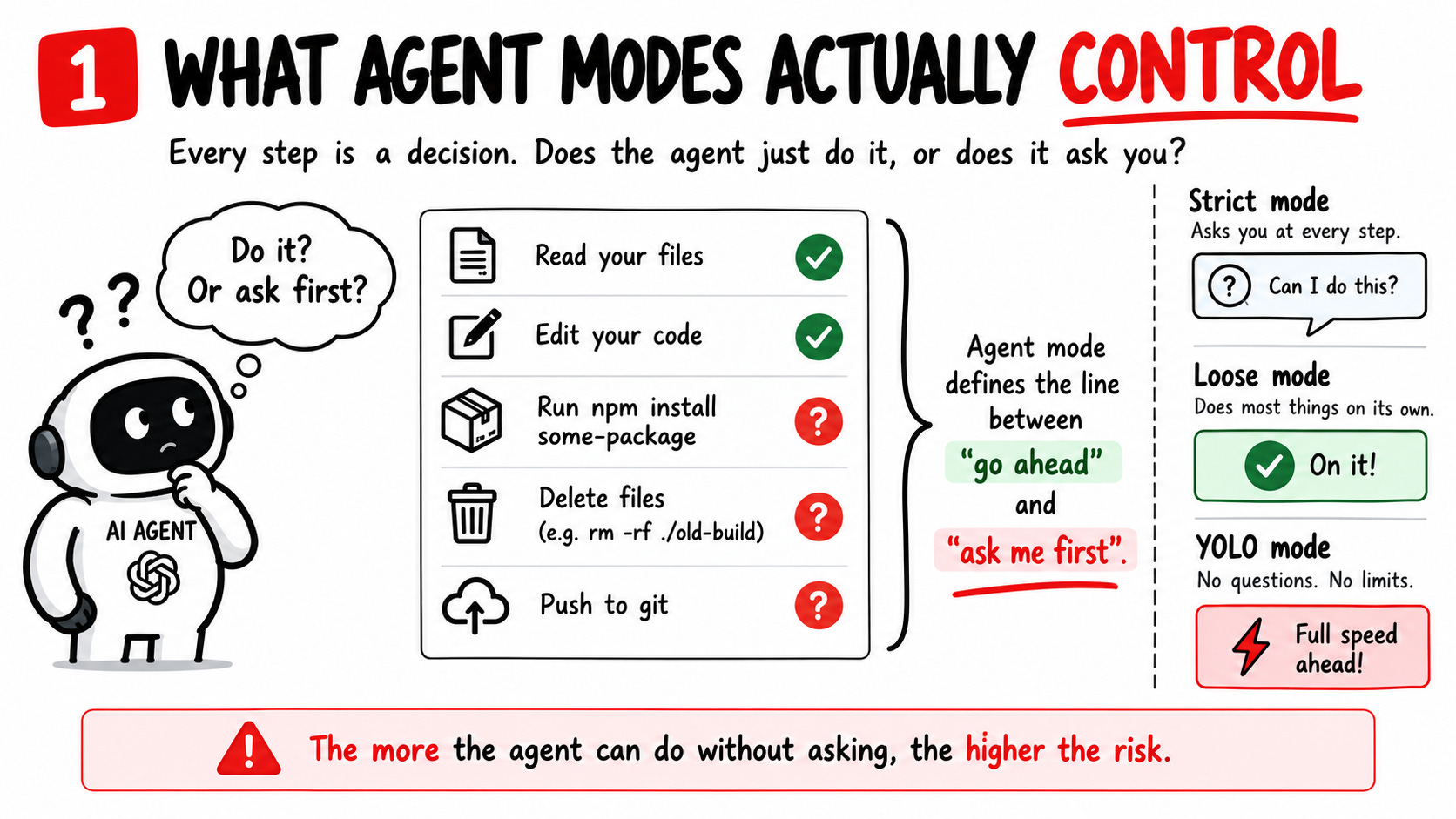
That’s all an AI agent mode is. It defines the line between “go ahead” and “ask me first”.
A strict mode would stop it basically every step of the way. A loose mode lets it read, edit, install, delete, and push without a single prompt. YOLO mode removes the line completely.
But that's enough theory. Let's see how one of the most popular AI coding agents, Claude Code, actually handles this.
Quick gut check before we continue: what mode are your agents running in right now?
Claude Code's modes
This is the modes Claude Code implements from safest to YOLO:
Manual: Reads files on its own, but asks before every edit, command, or network call. Least privilege. Best for sensitive work.
Plan: Write a full plan and change nothing until you approve it.
Accept edits: Edits files in your working folder without asking. Anything outside it still prompts you.
Auto: Runs most things on its own, but a second model checks each action first and blocks the dangerous ones (piping scripts off the internet into your shell, pushing secrets, force pushes, mass deletions). Now the default is on paid plans.
Bypass permissions, aka YOLO mode: Everything is off. You opt in on purpose with the
--dangerously-skip-permissionsflag.
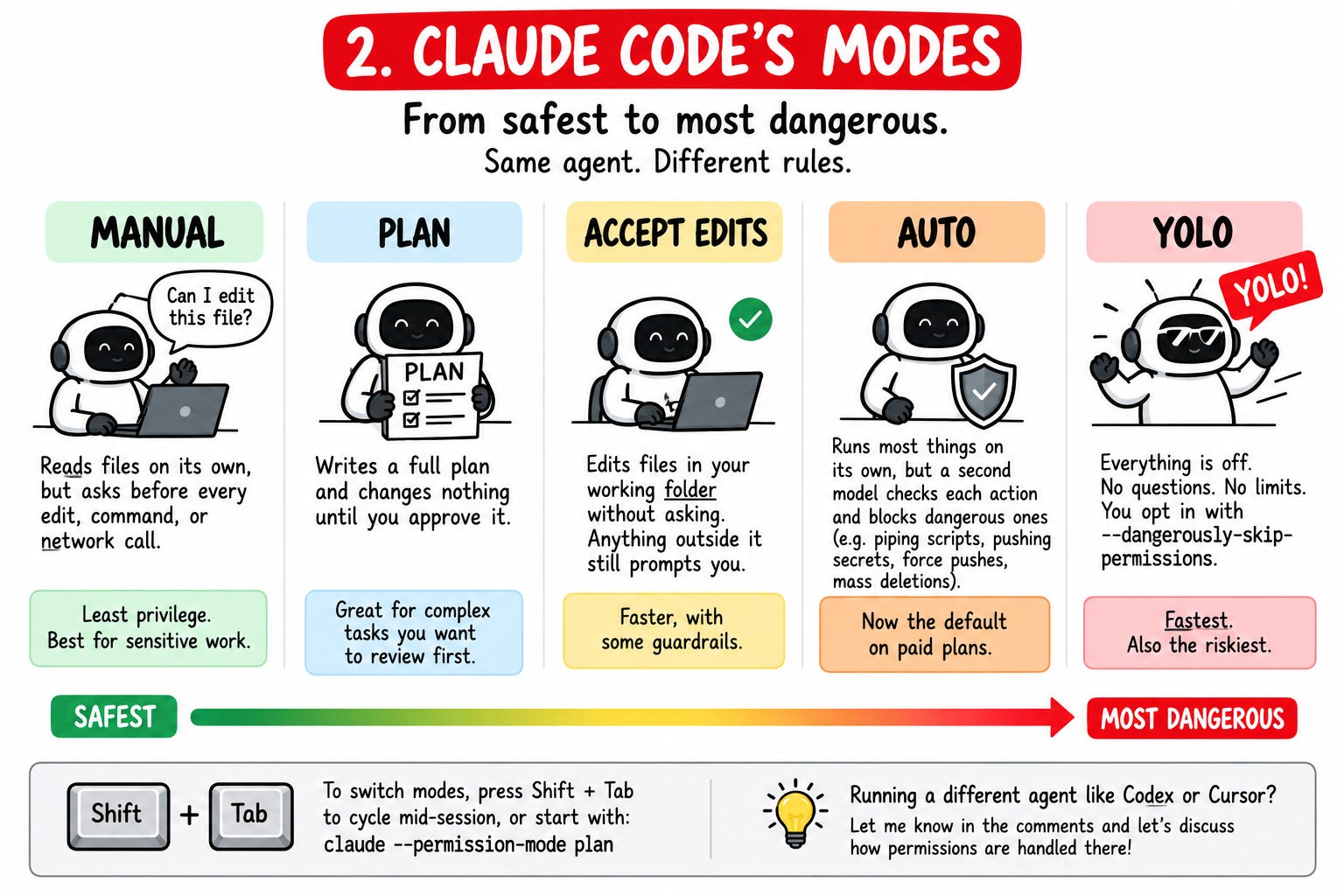
To switch modes, simply press
Shift+Tabto cycle modes mid-session, or start with a flag likeclaude --permission-mode plan.
Running a different agent, like Codex or Cursor? Let me know in the comments and let’s discuss it how the permissions are handled there!
Why people use YOLO mode despite the risk
Let’s keep it real. Once again, convenience won over security. That’s how it is, and that’s how it will always be.
We don’t want to babysit our AI agents. We want them to work for us while we are enjoying our coffee.
And I get it, the convenience is real, and I know from experience that when the gap between a secure solution and a convenient solution is too wide, convenience always wins.
So how do we solve this situation? On one side, we have people who want to let AI agents do their work for them, on the other, we have significant risks associated with AI agents executing commands in the environment.
Sounds almost like an impossible situation, right?
Be honest with me in the comments: has an agent ever done something on your machine you didn't ask for? A wrong deletion, a sketchy package, a command you didn't expect? Your story might be the warning someone else needs.
How to run any AI agent securely
Would I let any AI agent in YOLO mode operate on my machine?
Absolutely not.
That’s an unacceptable risk, and any good AI policy should strongly prohibit these situations. That would be my decision as a Head of IT security.
Does it mean you can’t use AI agents in YOLO mode?
Of course not.
You just have to stop running the agent with your whole life within its reach.
These are the rules that I’d suggest following if you want to use AI agents securely:
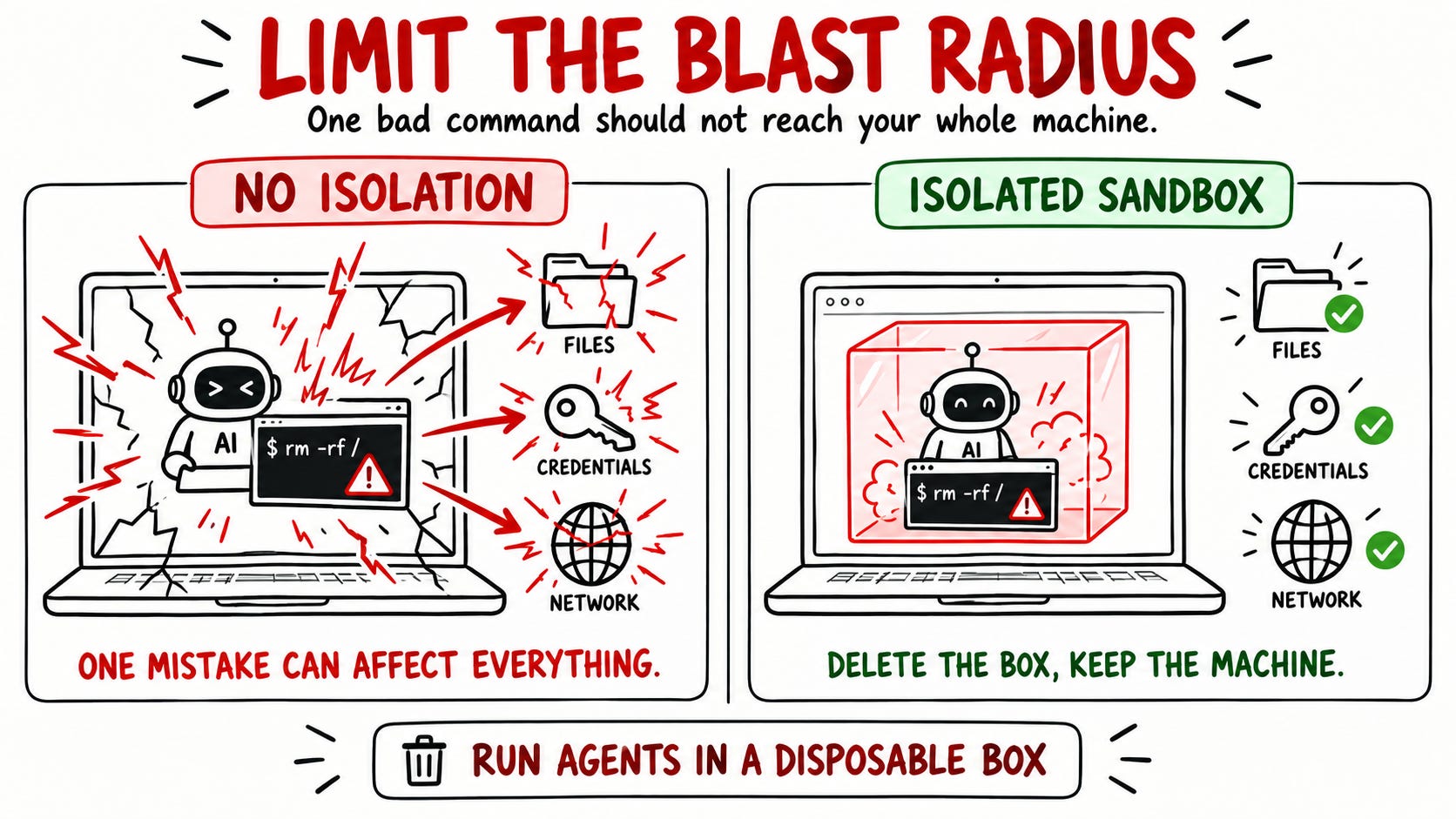
Isolate it - limit the blast radius: Run the agent inside a container or a throwaway virtual machine, not directly on your main system. If something goes wrong, you delete the box and start fresh. Your real machine is never in the blast radius.
Keep your credentials out: Don’t hand the agent your SSH keys, cloud logins, or password manager. Give it only a scoped, short-lived token for the one task it’s doing.
Limit the network: Allow only the connections the task actually needs. An agent that can’t reach the open internet can’t quietly send your data out or pull down a malicious payload.
Drop the privileges: Run it as a non-root user inside that box. Least privilege doesn’t stop at the container wall.
Mount only what it needs: Give the agent access to the one project folder, not your entire home directory. Take a snapshot before a big run so you can roll back in seconds.
And one habit above all: Follow the secure default principle and save YOLO mode for the disposable box, where losing everything costs you two minutes.
None of this is advanced or new. It’s how you would treat any untrusted program that runs commands. And that is exactly what an AI agent with terminal access is.
Save this list. Then tell me in the comments which of the five you already do, and which one you are missing. I will be happy to help you close the gap!
Conclusion
I must say I am happy that I finally found time to actually start playing with AI agents.
There is no doubt that AI agents are one of the most useful tools I have picked up this year, and I have a big plan with them.
If you want to follow this journey and learn more about how to use AI agents securely, simply subscribe to Decoded Security and reach out to me anytime!
Put the agent in a box it can't escape, and you get all the speed with none of the gamble.
That's just least privilege, human in the loop, and blast-radius thinking, the same fundamentals I keep coming back to, applied to a tool you probably use every day.
And what now?
I'm turning my own setup into a Secure AI Agent Setup guide.
The exact container config, the settings that lock things down, and a one-page checklist so you can run any AI agent in full-autonomy mode without handing over your machine.
It is not public yet. To get it the moment it drops, join the waitlist here.
Thank you for reading Decoded Security!
See you next time..
Erich
Let’s Connect
If you want to collaborate, discuss, or just geek out over networking and cybersecurity, reach out:
Email: erich.winkler@decodedsecurity.com
LinkedIn: Erich Winkler
Gumroad community: Decoded Security
Start Here: Decoded Security Roadmap
Enjoyed this article? Like it or drop a comment. I’d love to hear your thoughts and questions!
Let’s learn and grow together!
Really useful breakdown, Erich. I especially like the shift from thinking about AI security as just securing the model to securing what the agent can actually access and do. As agents get more autonomy, permissions and boundaries become a much bigger part of the security conversation.
Great article, I will be procuring a dedicated SFF Mini Micro for this exact purpose in the next few months.