

Cloud, cloud, cloud.
The more we move to the cloud, the better our systems become… right?
Well, yes and no.
CISSP Warning: Make sure you understand between the VMs and Containers as well as common vulnerabilities for the exam! Lear more here.
Today, I want to talk about two technologies that are absolutely crucial for cloud computing and for building secure, scalable environments.
Remember the architecture of microservices?
Virtualization is what makes all of that possible.
It powers everything from Netflix streaming to Kubernetes clusters, and it’s also a frequent topic on the CISSP exam.
Interested in Cloud Computing? Don’t miss one of my previous articles!

There are two major technologies for virtualization - Containers and Virtual Machines (VMs).
But what is the difference between them?
Isn’t it the same thing?
Well, not really.
Let me show you…
Virtual Machine - what is it?
A Virtual Machine is a software-based computer that runs within a physical computer, also known as the host.
It behaves like a real physical computer with its own operating system, its own virtual CPU, memory, disk, and applications.
It essentially abstracts the hardware of a physical machine into a virtual environment, allowing us to create an independent machine without purchasing new equipment.
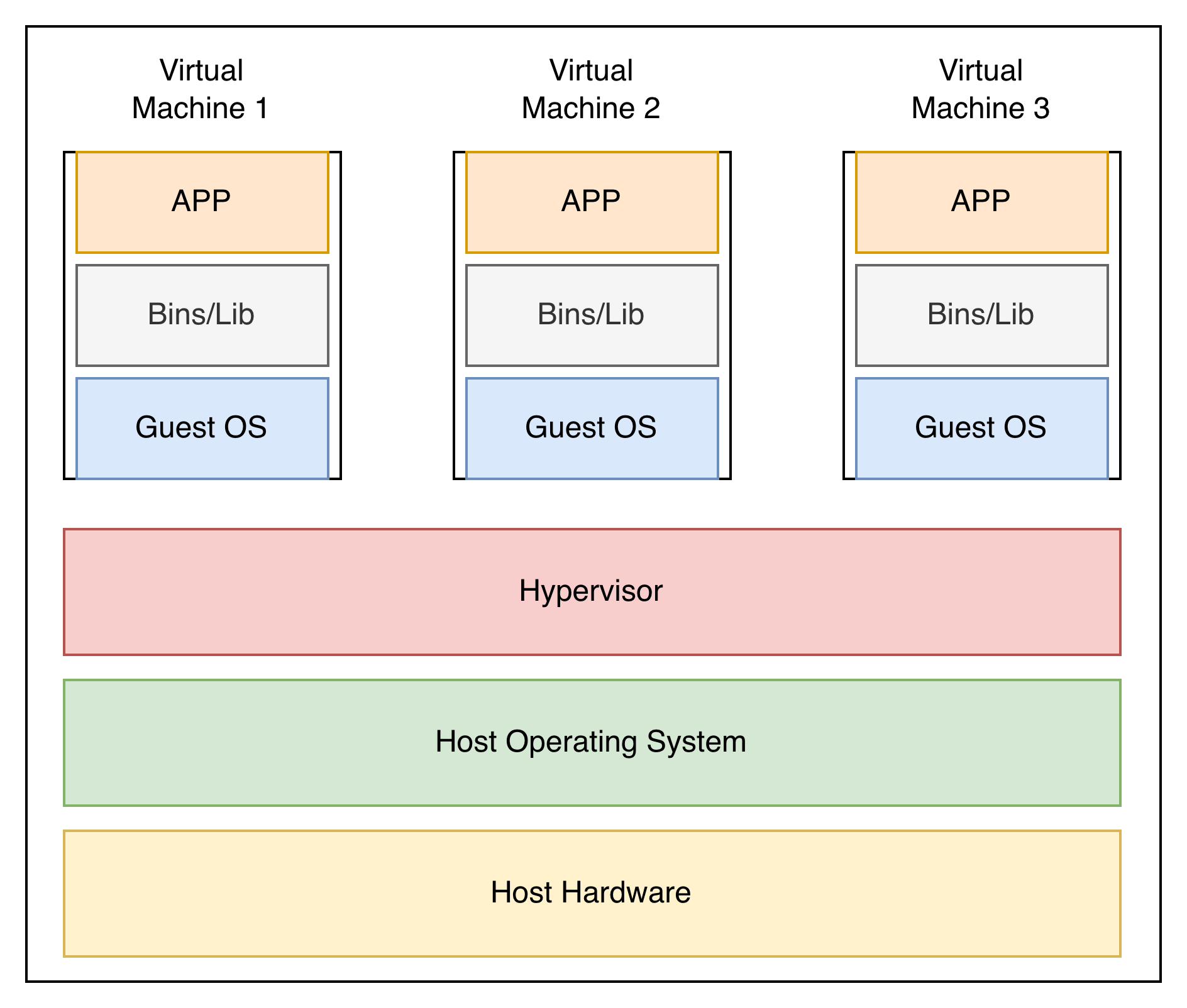
Key Components of a Virtual Machine
Host Hardware: The physical machine that powers everything. That would be, for example, your computer.
Host Operating System: The Operating System that manages the host hardware. If you use Windows on your computer, it would be Windows. If you use a MacBook, it would be macOS.
Hypervisor (the “VM manager”): This is the most important component. The “manager of virtual machines”. It basically creates and manages the VMs on a single host.
Responsibilities:
Allocates CPU, memory, storage, and network to each VM
Ensures strong isolation between VMs
Provides virtual hardware to the guest OS
Manages VM lifecycle (start, pause, stop, snapshot)
Two types:
Type 1 (bare-metal): runs directly on hardware (VMware ESXi, Hyper-V)
Type 2 (hosted): runs on top of host OS (VirtualBox, VMware Workstation)
Guest Operating System: The OS you install inside the Virtual Machine. independent from the host OS and can be completely different. This is how you can run Linux on a Windows machine.
Binaries / Libraries: These are the core components the guest OS and applications rely on to function: System libraries, Command-line tools and utilities, drivers..
Application Layer: These are the applications you install and run on your guest OS, just like you would on your physical machine.
What to remember about VMs
Isolation.
When somebody says Virtual Machine, think “isolation”. That’s the whole point: creating a fully isolated environment. If one VM is compromised, it doesn’t affect the rest of your system.
The tradeoff? Resources.
Each VM requires significant resources to run, which brings us to our next topic: Containerization.
Containers - What are they for?
Containers are another form of virtualization, but they work differently from VMs.
Instead of simulating a complete computer with its own OS, containers share the host OS kernel while keeping applications and their dependencies isolated.
This makes them lighter, faster, and more resource-efficient than VMs — but with slightly less isolation.
Think of containers as portable, self-contained application packages. They include everything an app needs to run:
the application itself
necessary binaries and libraries
configuration files
…but not a full OS.
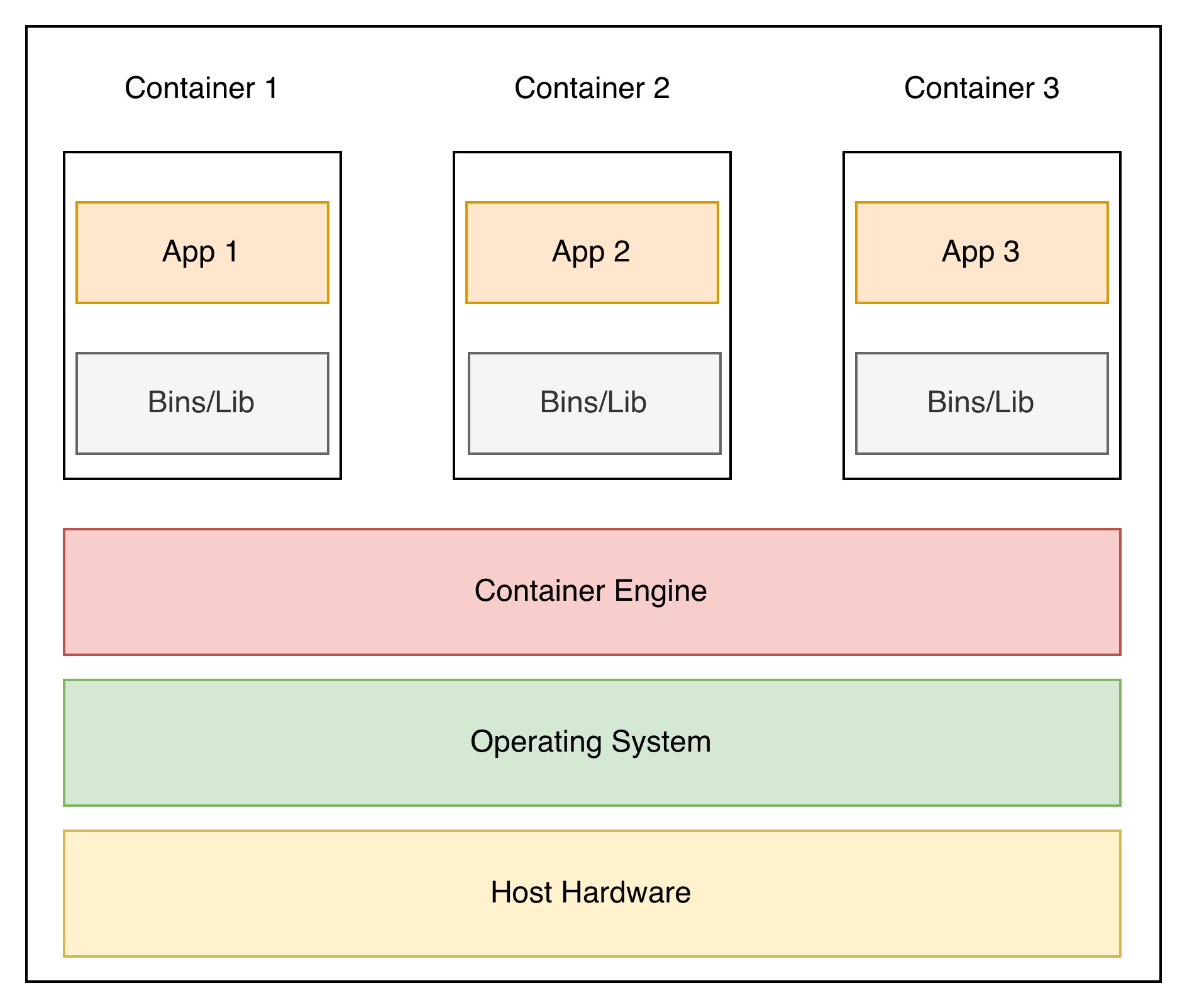
Key Components of Containers
Host Hardware – the physical machine powering everything, just like with VMs.
Host Operating System – Same as for the VM.
Container Engine / Runtime – the software that runs containers (Docker, Podman, containerd). It manages:
resource allocation
isolation (process, filesystem, and network namespaces)
lifecycle (start, stop, scale)
Containers – the isolated application environments, including:
Application binaries and libraries
Configuration files
Runtime dependencies
Key takeaways - Containers
So, here is what I want you to remember:
Lightweight and fast: Containers require far fewer resources than VMs because they don’t run a full OS.
Efficiency at a cost: They are efficient and start almost instantly, but that comes with a tradeoff.
Less isolated: Unlike VMs, containers share the host OS kernel, so if one container is compromised, others could be at risk too.
💡 Remember:
Priority = Security & Isolation → Virtual Machines
Priority = Efficiency & Performance → Containers
Do you find this article helpful? Let me know in the comments!
🥊 Virtual Machines vs Containers: The Ultimate Showdown
Let’s make it interesting, shall we?
In the red corner: Virtual Machines: heavyweight, isolated, and built for security.
In the blue corner: Containers: fast, lightweight, and ready to scale.
Let’s see who wins this fight!
Round 1: Isolation & Security
VMs throw the first punch: full OS, full separation, total isolation.
One VM goes down?
No problem, the others keep running. Boom!
Containers counter: they share the host OS. Fast and nimble, but if one container gets hit hard, it could take others down with it.
Round winner: VMs 🏆
Round 2: Resource Usage & Agility
Containers come out swinging: no full OS, minimal overhead, lightning-fast startup. They are like ninjas - swift, efficient, everywhere!
VMs try to retaliate: heavy gear, full OS, lots of memory, and CPU needed. Scaling up? Not so fast.
Round winner: Containers 🏆
Round 3: Startup Speed
Containers jab: “I’m ready in seconds!” ⚡
VMs respond: “I need a few minutes to warm up my engine…” 🐢
Round winner: Containers 🏎
Round 4: Flexibility & Portability
VMs throw a haymaker: multiple OS types on one host, legacy apps supported, compliance boxes ticked. Solid punch.
Containers dance around: package everything an app needs, run anywhere a container runtime exists, scale horizontally like a swarm of bees.
Round winner: Containers
The Final Bell: Who Wins?
The final score is 3:1! Does that mean containers are better than VMs?
No, it does not!
I can make it look like VMs are way better just as easily.
The real secret is to know when to use each of them. Understand the advantages and disadvantages of each solution and select the most suitable one based on your priorities.
Preparing for the CISSP exam?
Virtualization is just one small piece of the puzzle of the CISSP exam.
If you want a structured way to master Domain 1 of the CISSP exam, I’ve created something for you.
My CISSP Domain 1 Checklist provides clarity and focus on everything that truly matters for the exam and real-world practice.
➡️ Download it here and stop wasting time on scattered study materials.
Summary: Key differences
I find it useful to remember this picture. Just one look at it, and you immediately see what the main difference is - there is a Guest OS missing in containers.
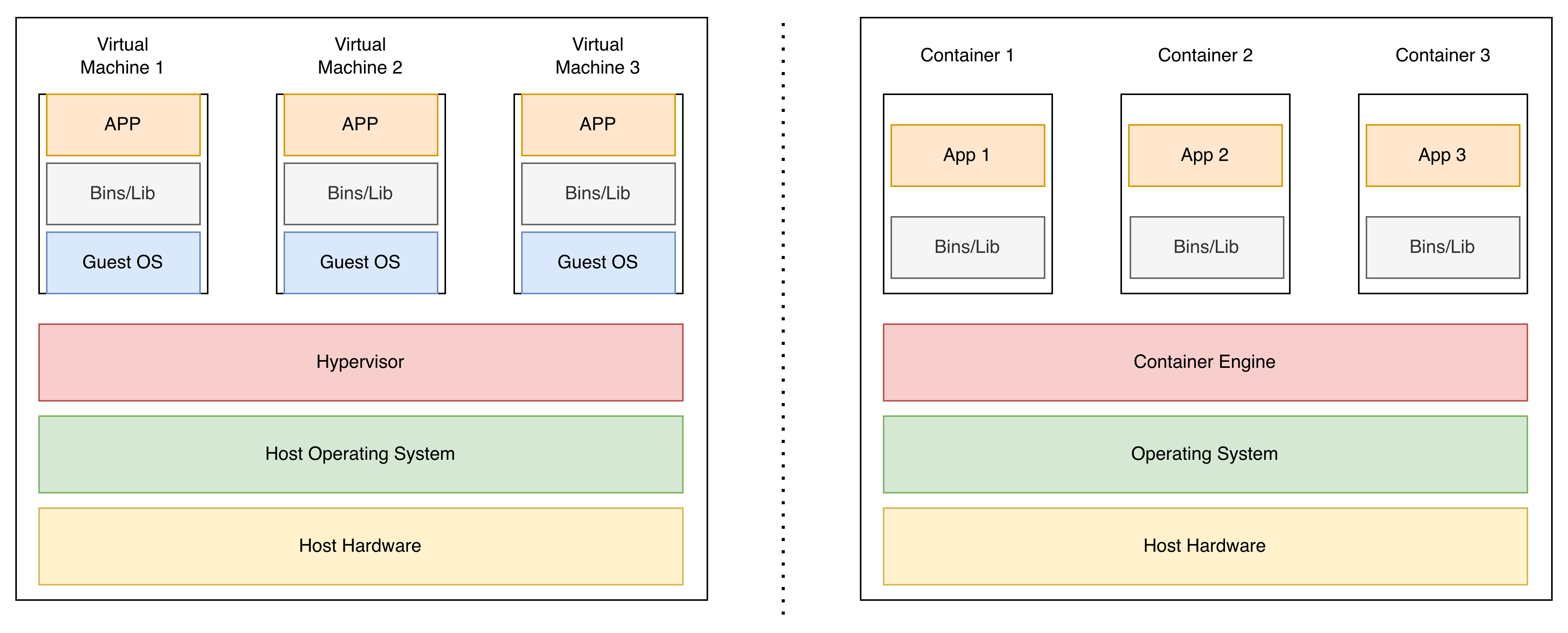
Here’s what you need to remember:
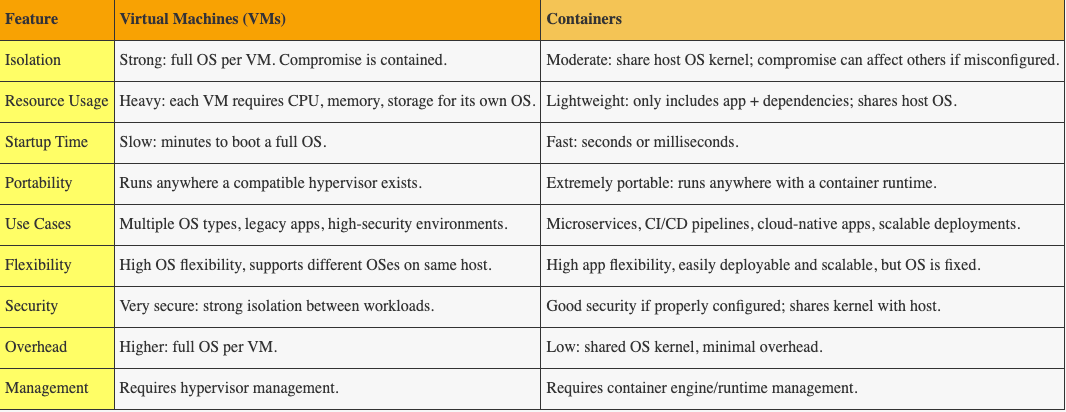
VMs = Security & Isolation: Best for strong boundaries, legacy apps, or regulated environments.
Containers = Speed & Efficiency: Ideal for modern cloud-native applications, microservices, and DevOps pipelines.
Pro Tip: In practice, VMs and Containers often work together, combining isolation and scalability.
Conclusion
If you’re reading this, congratulations! You now understand the key differences between Virtual Machines and Containers.
At first glance, this might seem like just a technical detail — but for cybersecurity professionals, it’s far from trivial. Most companies are moving to the cloud and heavily relying on virtualization. Understanding the basics of VMs and containers is essential to:
Identify potential risks and vulnerabilities
Make informed decisions about architecture and security controls
Prepare for real-world scenarios and the CISSP exam
Remember: VMs for isolation and security, Containers for speed and efficiency. Knowing when to use each is what separates good architects from great ones.
And if you’re studying for the CISSP?
This topic will appear in your exam, and understanding these distinctions isn’t something you can avoid.
If you found this helpful, consider joining our community of over 400 people.

Let’s connect
If you want to collaborate, discuss, or just geek out over virtualization and cloud security, reach out to me:
Email: erich.winkler@decodedsecurity.com
LinkedIn: Erich Winkler
Enjoyed this article? Like it or drop a comment. I’d love to hear your thoughts and questions!
Let’s learn and grow together!
Very informative article, like the concluding paragraphs fight scenes, thanks