

Introduction
It’s finally here, the part of cybersecurity where we start talking about networks, firewalls, and how to design them securely.
But before we get there, let’s talk about something every modern organization depends on: the cloud.
Imagine being asked to set up a brand-new server room. Power, cooling, hardware, installation, configuration, the list is endless. And by the time you’re done, the business might already be moving on.
What if instead of sinking months of effort and money into a server room, you could just rent one and walk away when you no longer need it?
That’s the promise of cloud computing, and it’s why it’s not only crucial for the CISSP exam, but for nearly every organization today.
What Is Cloud Computing, Really?
Cloud computing is the on-demand delivery of computing resources, like servers, storage, applications, and networking, over the internet, paid for as a service instead of owned and maintained locally.
The concept is quite simple. Instead of maintaining your own server room, you pay a third-party CSP (Cloud service provider) to maintain it for you.
But be careful, the concept might be simple, but there are many different types of cloud service models and deployment models that a Cybersecurity specialist should be aware of.
Let’s take a look at them.
If you’re following my CISSP journey, I’d love to hear from you: which cloud concepts do you find tricky, and which ones clicked immediately? Drop a comment below!
Cloud Service Models
First of all, let’s take a look at the three models for cloud computing services.
Software as a Service (SaaS):
The user gets access to a specific application running in the cloud provider’s environment. In other words, you just show up, sit down, and eat the pizza. Everything is done for you - cooking, serving, cleaning. Think Gmail, Netflix, or Microsoft 365. You don’t worry about ovens, ingredients, or delivery… you just enjoy the service.Platform as a Service (PaaS):
Here, the user gets access to a ready-made platform for building and deploying applications. It’s like renting a kitchen that’s already stocked with ovens, fridges, and tools, but you bring your own recipe and ingredients. The platform takes care of the boring stuff (infrastructure, runtime, updates), and you focus on your “secret sauce” (your app). Examples: Google App Engine, Heroku, AWS Elastic Beanstalk.Infrastructure as a Service (IaaS):
If you need full control over a cloud-based virtual machine, IaaS is your choice. Think of it as renting an empty apartment with running water and electricity. You decide how to decorate it, what furniture to bring, and even what pizza oven to install. The provider gives you the raw resources (compute, storage, networking), and you build whatever you want. Examples: AWS EC2, Microsoft Azure VMs.
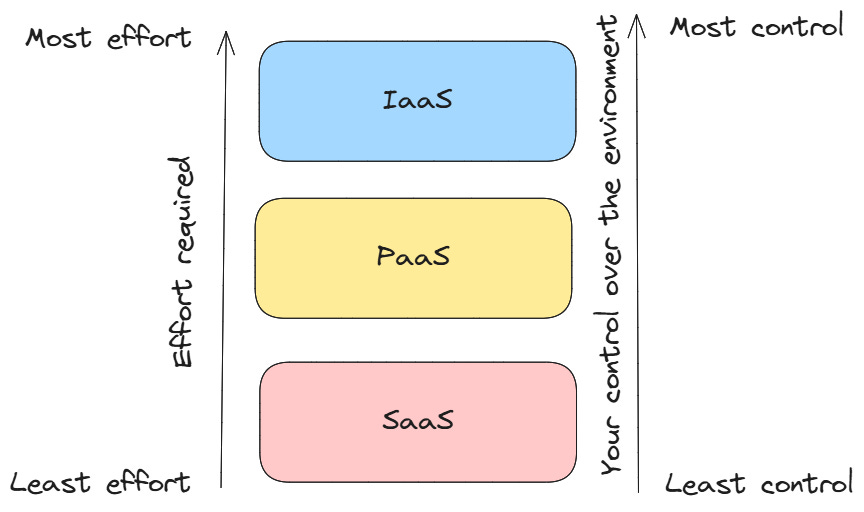
The main difference lies in how much is “ready” for you. With IaaS, you rent hardware. With SaaS, you rent fully prepared software. The more convenience you get, the less control you have over the environment, which might be perfect, or a dealbreaker, depending on your use case.
Deployment Models - Where the cloud even is?
Excellent! Now we know what kind of services we can rent, that’s a good start. But there’s another question that deserves an answer.
I said we can “rent a server room,” but the room has to be somewhere, right?
So, where exactly is the cloud?
Here’s the catch: it depends.
Cloud resources can be deployed in different ways, depending on who owns them and who can access them. The four most common deployment models are:
Public Cloud:
Think of this as living in a massive apartment building with thousands of tenants. You share resources such as electricity, water, and maybe even the Wi-Fi with everyone else. It’s managed by the landlord (cloud provider), and it’s usually cheaper and easier to scale. Public cloud vendors typically also offer a VPC (Virtual Private Cloud), in which increased isolation between users provides added security.
CISSP tip: Security responsibility is shared, the provider secures the building, but you’re still responsible for your apartment (your data and apps).Private Cloud:
This is like owning your own house. All resources are dedicated just to you or your organization. You can control every lock, every room, and every appliance. It’s more expensive, but it offers maximum control and privacy.
CISSP tip: Excellent for sensitive data or regulatory compliance requirements.Community Cloud:
Imagine a gated neighborhood shared by several similar organizations. Say, hospitals or government agencies. Everyone contributes to the upkeep and shares some resources, but access is restricted to the “community.”
CISSP tip: Often used when organizations have similar compliance needs or want to collaborate securely.Hybrid Cloud:
A mix of the above, like owning a private house but also renting an apartment in the city when you need extra space. You get the best of both worlds: control and flexibility.
Why Organizations Love the Cloud
Now that we know what the cloud is and where it lives, let’s talk about why businesses are flocking to it.
Speed:
No more waiting weeks for a server room to be built or hardware to arrive. With the cloud, you can spin up a server or deploy an application in minutes. Instant gratification for IT teams.Cost Efficiency:
You pay only for what you use. Forget buying expensive hardware that sits idle most of the time. Cloud computing is like renting on-demand.Scalability:
Need more resources for a sudden spike in traffic? No problem. The cloud grows with you. Need less next month? Scale back and save money.Accessibility:
Teams can work from anywhere in the world. Files, applications, and systems are just a click away. The cloud makes remote work seamless.Disaster Recovery & Backup:
Many cloud providers include built-in backup and recovery solutions. If something breaks, you can restore it quicklyInnovation:
Because the cloud handles the heavy lifting, organizations can focus on building new features and services instead of managing infrastructure.
CISSP Tip:
All these benefits sound great, but remember, with great power comes great responsibility. Security, compliance, and proper access control are still on the organization, even in the cloud. That’s why CISSP candidates need to understand not just the benefits, but also the risks.
Are you interested in more CISSP topics?

Key takeaways
As always, if you’re reading this, congratulations! You know that Cloud computing isn’t just a buzzword, but it’s the foundation of modern IT. Whether you’re studying for CISSP or managing real-world IT systems, understanding the what, where, why, and risks of cloud computing is essential.
And to make it easy for you, here is the list of things I think you should remember about clouds:
Cloud computing = rented IT resources: Instead of building your own server room, you can use someone else’s infrastructure over the internet.
Service models determine control vs convenience:
IaaS: Rent raw infrastructure → maximum control, more responsibility.
PaaS: Rent a ready-made platform → focus on your app, less control.
SaaS: Rent software → minimal effort, minimal control.
Deployment models determine where your cloud lives:
Public: Shared with everyone → scalable, cost-efficient, less control.
Private: Just for you → secure, more expensive, full control.
Community: Shared among similar organizations → collaboration + compliance.
Hybrid: Mix → flexible, complex.
Why organizations love it: Speed, cost efficiency, scalability, accessibility, backup/recovery, and faster innovation.
Risks still exist: Security, compliance, vendor lock-in, downtime - don’t assume “someone else handles it all.”

Awesome breakdown of cloud fundamentals
Great work Erich!