

Not every door needs a key.
But in cybersecurity, giving the wrong person the wrong key can ruin everything.
What do I mean by that?
I’m talking about access controls.
The rules and mechanisms that decide who gets access to what inside an organization.
Think you already know your access control models?
Prove it. Start with this quick quiz and test yourself before you read:
👉 Start here
Think about it:
Would you want every admin officer to access top-secret government files?
Or should every employee see the salaries of their coworkers?
Probably not.
That’s why access control exists. It’s how we limit access to sensitive resources, based on roles, responsibilities, and need-to-know.
Before we explore different access control models, let’s start with the basic definitions and principles that apply no matter which system you use.
Introduction to Access Controls
If you’ve been reading my posts for a while, you know how it goes in cybersecurity:
Before you can explain a principle, you need to define a few terms.
So let’s get that out of the way.
All access control models are built around two core concepts: subject and object.
Luckily, these definitions are simple:
A subject is any active entity that tries to access something. Most often, it’s a user, but it could also be a process, device, or service acting on behalf of a user.
An object is the resource being accessed, such as a file, database, system, or network.

The subject is who is requesting access.
The object is what they’re trying to access.
I think you already know what I am getting at. Those two terms kind of give you a hint, don’t they?
Access control is all about enforcing pre-defined rules based on which subjects access objects.
Simple, isn’t it?
Well, it is, until you have 10,000 people and you need to somehow control that no one has access to anything that isn’t necessary for their job.
Still confused about what it's all about?
Don’t worry, I have something that will make it clear to you!
Real-Life Example: Who Gets In?
Let’s imagine a mid-sized company with around 500 employees.
There’s Anna from Finance, Tom from IT, and Lisa from HR.
They all work for the same organization, but should they have access to the same files?
Of course not.
Anna needs access to financial reports, payroll data, and accounting software.
She shouldn’t be able to open employee health records or system configuration files.Tom, the IT guy, needs admin rights to servers, firewalls, and technical documentation.
But he has no reason to access employee salary details.Lisa from HR needs to view personal employee records, benefits info, and performance evaluations.
She shouldn’t be able to modify system settings or approve financial transactions.
All of them are subjects.
The files, systems, and databases they want to access? Those are objects.
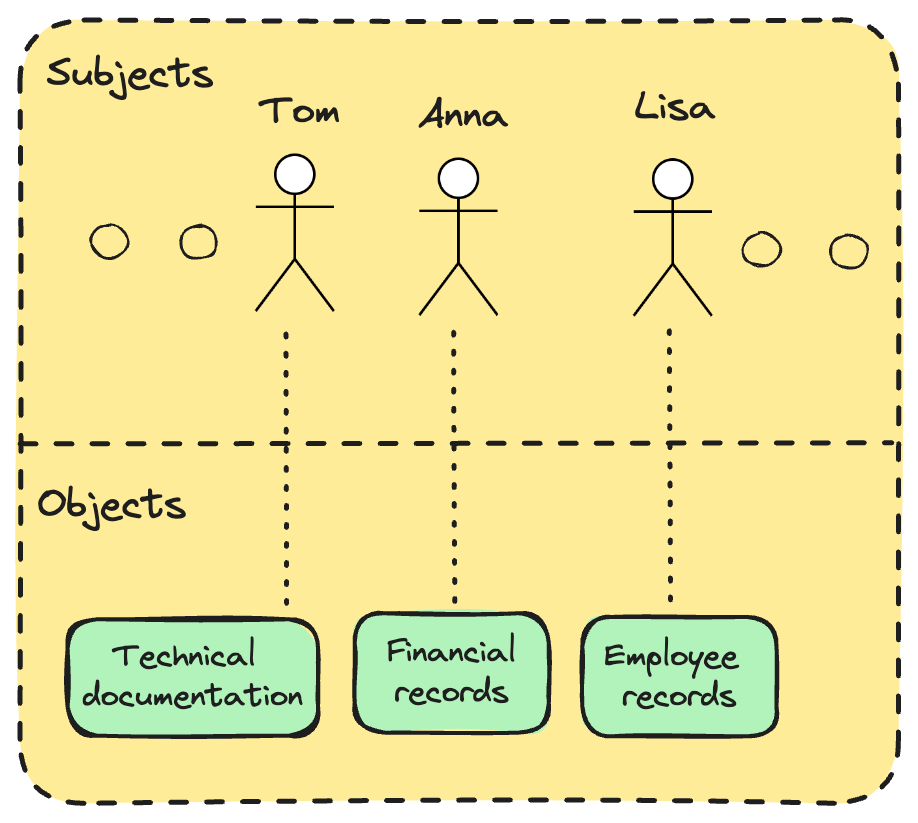
Access control is what ensures each person gets just enough access to do their job and nothing more.
This isn’t about trust. It’s about limiting the blast radius when something goes wrong, whether it’s human error, an insider threat, or a compromised account.
Principle of Least Privilege
Every subject should have the minimum level of access necessary to perform their duties and no more.
Access control models
Okay, I hope it’s clear by now what we’re dealing with and what we’re trying to achieve.
We want to make sure that only the right people can access the right resources, at the right time, for the right reasons.
The only question left is:
How exactly do we enforce that?
And of course, somebody has already solved this problem for us.
There are quite a few out there, but today we’ll focus on the most common models. The ones you're most likely to encounter in the real world and in the CISSP exam.
1. DAC – Discretionary Access Control
Access decisions are made by the resource owner.
Example: You create a file and decide who can read or edit it.
Common in personal or small business settings.
Benefits:
Easy to understand and implement.
Very flexible for users.
Drawbacks:
Decentralized - hard to manage in large environments.
Vulnerable to insider threats and careless permission sharing.
2. MAC – Mandatory Access Control
Access is based on security labels (classification levels).
Enforced by the system, not the user.
Common in military, government, and high-security environments.
Benefits:
Strong, centralized control.
Very secure for sensitive data.
Drawbacks:
Inflexible and hard to manage.
Not practical for most business environments.
3. RBAC – Role-Based Access Control
Access is tied to job roles (e.g., HR Manager, Developer, CEO).
Permissions are granted to roles, not individuals.
The most common model in enterprises.
Benefits:
Scalable and easy to manage.
Supports least privilege by default.
Drawbacks:
Roles must be well-defined, and poor design leads to over-privilege.
Not flexible for context-specific access needs.
4. RB-RBAC – Rule-Based Access Control
Built on top of traditional RBAC
Access is granted based on system-enforced rules, not user decisions.
Rules can be time-based or event-driven (e.g., require MFA after hours).
Benefits:
Adds dynamic, policy-driven restrictions.
Reduces unnecessary access during risky periods.
Drawbacks:
Rules can become complex and hard to maintain.
Requires careful testing to avoid unintended lockouts.
5. ABAC – Attribute-Based Access Control
Access depends on attributes of the user, object, and environment.
These attributes can belong to subjects, objects, actions, or context
Examples: department, location, device, time of day.
Benefits:
Extremely flexible and fine-grained.
Ideal for dynamic, modern environments.
Drawbacks:
Complex to configure and audit.
Difficult to troubleshoot when access is denied unexpectedly.
6. Risk-Based Access Control
Access decisions are based on real-time risk evaluation.
The model simply estimates the risk associated with a particular request in time
Benefits:
Adapts access based on current threats and behavior.
Great for high-security or cloud environments.
Drawbacks:
Requires advanced tech and threat intelligence integration.
Can lead to user frustration if overly aggressive.
Which one is the best?
I know what you’re thinking. Why should I know all that?
Just tell me which one is the best.
The thing is..I can’t.
Each one of the models above is the best for a different context.
Need tight control over highly sensitive, classified data?
→ Go with MAC. It’s strict, centralized, and designed for environments where mistakes aren’t an option.Managing a large enterprise with thousands of employees?
→ RBAC is your friend. It simplifies access management by assigning permissions based on job roles.Small team, flat structure, everyone trusts each other?
→ You might get away with DAC, just be careful about who shares what.
There is no best model. However, the chances are you will be using a role-based access control model, because it’s most suitable for standard companies.
Conclusion
If you’re still reading, congratulations. I know most people don’t get this far.
By now, you should understand why access control is crucial in any organization. You’re also familiar with the six most common access control models, which not only help define who (subjects) can access what (objects), but also provide the tools to enforce and audit those rules.
Remember: always choose the model that best fits your or your organization’s priorities. There’s no single “best” model, but today, most organizations rely on Role-Based Access Control (RBAC) for its balance of flexibility and manageability.
For those preparing for the CISSP exam, understanding access control models is crucial, as it forms a foundational part of the Security and Access Control domain.
Before you go, try the quiz I prepared for you to test what you’ve learned. I consider it a great way to reinforce your understanding.
Did you take the quiz yet?
Circle back to the top and see how many questions you nailed. If you scored 8/10 or more, you're on solid ground.
And if you didn’t, now you know exactly what to review.
Role-based access control was the one I learned many years ago as a Motorola (pre-bifurcation) product manager.